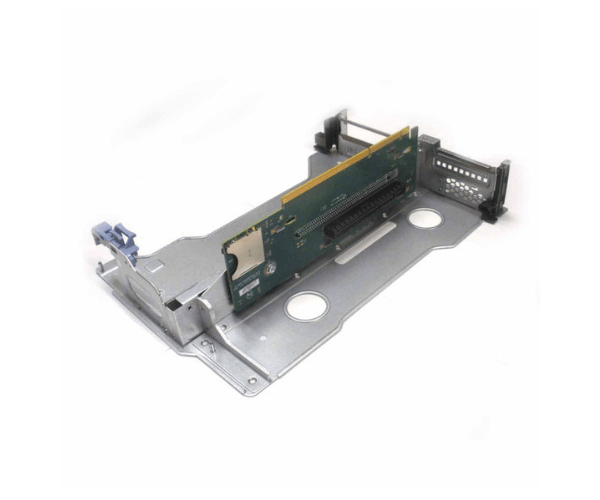
Introduction of Cisco 74-10153-01 Riser 2 for UCS C240-M3
The Cisco 74-10153-01 Riser 2 for UCS C240-M3 is a versatile and essential component designed to enhance the expandability of your Cisco UCS C240-M3 server. This riser card provides two additional PCIe slots, allowing you to increase the functionality and flexibility of your server setup. Ideal for users looking to expand their server's capabilities, the Cisco 74-10153-01 Riser 2 integrates seamlessly with existing hardware, making it a smart choice for upgrading server configurations and accommodating future growth.
Why Choose Cisco 74-10153-01 Riser 2?
Choosing the Cisco 74-10153-01 Riser 2 for UCS C240-M3 boosts your server's expandability and performance. This riser card adds two PCIe slots, which are essential for incorporating additional expansion cards, like network interfaces, storage controllers, or graphics cards. The Cisco 74-10153-01 Riser 2 integrates seamlessly with the UCS C240-M3, ensuring that you preserve high performance and reliability while enhancing your server’s capabilities. Designed with Cisco’s dedication to quality and innovation, this riser card represents a smart investment for optimizing server functionality.
User Experience
Users often praise the Cisco 74-10153-01 Riser 2 for its ease of installation and effective performance. The installation process is simple and involves only basic steps to fit the riser card into the UCS C240-M3 server. After installation, users quickly notice that the additional PCIe slots significantly enhance the server’s flexibility. This makes it easy to add new hardware components. The riser card integrates smoothly with existing systems, ensuring reliable performance and expanded capabilities. Consequently, IT professionals favor this product for optimizing their server setups.
Key Features
- Additional PCIe Slots: Provides 2 extra PCIe slots for expanding server capabilities.
- Seamless Integration: Designed to work seamlessly with Cisco UCS C240-M3 servers.
- User-Friendly Installation: Simplifies the process of adding more hardware components.
- High-Quality Build: Ensures durability and reliable performance in enterprise environments.
- Enhanced Flexibility: Allows for customization and upgrading of server hardware.
Installation Step
- Power Down the Server: Ensure that the server is completely powered off and disconnected from any power source.
- Open the Server Case: Remove the server case or access panel to expose the motherboard and available PCIe slots.
- Locate the PCIe Slot: Identify an available PCIe slot on the motherboard for the Cisco 74-10153-01 Riser 2.
- Insert the Riser Card: Align the Cisco 74-10153-01 Riser 2 with the PCIe slot and gently insert it until it is securely seated.
- Connect Hardware: Attach any necessary expansion cards or devices to the newly available PCIe slots.
- Close the Server Case: Reattach the server case or access panel securely.
- Power On the Server: Plug in and power on the server. The system should detect and configure the new riser card automatically.
Where it Can Be Used?
The
Cisco Riser 2 is ideal for use in enterprise data centers, corporate networks, and large IT infrastructures that utilize Cisco UCS C240-M3 servers. It is especially useful in environments where expanded PCIe capabilities are needed, such as telecommunications facilities, financial institutions, healthcare centers, and educational institutions. By providing additional PCIe slots, this riser card enhances the server’s ability to handle various tasks and applications, ensuring reliable performance and uninterrupted operation.