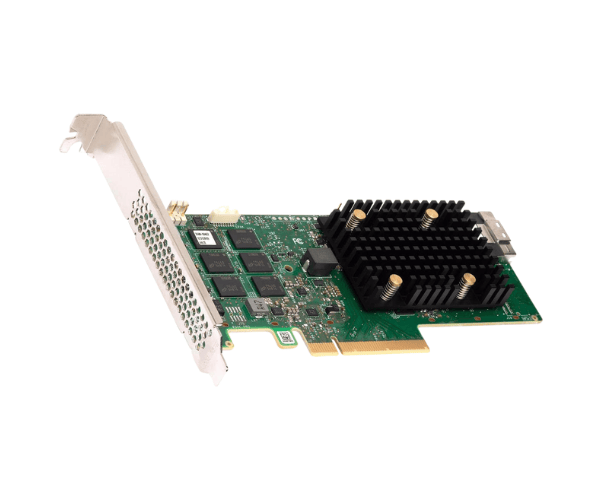
Introduction of Broadcom MegaRAID 9560-8i RAID Controller
The
Broadcom MegaRAID 9560-8i RAID Controller delivers high-performance storage for businesses needing reliable data access. As data grows in size and complexity, this RAID controller manages storage efficiently. It protects data while ensuring fast access. Ideal for enterprise use, it supports various RAID levels for flexibility and security. The
Broadcom MegaRAID 9560-8i is built to handle mission-critical applications with ease.
Why Choose the Broadcom MegaRAID 9560-8i RAID Controller?
The
Broadcom 9560-8i RAID Controller handles demanding data storage environments with ease. Its
PCIe Gen4 interface delivers top-tier data transfer rates, making it ideal for data centers and enterprise servers. You can optimize performance and ensure data redundancy with its advanced RAID levels, which protect data while improving access speeds. The controller supports both
SAS and SATA drives, offering flexibility and performance for businesses that need scalable storage solutions.
User Experience
Users of the
Broadcom 9560-8i RAID Controller report an excellent experience thanks to its seamless integration and user-friendly configuration interface. The controller performs exceptionally well in high-load environments, providing consistent reliability and fast data access. With its efficient energy consumption and strong security features, the
Broadcom 9560-8i has become a trusted solution for IT professionals managing complex data storage systems.
Detailed Breakdown of Features
The Broadcom MegaRAID 9560-8i RAID Controller stands out with its advanced features. Its PCIe Gen4 interface ensures faster data transfer rates, optimizing system performance even during heavy workloads. The controller connects to multiple storage devices simultaneously through its eight channels. It supports a wide range of RAID levels (RAID 0, 1, 5, 6, 10, 50, and 60), providing robust data protection and redundancy. With 2GB of DDR4 cache memory, the Broadcom MegaRAID 9560-8i accelerates data access, ensuring smooth and efficient operations across all storage systems.
Installation Steps
- Prepare the System: Ensure that your system is powered down and disconnected from the power supply.
- Access the Motherboard: Remove the computer case's side panel to access the motherboard.
- Identify the PCIe Slot: Locate an available PCIe Gen4 slot on your motherboard.
- Insert the RAID Controller: Carefully insert the Broadcom RAID Controller into the PCIe slot and secure it.
- Connect Storage Devices: Attach your SATA, SAS, or SSD drives to the controller.
- Power Up the System: Reconnect the power supply and start the system.
- Configure RAID: Use the RAID configuration utility to set up your desired RAID level.
Where It Can Be Used?
The
Broadcom RAID Controller is versatile and can be used in various settings:
- Data Centers: Ensure high performance and data redundancy for large-scale storage environments.
- Enterprise Servers: Enhance data protection and optimize storage for business-critical applications.
- Cloud Storage Solutions: Perfect for cloud-based infrastructure requiring efficient and scalable storage.
- Virtualization: Ideal for supporting virtualized environments where performance and data security are key.