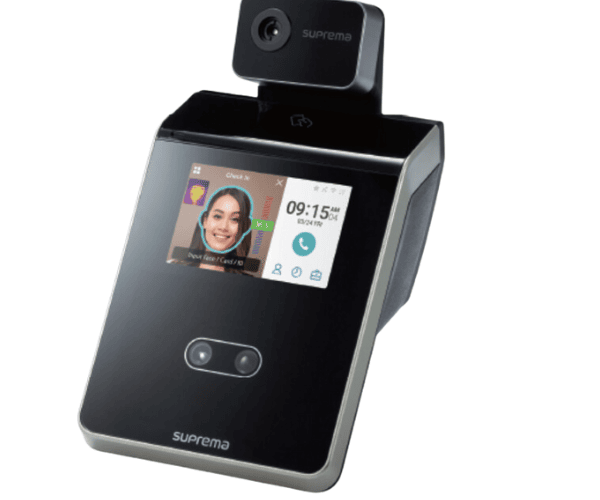
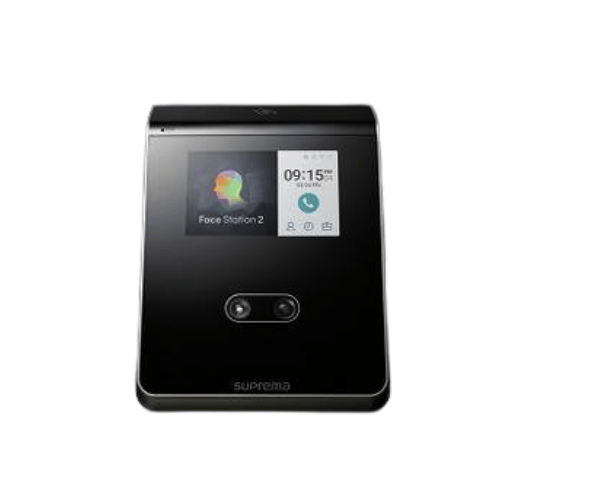
About the Suprema FS2-DB Smart Face Recognition Terminal
The
Suprema FS2-DB Smart Face Recognition Terminal is an advanced biometric access control solution that utilizes cutting-edge facial recognition technology. With a high-speed recognition system, it provides secure and touchless access control, ideal for environments where hygiene and security are paramount. Perfect for businesses seeking efficiency and reliability.
Suprema FS2-DB Smart Face Recognition Terminal in BD
The
Suprema FS2-DB Smart Face Recognition Terminal is available in Bangladesh, offering businesses a state-of-the-art solution for touchless access control. This device ensures a secure, hygienic, and efficient means of managing access, making it an ideal choice for various sectors, including offices, factories, and government buildings.
User Experience
Users of the
Suprema FS2-DB report high satisfaction with the fast and accurate face recognition process. The terminal’s high recognition speed of less than 1 second and ease of use make it a preferred choice for workplaces where quick, contactless access is required. Its large user capacity and customizable settings ensure seamless access control for businesses of all sizes.
Why Choose The Suprema FS2-DB Smart Face Recognition Terminal?
The
Suprema FS2-DB Smart Face Recognition Terminal stands out due to its advanced facial recognition technology, which offers high accuracy and speed. This device is ideal for businesses that prioritize hygiene, security, and efficiency. With a large user capacity and the ability to operate in various environments, this terminal is perfect for handling both high-traffic areas and high-security zones.
Key Features
- Advanced Face Recognition: Supports up to 50,000 face templates, offering high accuracy and security for access control.
- Fast Verification Speed: Less than 1 second verification time ensures quick and efficient access.
- Dual Biometric Technology: In addition to facial recognition, it supports fingerprint identification for multi-factor authentication.
- Large User Capacity: Can handle up to 50,000 users and 2,000 fingerprints, making it suitable for medium to large-sized businesses.
- Touchless Operation: Ideal for environments where hygiene is a priority, offering secure and contactless access.
- Wide Recognition Range: The terminal can recognize faces from a distance of 0.3m to 1.5m, providing flexibility in access control.
- Color LCD Display: Provides clear visual feedback for users, including confirmation of successful authentication.
- Robust Design: Built to operate in a wide range of temperatures (-20°C to 50°C) and humidity conditions (0% to 90% non-condensing).
Installation Steps
- Unbox the Device: Carefully unpack the Suprema FS2-DB and check for all components.
- Mount the Device: Install the device on the wall or surface at the appropriate height for optimal facial recognition.
- Connect Power Supply: Plug the device into a 12V DC power source.
- Connect Communication Cables: Use TCP/IP, RS-485, or Wiegand cables to integrate the terminal with your network.
- Configure the Device: Use the software to set up users, time zones, and access rights.
- Enroll Faces and Fingerprints: Register users’ face templates and fingerprints into the system for authentication.
- Test the System: Perform several tests to ensure the system is working correctly and that users are verified efficiently.
Where It Can Be Used?
The
Suprema FS2-DB Smart Face Recognition Terminal is ideal for a variety of environments:
- Offices: Control access to sensitive areas such as executive offices, meeting rooms, and restricted zones.
- Factories: Ensure secure access to manufacturing areas while tracking employee attendance.
- Healthcare Facilities: Secure access to laboratories, pharmacies, and medical rooms where hygiene is critical.
- Schools and Universities: Manage campus access for students, faculty, and staff, ensuring a secure environment.
- Government Buildings: Secure high-security zones, ensuring only authorized personnel can enter restricted areas.
- Retail and Hospitality: Control employee access to stockrooms and back-office areas, while also ensuring customer safety.