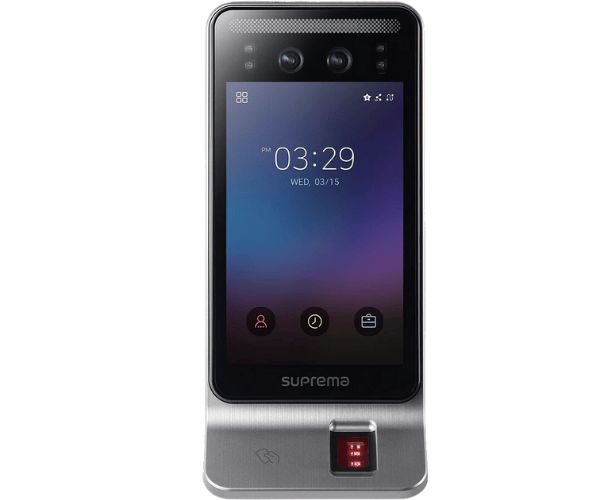
About the Suprema FSF2-ODB FaceStation F2 Fusion Face Fingerprint Terminal
The
Suprema FSF2-ODB FaceStation F2 Fusion Face Fingerprint Terminal combines advanced face recognition and fingerprint technologies for secure access control. With its high-performance optical sensor, fast identification speed, and versatile authentication options, it provides businesses with an ideal solution for seamless and secure access management.
Suprema FSF2-ODB FaceStation F2 Fusion Face Fingerprint Terminal in BD
The
Suprema FSF2-ODB FaceStation F2 Fusion Face Fingerprint Terminal is available in Bangladesh, providing businesses with an all-in-one solution for access control and time attendance management. Its advanced biometric capabilities, combined with easy integration into existing security systems, make it an ideal choice for organizations aiming to enhance their security measures.
User Experience
Users of the
Suprema FSF2-ODB FaceStation F2 Fusion Face Fingerprint Terminal report a seamless experience, thanks to its fast and accurate face recognition technology, as well as the fingerprint option for backup authentication. The 5-inch TFT color touchscreen is intuitive and easy to navigate, ensuring smooth and quick operation for employees and security personnel alike.
Why Choose TheSuprema FSF2-ODB FaceStation F2 Fusion Face Fingerprint Terminal?
Choose the
Suprema FSF2-ODB FaceStation F2 Fusion Face Fingerprint Terminal for its cutting-edge technology, which combines face and fingerprint recognition for top-tier security. With a large template capacity, high-speed verification, and reliable performance in all environments, this terminal provides businesses with a secure, efficient, and scalable access control solution.
Key Features
- Fusion Authentication: The Suprema FSF2-ODB FaceStation F2 offers advanced fusion authentication by combining face recognition with fingerprint technology, enhancing security.
- Large Capacity: Stores up to 50,000 face templates and 50,000 fingerprint templates, making it perfect for organizations of all sizes.
- Fast Identification Speed: Authentication in less than 1 second, ensuring efficient and smooth access management.
- 5-inch Touchscreen: A user-friendly color touchscreen for easy navigation and operation.
- Flexible Connectivity: Supports TCP/IP, Wiegand, USB Host, and USB Slave for easy integration with existing systems.
- Versatile Application: Ideal for both indoor and outdoor use with its high-performance recognition and rugged design.
Installation Steps
- Unbox the Device: Carefully unpack the Suprema FSF2-ODB FaceStation F2 terminal and check all parts.
- Mount the Device: Secure the terminal at an optimal height for face recognition.
- Connect Power Supply: Attach the terminal to a 12V DC power supply.
- Network Setup: Use TCP/IP or USB connections to link the device to your security network.
- Enroll Users: Register faces, fingerprints, and cards for authentication through the terminal’s interface.
- Test the System: Perform a test to ensure the terminal works as expected and verify user access.
Where It Can Be Used?
The
Suprema FSF2-ODB FaceStation F2 Fusion Face Fingerprint Terminal is ideal for a range of environments, including:
- Corporate Offices: Secure access to offices and restricted areas with advanced biometric authentication.
- Manufacturing Facilities: Control access to secure zones and monitor employee attendance.
- Healthcare Institutions: Ensure restricted access to sensitive areas and manage personnel access efficiently.
- Educational Institutions: Protect campus buildings and monitor student and staff attendance.
- Government Buildings: Secure entry points with high-level biometric verification for sensitive areas.