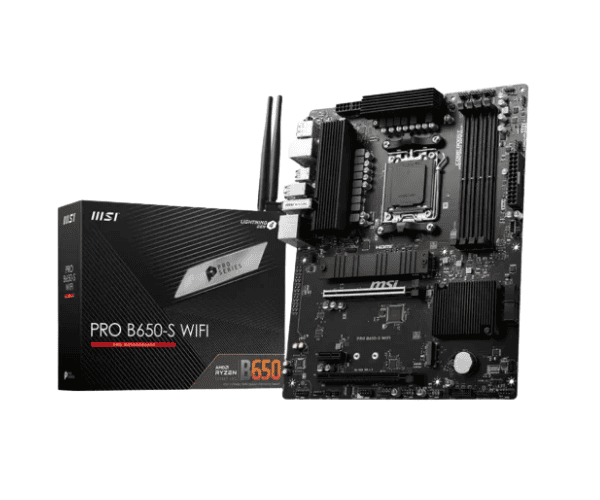
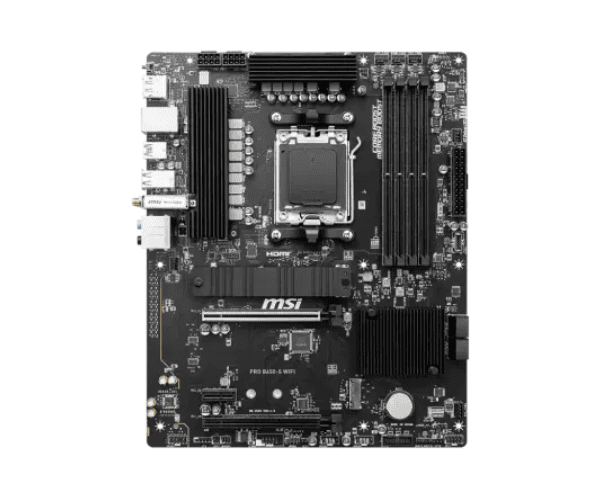
Overview of the MSI PRO B650-S WIFI DDR5 AM5 ATX Motherboard
The
MSI PRO B650-S WIFI DDR5 AM5 ATX Motherboard is the best in class for performance, with blazing-fast connectivity and a future-proof motherboard. Equipped with an AMD Ryzen 7000 series processor and DDR5 memory, class-leading performance and dependability are ensured; integrated WiFi 6E and 2.5G LAN, and plenty of expansion options provide room to upgrade your computer.
Specification
| Feature |
Specification |
| Brand |
MSI |
| Model |
PRO B650-S WIFI |
| Socket Type |
AMD AM5 |
| Supported CPU |
Ryzen 9000/8000/7000 Series Processors for Socket AM5 |
| Chipset |
AMD B650 |
| Memory Support |
4x DDR5, up to 6400+(OC) MHz |
| Graphics Output |
1x HDMI, 1x Display Port |
| LAN |
2.5G LAN |
| Wi-Fi |
Intel Wi-Fi 6E |
| Audio |
Realtek ALC897 7.1-Channel HD Audio |
| Storage |
1x M.2 (PCIe 4.0 x4), 4x SATA 6Gb/s |
| USB Ports |
2x USB 2.0 (Rear), 4x USB 3.2 Gen1 (Front/Rear) |
| Form Factor |
ATX |
| Dimensions |
12 x 9.6 inches (ATX) |
Description
MSI PRO B650-S WIFI DDR5 AM5 ATX Motherboard in Bangladesh
The
MSI PRO B650-S WIFI DDR5 AM5 ATX Motherboard is available in Bangladesh through several online and retail sources. Value for money, a gamer, content creator, and professional would just love to have stability and future proofing in one motherboard.
User Experience of MSI PRO B650-S WIFI DDR5 AM5 ATX Motherboard
The
MSI PRO B650-S WIFI DDR5 AM5 ATX Motherboard ensures seamless, judder-free performance, right from casual gaming to professional gaming. Moreover, DDR5 memory support allows considerably quicker data transfer rates for super fast multitasking. In addition to this, the board sports Intel Wi-Fi 6E and 2.5G LAN for guaranteed, seamless connection-be it wireless or wire-lined. Hence, this ought to be fitting for everybody desirous of constructing a highly performant desk setup with easy, seamless assembly and solid reliability in operation.
Why Choose the MSI PRO B650-S WIFI DDR5 AM5 ATX Motherboard?
The
MSI PRO B650-S WIFI DDR5 AM5 ATX Motherboard represents an investment in the future. The new AMD Ryzen 7000 series processors and high-speed performance of DDR5 memory combine on this motherboard for seamless execution of demanding applications with no glitches in video editing, for instance. Equipped with Integrated Wi-Fi 6E, seamless internet via 2.5G LAN, a slot for fast PCIe 4.0 M.2 storage along with SATA. In that respect, if one has to make a well-maintained option which considers the aspect of speed, stability along with longevity then the one ideal choice shall be PRO B650-S WIFI DDR5 AM5 ATX Motherboard.
Key Features
- AMD Ryzen 7000 Series Supported: Optimized for high-performance AMD processors, making the system responsive with quick performance.
- DDR5 Memory Support: DDR5 memory for up to 6400+ MHz (OC) is an absolute performer.
- Intel Wi-Fi 6E: Onboard Wi-Fi 6E makes way for faster and strong wireless connectivity.
- 2.5G LAN: The ultra-fast wired networking will prevent lag in online gaming and will also enable one to browse smoothly.
- Multi-Display Outputs: With HDMI and DisplayPort outputs, this motherboard has flexible display outputs.
- Realtek ALC897 Audio: High-quality 7.1-channel HD audio for an immersive sound experience.
- PCIe 4.0 M.2 Slot: Faster storage with support for PCIe 4.0 x4 M.2 devices.
- USB 3.2 Ports: Multiple high-speed USB ports to connect your external devices with ease.
Installation Steps for the MSI PRO B650-S WIFI DDR5 AM5 ATX Motherboard
- Preparation of Components: Take out the CPU, RAM, and storage devices-whichever you want to install.
- CPU Installation: Install your Ryzen processor into the AM5 socket and lock it firmly.
- Installation of RAM: Your DDR5 RAM goes into any of these DIMM slots, ensuring that every stick goes perfectly into the slot.
- Install Motherboard: Place your motherboard to install with your PC case and screw accordingly.
- Power Connection: Connect an 8-pin CPU power connector and hook up the 24-pin ATX power connector.
- Install Storage Devices: Install your M.2 SSD into the PCIe x4 slot and install SATA drives into the free SATA ports.
- Install the Graphics Card: Slip your GPU into the PCIe x16 slot and screw it in.
- Connect Peripherals: Connect your keyboard, mouse, and other peripherals using the USB ports.
- Power on and test: Turn your system on and test everything to see if it is working just right: display, storage, network connectivity.
- Driver installation: Boot into the operating system and install drivers for the motherboard and other components.
Why Buy From Crystal Vision Solution?
Crystal Vision Solution offers the
MSI PRO B650-S WIFI DDR5 AM5 ATX Motherboard at competitive prices with excellent customer service and expert support. We ensure timely delivery, secure payments, and hassle-free returns, making it easy to purchase with confidence from a trusted supplier for your PC build.
What is the Price of the MSI PRO B650-S WIFI DDR5 AM5 ATX Motherboard in Bangladesh?
The latest price of
MSI PRO B650-S WIFI DDR5 AM5 ATX Motherboard in Bangladesh depends on quantity.
Crystal Vision Solution ensures this motherboard has the best market price in Bangladesh. Our product is 100% original and lowest price in Bangladesh. All kinds of services are the best in Bangladesh, and contact us for any information and latest price.