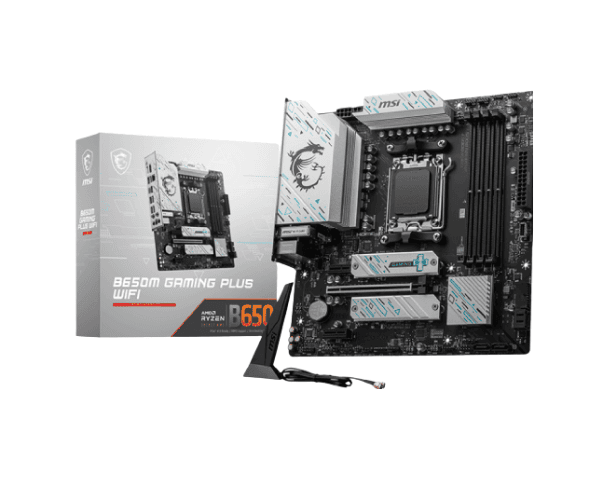
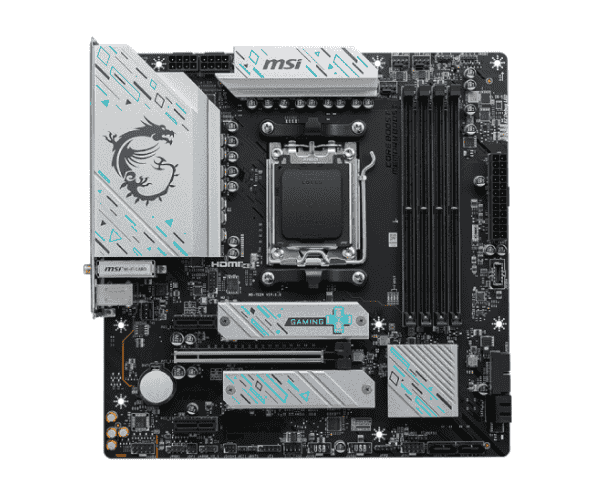
About the MSI B650M GAMING PLUS WIFI AM5 Motherboard
The
MSI B650M GAMING PLUS WIFI AM5 is ultimate for gamers and power users alike. Developed to support AMD Ryzen 7000 series processors, this model has been remarkably fast with support for DDR5 memory. Wi-Fi 6E and onboard 2.5Gbps LAN will guarantee the best connectivity. The model will turn out ideal while constructing powerful, fast, and reliable PC builds.
Specification
| Feature |
Specification |
| Brand |
MSI |
| Model |
B650M GAMING PLUS WIFI |
| Socket Type |
AMD AM5 |
| Supported CPU |
Ryzen 7000 Series Processors |
| Chipset |
AMD B650 |
| Memory Support |
2x DDR5, up to 6400+ MHz (OC) |
| Expansion Slots |
1x PCIe 4.0 x16, 1x PCIe 3.0 x1 |
| Graphics Output |
1x HDMI, 1x DisplayPort |
| Wi-Fi |
Wi-Fi 6E (802.11ax) |
| Audio |
Realtek ALC897 7.1-Channel HD Audio |
| Storage |
1x M.2 (PCIe 4.0 x4), 4x SATA 6Gb/s |
| LAN |
Realtek 2.5Gbps LAN |
| USB Ports |
2x USB 2.0 (Rear), 4x USB 3.2 Gen1 (Front/Rear), 2x USB 3.2 Gen2 (Rear) |
| Form Factor |
mATX |
| Dimensions |
9.6 x 8.3 inches (mATX) |
Description
MSI B650M GAMING PLUS WIFI AM5 Motherboard in Bangladesh
The
MSI B650M GAMING PLUS WIFI AM5 Motherboard can be bought in Bangladesh-both from online vendors only and from locally attached computer hardware stores. With such a good price-performance ratio, this board would surely be a must for gamers and builders alike to build their top-notch performance-based PC.
MSI B650M GAMING PLUS WIFI AM5 Motherboard User Experience
Reviews of the
MSI B650M GAMING PLUS AM5 Motherboard speak highly of this motherboard as an exceptional performance-based mainboard. It is easily installed, and one can assure stability with great connectivity. Gamers will simply love this board, availing them with Wi-Fi 6E for super-fast internet in online gaming and streaming, and for wired networking, there is a 2.5Gbps LAN to assure seamless gameplay with fast data transfer. It features solid build quality and is, hence, a favorite among those building high-performance systems. In general, the user experience is extended.
Why Choose the MSI B650M GAMING PLUS WIFI AM5 Motherboard?
The
B650M GAMING PLUS WIFI AM5 Motherboard deserves mention based on the broad set of features, well-constructed, and for its reasonable cost. It covers the latest Ryzen 7000 series processor, hence future-proof with demanding tasks. It features DDR5 memory, availing it of fantastic speeds and bandwidth for both gaming and creation. Get ultra-fast, wirelessly or wired, seamless connectivity with onboard Wi-Fi 6E and 2.5Gbps LAN. What's more, in its compact mATX design, it fits into most cases and is highly versatile for any build.
Key Features
- Wi-Fi 6E (802.11ax): Provides super-fast and reliable wireless connectivity for flawless gaming, streaming, and productive work.
- AMD Ryzen 7000 Series Support: Future-proof your new build with very the latest AMD Ryzen processors.
- DDR5 Memory Support: To enable better performance, up to DDR5 6400+(OC) memory for faster speeds.
- 2.5Gbps LAN: Get ultra-fast wired networking for lag-free online gaming, large file transfers, and data streaming.
- Realtek ALC897 HD Audio: Quality audio for immersive gaming and multimedia.
- PCIe 4.0 x16 Slot: Perfect place that can install high-end graphics which can manage all the latest gaming and demanding applications with ease,
- Compact mATX Form Factor: The best option to build in smaller cases without losing performance or connectivity.
Steps to Install MSI B650M GAMING PLUS WIFI AM5 Motherboard
- Components Preparation: First of all, arrange all the required components: AMD Ryzen CPU, DDR5 RAM, storage device, and GPU.
- Install the processor: Carefully sit the Ryzen processor into the socket. Screw up the processor to the socket.
- Install the memory: Put your DDR5 memory sticks onto the DIMM slots, making sure those are well seated.
- Connect storage devices: Your M.2 SSD in an M.2 slot (PCIe 4.0 x4) and SATA devices install with the motherboard.
- Installing Graphics Card: Availed in PCIe 4.0 x16 slot for better performance.
- Power Cables: Connect the 24-pin ATX power and 8-pin CPU power cables, attached to your power supply, to your motherboard.
- Front Panel Cables: Connect all front panel cables-power button, reset, USB, etc.-to their headers on the motherboard.
- Your Ethernet cable goes in the 2.5Gbps LAN port, and hook your USB gadgets up to the USB.
- The system should not have problems booting, and BIOS would detect all attached devices.
- BIOS and Drivers Updates: Download drivers and BIOS update from the official MSI website to enhance performance.
Why Buy From Crystal Vision Solution?
Crystal Vision Solution offers the
MSI B650M GAMING PLUS WIFI AM5 Motherboard at competitive prices with excellent customer service and expert support. We ensure timely delivery, secure payments, and hassle-free returns, making it easy to purchase with confidence from a trusted supplier for your PC build.
What is the Price of the MSI B650M GAMING PLUS WIFI AM5 Motherboard in Bangladesh?
The latest price of
MSI B650M GAMING PLUS WIFI AM5 Motherboard in Bangladesh depends on quantity.
Crystal Vision Solution ensures this motherboard has the best market price in Bangladesh. Our product is 100% original and lowest price in Bangladesh. All kinds of services are the best in Bangladesh, and contact us for any information and latest price.