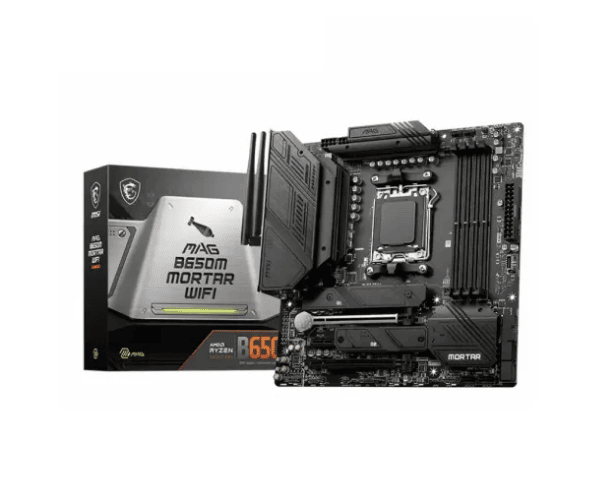
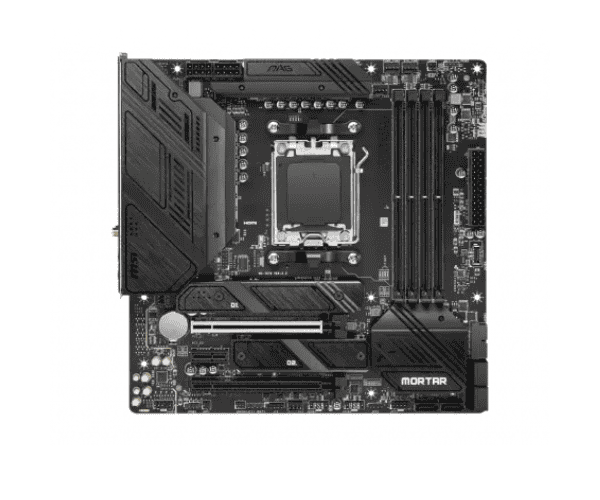
About the MSI MAG B650M MORTAR WIFI DDR5 AMD AM5 mATX Motherboard
Driving right to the cores of gaming and enthusiast requirements at the very edge between overwhelming performance and unrivaled connectivity, this is a choice: perfectly seated by the
MSI MAG B650M MORTAR WIFI DDR5 AMD AM5 mATX Motherboard. Equipped with the latest AMD Ryzen 7000, 8000, and 9000 series processors, DDR5, 2.5Gbps LAN, and Intel Wi-Fi 6E for hardcore gaming and professional work at top speed, now is the great chance for small form factor but high-performance desktop computers: mATX.
Specification
| Feature |
Specification |
| Brand |
MSI |
| Model |
MAG B650M MORTAR WIFI |
| Socket Type |
AMD AM5 |
| Supported CPU |
Ryzen 9000/8000/7000 Series Processors (Socket AM5) |
| Chipset |
AMD B650 |
| Memory Support |
4x DDR5, up to 6400+ MHz (OC) |
| Expansion Slots |
1x PCIe 4.0 x16, 1x PCIe 3.0 x1 |
| Graphics Output |
1x HDMI, 1x DisplayPort |
| Wi-Fi |
Intel Wi-Fi 6E (802.11ax) |
| Audio |
Realtek ALC897 7.1-Channel HD Audio |
| Storage |
1x M.2 (PCIe 4.0 x4), 4x SATA 6Gb/s |
| LAN |
Realtek 2.5Gbps LAN |
| USB Ports |
2x USB 2.0 (Rear), 4x USB 3.2 Gen1 (Front/Rear), 2x USB 3.2 Gen2 (Rear) |
| Form Factor |
mATX |
| Dimensions |
9.6 x 8.3 inches (mATX) |
Description
MSI MAG B650M MORTAR WIFI DDR5 AMD AM5 mATX Motherboard in Bangladesh
The
MSI MAG B650M MORTAR WIFI DDR5 AMD AM5 mATX Motherboard bears a pretty much economical price in Bangladesh. Being rich in performance with lots of connectivity options, along with the capability to run recent processors of AMD Ryzen, it enjoys a highly positive rating in the marketplace. Be sure to shop from trustworthy places in order to find this item at its best price-MSI MAG B650M MORTAR WIFI DDR5 AMD AM5 mATX Motherboard BD.
The User Experience of the MSI MAG B650M MORTAR WIFI DDR5 AMD AM5 mATX Motherboard
Generally, it is quite a fine motherboard and painless to set up. It left an impression with gamers due to its quick and reliable network speeds via the Intel Wi-Fi 6E solution and 2.5Gbps LAN. It will do great in gaming, creation, and serious multitasking. That didn't take long to set up, considering how intuitive the BIOS interface is. Generally speaking, construction and solid toughness can be utilized for carrying any build of your kind.
Why Choose MSI MAG B650M MORTAR WIFI DDR5 AMD AM5 mATX Motherboard?
The
MSI MAG B650M MORTAR WIFI DDR5 AMD AM5 mATX Motherboard is for those who seek high power and high speed in compact form. The board is fully supported for Ryzen 7000, 8000, and 9000 series processors right now, boasts the latest set of features that come with it, including DDR5 memory support, 2.5Gbps LAN, and Intel Wi-Fi 6E. This motherboard will have one slot provided for a PCIe 4.0 card to fit high-resolution graphics cards hence future-proofing. This is going to be the perfect motherboard at this length, henceforth, considering performance and stability. Flawless connectivity, in respect to consideration for both wired and wireless devices, is important.
Key Features
- Wi-Fi 6E (802.11ax): Ultra-fast Wi-Fi delivers lightning-fast speeds ideal for gaming, streaming, and high-bandwidth activities.
- DDR5 Memory Support: Up to 6400+ MHz (OC) supported for improved system responsiveness and heavy multitasking.
- 2.5Gbps LAN: With high-speed wired networking for lag-free online gaming and fast data transfer.
- Support AMD Ryzen 7000/8000/9000 Series: Designed to fit the latest Ryzen processors with advanced performance.
- Realtek ALC897 HD Audio: Premium audio capacitors assure an immersive gaming, movie, and music experience.
- PCIe 4.0 x16 Slot: Fitted to address modern graphic card needs for demanding usages, games, and productivity.
- M.2 Slot (PCIe 4.0 x4): Accommodate the most recent storage technology in ultra-high speed, translating it to faster boot time with even quicker data transfer.
Installation of the MSI MAG B650M MORTAR WIFI DDR5 AMD AM5 mATX Motherboard
- Preparation of components: Extract the CPU AMD Ryzen, memory DDR5, Storage devices, and peripherals for use.
- Install an AMD Ryzen processor: It shall be fitted on an AM5 socket on your motherboard; insert it there carefully and lock the processor in his place.
- Install the Memory: Insert your DDR5 memory sticks into the respective DIMM slots, ensuring those fit well.
- Storage Devices Mount: Install M.2 SSD in the PCIe 4.0 x4 slot and screw SATA drives on the motherboard.
- Installing a Graphics Card: Carefully slide your GPU within the PCIe 4.0 x16 slot.
- Power Cables: Connect the 24-pin ATX and 8-pin CPU power connectors on the power supply to the motherboard.
- Front Panel Cables: Connect the following wires to the corresponding headers on the motherboard: power button, reset button, USB, and audio port.
- Installation of LAN and USB Devices: Install devices using an Ethernet cable with the 2.5Gbps LAN port and connect peripherals via USB.
- Power Up and Testing: All in, it's time to power on and if the system will boot correctly.
- Drivers and BIOS Update Installation: Access the official MSI website then download the latest drivers and BIOS for optimal performance.
Why Buy From Crystal Vision Solution?
Crystal Vision Solution offers the
MSI PRO H610M-S DDR4 mATX Motherboard at competitive prices with excellent customer service and expert support. We ensure timely delivery, secure payments, and hassle-free returns, making it easy to purchase with confidence from a trusted supplier for your PC build.
What is the Price of the MSI PRO H610M-S DDR4 mATX Motherboard in Bangladesh?
The latest price of
MSI PRO H610M-S DDR4 mATX Motherboard in Bangladesh depends on quantity.
Crystal Vision Solution ensures this motherboard has the best market price in Bangladesh. Our product is 100% original and lowest price in Bangladesh. All kinds of services are the best in Bangladesh, and contact us for any information and latest price.