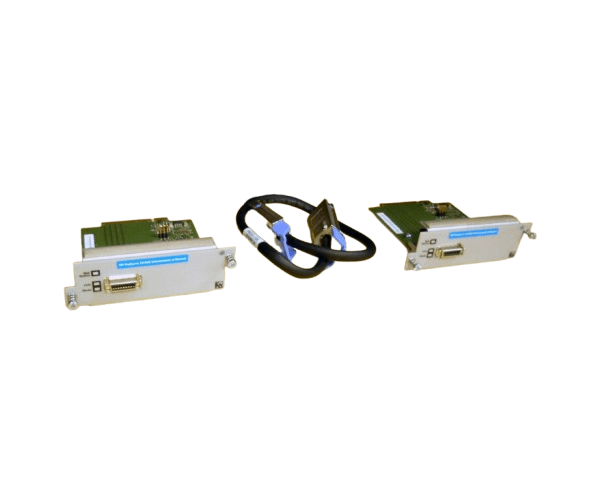
HP J9165A ProCurve 10GbE Interconnect Kit Module
The
HP J9165A ProCurve 10GbE Interconnect Kit Module is designed to enhance network connectivity by providing high-speed 10GbE links. This module is ideal for ProCurve switches, delivering fast, reliable interconnects to improve overall network performance and ensure seamless data transfers across your network infrastructure.
User Experience
The
HP J9165A ProCurve 10GbE Interconnect Module is highly valued for its efficiency in improving network performance. Users report significant enhancements in data transfer speeds and network stability. The module’s ease of installation and integration with HP ProCurve switches make it a preferred choice for optimizing network setups.
Why Choose the HP J9165A ProCurve 10GbE Interconnect Module?
The
HP J9165A ProCurve 10GbE Interconnect Module is essential for upgrading your network infrastructure to handle high-speed data transfers. By choosing the
HP J9165A, you ensure optimal performance with reliable 10GbE connectivity, making it a crucial component for maintaining an efficient and robust network.
Key Features
- High-Speed Connectivity: Provides up to 10 Gbps data transfer rate for rapid data exchanges.
- Broad compatibility: designed to work with HP ProCurve switches for seamless integration.
- Reliable Performance: Ensures stable and consistent network performance.
- Easy Installation: Simple to install and configure in compatible ProCurve switches.
- Efficient Design: Compact and lightweight for space-saving installation.
Installation Steps
- Power Down the Switch: Ensure that your HP ProCurve switch is powered off and disconnected from any power sources.
- Locate the Module Slot: Find the appropriate slot for the 10GbE interconnect module on the switch.
- Insert the Module: Carefully insert the HP J9165A ProCurve 10GbE Interconnect Module into the slot, ensuring it is properly aligned.
- Secure the Module: If applicable, secure the module with any necessary screws or latches.
- Reconnect Power and Test: Reconnect the power to the switch and turn it on. Verify that the module is recognized and functioning correctly.