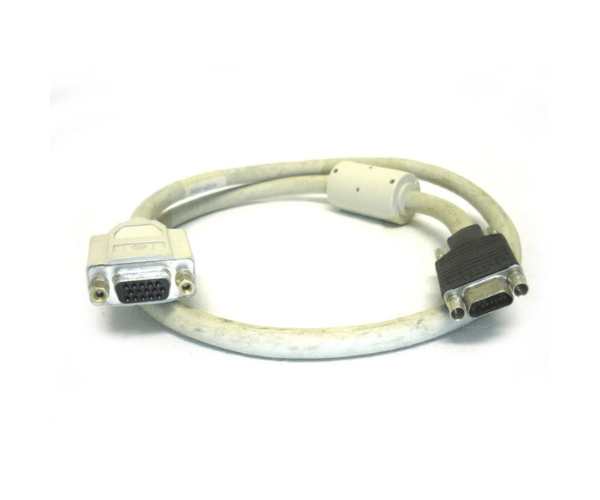
HP A4500-62004 Video Adapter DP1 Cable
The
HP A4500-62004 Video Adapter DP1 Cable is a high-performance display adapter designed to connect your HP devices to DisplayPort-enabled monitors. Offering reliable and crisp video output, this cable is ideal for achieving high-resolution displays and seamless connectivity. It’s a must-have accessory for enhancing your visual experience with HP hardware.
User Experience
Users of the
HP A4 500-62004 Video Adapter DP1 Cable appreciate its excellent build quality and performance. The cable ensures stable and high-resolution video output, making it perfect for gaming, professional presentations, and high-definition media playback. The 6-foot length provides flexibility in positioning your monitor and computer. Users report that the
HP A4 500-62004 Video Adapter DP1 Cable delivers sharp, clear images without signal loss, enhancing their overall visual experience.
Why Choose The HP A4500-62004 Video Adapter DP1 Cable?
The
HP A4500-62004 Video Adapter DP1 Cables is the optimal choice for connecting your HP devices to DisplayPort monitors. It supports high-definition resolutions up to 4K, ensuring superior image quality and performance. Designed specifically for HP systems, this cable guarantees compatibility and reliable connectivity. The durable construction and generous length make the
HP A4500-62004 Video Adapter DP1 Cables a practical solution for any setup, providing an exceptional visual experience and robust performance.
Key Features
- High-Resolution Support: The HP A4500-62004 Video Adapter DP1 Cables supports video resolutions up to 4K, offering crystal-clear image quality.
- Durable Construction: Made with copper conductors and PVC insulation, this cable is built to last and withstand daily use.
- Flexible Length: With a 6-foot length, the cable provides ample reach for various setups, reducing clutter and allowing for flexible positioning.
- Seamless Connectivity: Designed for HP devices, the cable ensures reliable and consistent connection to DisplayPort monitors.
- RoHS Compliant: The HP A4500-62004 Video Adapter DP1 Cables meets environmental standards, ensuring it is free from hazardous substances.
Installation Steps
- Power Down Devices: Before connecting the HP A4500-62004 Video Adapter DP1 Cables, ensure that both your HP device and DisplayPort monitor are powered off.
- Connect the Cable to the Monitor: Insert one end of the HP A45 00-62004 Video Adapter DP1 Cables into the DisplayPort input on your monitor.
- Connect the Cable to the HP Device: Plug the other end of the cable into the DisplayPort output on your HP device.
- Secure the Connection: Ensure that both ends of the cable are securely connected and that there is no excess tension on the cable.
- Power On Devices: Turn on your HP device and monitor. The video signal should automatically be recognized, and your display should be active.
- Adjust Display Settings: If necessary, adjust the display settings on your HP device to match the resolution and preferences for optimal visual performance.