HP 441449-001 XW4600 System Board
The
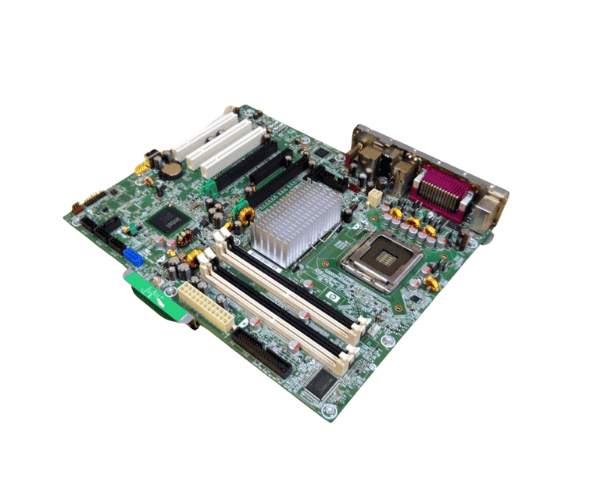
HP 441449-001 XW4600 System Board is a high-quality motherboard designed for HP's XW4600 Workstation. Engineered to deliver exceptional performance and reliability, this system board supports advanced processors and memory configurations, making it an ideal choice for demanding computing tasks and professional applications.
User Experience
The
HP 441449-001 XW4600 System Board offers a seamless computing experience for users with high-performance needs. It supports Intel Core 2 Quad and Core 2 Extreme processors, providing robust processing power essential for complex applications and multitasking. The system board's support for up to 8GB of DDR2 SDRAM ensures smooth and efficient performance.
Users find the
HP 441449-001 System Board to be reliable and versatile. Its expansion slots allow for additional graphics or network cards, enhancing the workstation's capabilities. The integrated Gigabit Ethernet and audio support provide comprehensive connectivity and multimedia functionality, making it a well-rounded choice for professionals. Overall, the
HP 441449-001 System Board is praised for its stability and performance, making it a preferred option for demanding computing environments.
Why Choose the HP 441449-001 XW4600 System Board?
Choosing the
HP 441449-001 System Board means investing in a reliable and high-performance motherboard tailored for the HP XW4600 Workstation. This system board supports Intel Core 2 Quad and Core 2 Extreme processors, offering powerful performance for various applications.
With support for up to 8GB of DDR2 SDRAM, the
HP 441449-001 System Board ensures smooth multitasking and efficient performance. Its expansion slots and integrated features, such as Gigabit Ethernet and audio support, provide enhanced functionality and connectivity. Opting for the
HP 441449-001 System Board ensures a dependable and capable foundation for your workstation, delivering both performance and reliability in demanding professional settings.
Installation Steps
- Power Down: Turn off the HP XW4600 Workstation and disconnect it from the power source.
- Open the Case: Remove the workstation’s side panel to access the internal components.
- Disconnect Cables: Unplug all cables connected to the old system board, including power, storage, and peripheral connections.
- Remove the Old Board: Unscrew and carefully lift out the old system board from the chassis.
- Install the New System Board: Position the HP 441449-001 System Board into the chassis, aligning it with the mounting standoffs. Secure it with screws.
- Reconnect Components: Reattach power cables, storage devices, and any other peripherals to the new system board.
- Install Processors and Memory: Insert the compatible Intel processors and DDR2 SDRAM into their respective slots.
- Close the Case: Replace the workstation’s side panel and secure it.
- Power On: Reconnect the power and turn on the workstation. Verify that all components are recognized and functioning properly.




-70x60h.png "HP 491835-001 ML370 G6 System Backplane Board")


