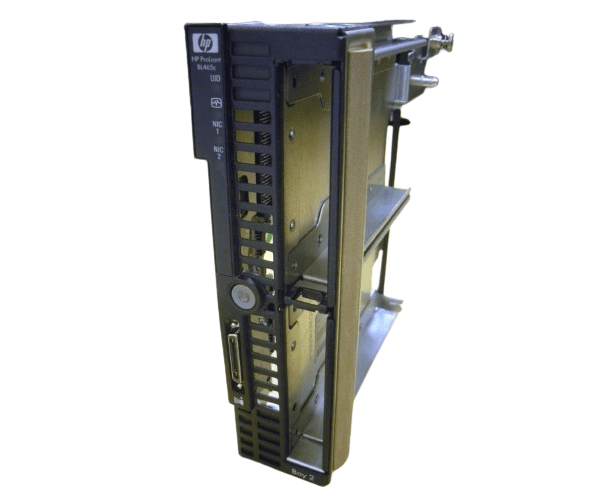
HP 418271-001 Front Bezel with LED Board and Hard Drive Cage for BL465c
The HP 418271-001 Front Bezel with LED Board and Hard Drive Cage for BL465c is a crucial component for your HP BL465c server. This assembly enhances your server’s performance by providing a durable front bezel, an efficient LED board, and a secure hard drive cage, ensuring optimal functionality and easy monitoring.
User Experience
Users of the HP 418271-001 Front Bezel with LED Board and Hard Drive Cage appreciate its comprehensive design that offers both aesthetic appeal and practical functionality. The front bezel provides a sleek look to the server, while the LED board delivers clear status indicators for efficient monitoring. The hard drive cage is secure and well-constructed, ensuring that drives are safely housed and easily accessible. Customers find the
HP 418271-001 assembly to be a reliable and durable addition to their BL465c servers, enhancing both usability and system management.
Why Choose the HP 418271-001 Front Bezels with LED Board and Hard Drive Cage for BL465c?
The
HP 418271-001 Front Bezel with LED Board and Hard Drive Cage is an essential upgrade for those looking to maintain the optimal performance of their HP server. The
HP 418271-001 not only provides a polished, professional look to your server but also improves functionality with its integrated LED board and sturdy hard drive cage. Choosing the
HP 418271-001 ensures that you receive a high-quality, reliable component designed specifically for the BL465c, offering enhanced durability and efficiency.
Key Features
- Integrated LED Board: Provides clear status indicators for easy server monitoring.
- Durable Hard Drive Cage: Securely houses hard drives, ensuring safe and stable operation.
- Sleek Front Bezel: Adds a professional and polished look to the HP BL465c server.
- Perfect Compatibility: Designed specifically for the HP BL465c server, ensuring a seamless fit.
- High-Quality Materials: Constructed from durable plastic and metal for long-lasting performance.
Installation Steps
- Power Down the Server: Ensure the HP BL465c server is completely powered off and disconnected from any power source.
- Open the Server Case: Access the front of the HP BL465c server where the bezel, LED board, and hard drive cage will be installed.
- Remove Existing Components: If applicable, carefully detach the old bezel, LED board, and hard drive cage.
- Install the LED Board: Align the LED board with the designated slots and secure it in place.
- Install the Hard Drive Cage: Position the hard drive cage into the designated area and secure it with screws.
- Attach the Front Bezel: Align the bezel with the front panel and snap it into place securely.
- Verify Connections: Ensure all components are properly connected and secured.
- Close the Server Case: Once all components are installed, close the server case and secure it.
- Power On the Server: Reconnect the power and start the server, checking that the LED board and hard drive cage are functioning correctly.