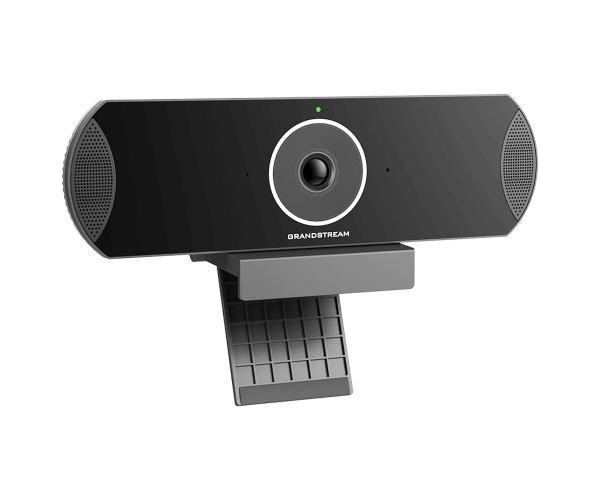
Grandstream GVC3210 Android Video Conferencing Endpoint
The Grandstream GVC3210 is a powerful all-in-one video conferencing system designed for professional meeting environments. Powered by Android 7.0, it combines high-definition video, crystal-clear audio, and flexible connectivity to deliver smooth collaboration for businesses and organizations.
With Full HD 1080p video, an integrated camera and microphone, and an intuitive touchscreen interface, the GVC3210 provides a complete video conferencing solution for boardrooms, offices, and remote collaboration spaces.
Key Specifications
- Operating System: Android 7.0
- Display: 8-inch capacitive touchscreen
- Video Resolution: Full HD 1080p
- Camera: Integrated HD camera
- Audio: Built-in microphone with noise reduction
- Connectivity: Wi-Fi, Ethernet, and Bluetooth
- Power: Power over Ethernet (PoE) supported
- Protocols: SIP and H.323 support
- Platform Compatibility: Works with Zoom, Teams, and other conferencing services
All-in-One Android Video Conferencing Solution for Modern Meeting Rooms
The Grandstream GVC3210 is designed to simplify video conferencing by integrating camera, audio, and collaboration software into a single device. Its 1080p Full HD camera delivers clear and detailed video, making remote meetings feel more natural and engaging.
The 8-inch touchscreen display provides an easy-to-use interface for managing calls, meetings, and settings. Users can install compatible conferencing apps directly on the Android system, allowing the device to work with modern collaboration platforms.
With support for Wi-Fi, Ethernet, and Bluetooth, the GVC3210 provides flexible connectivity options for different office environments. The built-in microphone captures voices clearly, while noise reduction ensures professional-quality audio during meetings.
Why Choose Grandstream GVC3210?
- Full HD 1080p video conferencing quality
- Android operating system for flexible app support
- Integrated camera and microphone for all-in-one collaboration
- 8-inch touchscreen interface for easy navigation
- Wi-Fi, Ethernet, and Bluetooth connectivity
- Power over Ethernet (PoE) for simplified installation
- Compatible with SIP, H.323, Zoom, and other platforms
This system is ideal for organizations looking for a simple yet powerful video conferencing solution.
User Experience
Users appreciate the Grandstream GVC3210 for its reliability, simple setup, and professional video quality. The Android interface allows quick access to collaboration tools, while the integrated hardware ensures smooth meetings without requiring multiple devices.
Businesses report improved productivity and communication due to the device’s stable connectivity and high-quality video conferencing capabilities.
Installation Process
- Unbox the Device: Verify that all components such as the device, cables, and manual are included.
- Connect Power: Use PoE or the supplied power adapter.
- Network Setup: Connect through Ethernet or configure Wi-Fi from the settings menu.
- Initial Configuration: Follow the on-screen setup process for language and network settings.
- Install Apps: Download conferencing apps such as Zoom or Teams if needed.
- Test the System: Make a test call to ensure video and audio function correctly.
Maintenance Tips
- Clean the camera lens and screen regularly using a microfiber cloth.
- Update firmware to maintain security and performance.
- Check network connectivity for stable conferencing.
- Inspect ports and cables for secure connections.
- Restart the device periodically for optimal operation.
Where It Can Be Used?
- Corporate conference rooms
- Executive offices
- Remote workspaces and home offices
- Training centers and classrooms
- Healthcare telemedicine consultations
- Government and organizational meeting rooms