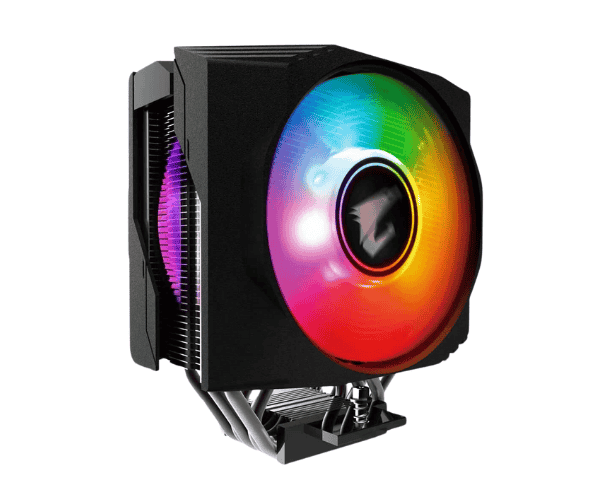
About this Gigabyte Aorus ATC800 RGB 120 mm CPU Cooler
The Gigabyte Aorus ATC800 RGB 120mm CPU Cooler is a high-performance cooling solution designed to keep your CPU temperatures in check. With its customizable RGB lighting and durable design, it provides both excellent heat dissipation and style for gamers and PC builders.
Specification
| Feature |
Details |
| Model |
Aorus ATC800 |
| Cooling Type |
Air Cooler |
| Fan Size |
120mm |
| Fan Speed |
600 – 2,400 RPM |
| RGB Lighting |
Yes, Addressable RGB |
| Compatibility |
Intel LGA 1200, LGA 115x, AMD AM4 |
| Heat Pipes |
6 Copper Heat Pipes |
| Material |
Aluminum and Copper |
| Dimensions |
120 x 120 x 25mm |
| Weight |
798g |
| Noise Level |
23.3 dB(A) |
Description
Gigabyte Aorus ATC800 RGB 120mm CPU Cooler in BD
The Gigabyte Aorus ATC800 RGB 120mm CPU Cooler is made to cool better than most in it is class. The 120mm adjustable RGB fan cools efficiently while six copper heat pipes take care of thermal management. This makes it suitable for cutting-edge gaming setups as well as productivity machines.
User Experience
A good cooling performance is characterized by the smooth operation of the cooler even during heavy gaming. The fan is hardly audible, capable of a lowly 23.3 dB(A), offer a peaceful environment to work or play; the customizable RGB lighting provides aesthetics to mix any build. Installation is quite fast, with compatibility over Intel and AMD sockets. Users admire the build quality of the cooler and the great heat dissipation, enabling their CPUs to run cool and stable even under utmost demands and overclocked settings.
Why Choose the Gigabyte Aorus ATC800 120mm CPU Cooler:
The Gigabyte Aorus ATC800 CPU Cooler is the ultimate combination of performance, looks and usability. Built for both gamer and builder, this CPU cooler manages to cool the CPU temperatures so that gaming and productivity can be done easily without heating up the body. Super customizable RGB lights put that personal flair on your build. Equipped with six copper heat pipes and a fan size of 120mm, it promotes good heat transfer allowing the CPU to maintain optimal temperatures. Easy installation coupled with wide compatibility to Intel and AMD sockets further enriches it is reliability.
Installation Steps
- Set Up the Mounting Bracket: Fix either Intel or AMD compatible mounting bracket according to your motherboard aligning it to sit over the CPU socket.
- Applying Thermal Paste: Clean the CPU surface and place a good thin, even film of thermal paste at its center.
- Mounting the Cooler: Take the Gigabyte Aorus ATC800 RGB cooler and place it over the CPU socket in such a way that the mounting holes of
- the cooler coincide with the mounting holes of the CPU socket.
- Securing the Cooler: Secure the cooler onto the mounting bracket using the provided screws.
- Connecting the Fan: Connect the 4-pin PWM connector into the motherboard fan header and RGB connector for the lights.
- Check the Cooler: Powering up the system, check for spinning of the fans, along with lighting for the RGB.
What is the Price of the Gigabyte Aorus ATC800 RGB 120 mm CPU Cooler in Bangladesh?
The latest price of
Gigabyte Aorus ATC800 RGB 120mm CPU Cooler in Bangladesh depends on quantity.
Crystal Vision Solutions ensure This product has the best market price in Bangladesh. Our product is 100% original and lowest price in Bangladesh. All kinds of services are the best in Bangladesh, and contact us for any information and latest price.