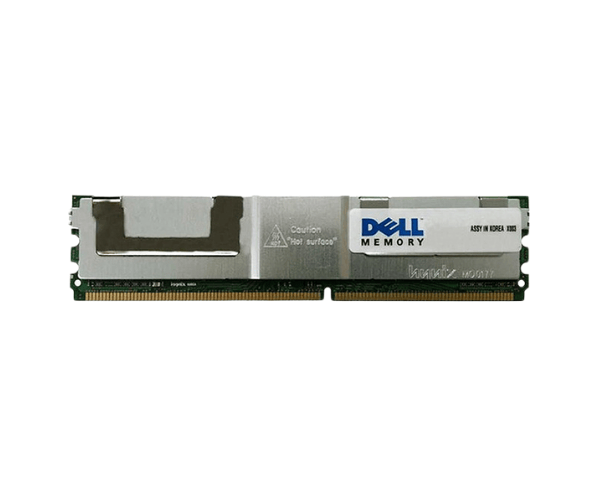
Overview of Dell W701G 4GB PC2-5300F 667MHz 4RX8 DDR2 ECC Memory RAM DIMM
The
Dell W701G 4GB PC2-5300F 667MHz 4RX8 DDR2 ECC Memory RAM DIMM offers a reliable memory solution for users requiring consistent performance in their systems. With its ECC (Error-Correcting Code) capability, this memory module ensures data integrity, making it an excellent choice for both personal and business applications. Whether you're looking to enhance your server's performance or upgrade your workstation, the
Dell W701G provides the necessary speed and reliability to support your computing needs.
Why Choose Dell W701G 4GB PC2-5300F 667MHz 4RX8 DDR2 ECC Memory RAM DIMM?
Choosing the
Dell W701G 4GB PC2-5300F 667MHz ECC Memory RAM DIMM ensures that your system operates at its best. This memory module features ECC technology, which identifies and corrects data errors, making it perfect for settings where data integrity is essential. The 4GB capacity is perfect for multitasking, allowing you to run multiple applications simultaneously without a hitch. Additionally, the low voltage of 1.8V promotes energy efficiency, reducing your system's overall power consumption. With its reliable performance and enhanced data integrity, the
Dell W701G stands out as a top choice for users seeking an effective memory upgrade.
User Experience
Users have reported significant improvements in their systems after installing the
Dell W701G 4GB 667MHz 4RX8 DDR2 ECC Memory RAM DIMM. Many have noted the module's reliability in critical computing tasks, such as data analysis and server management. The installation process is straightforward, allowing users to enhance their systems without requiring extensive technical knowledge. Overall, feedback emphasizes the module's stability and the positive impact it has on system performance, making it a valuable addition to any compatible device.
Detailed Breakdown of Features
- 4GB Capacity: 4GB capacity ensures sufficient memory to run multiple applications efficiently and without interruptions.
- DDR2 ECC Technology: Ensures data integrity by detecting and correcting errors, essential for critical applications.
- Data Rate of PC2-5300F: Delivers optimal performance for a variety of tasks.
- Speed of 667MHz: Facilitates quick data access, enhancing overall system responsiveness.
- DIMM Form Factor: Designed for compatibility with a wide range of systems, making installation easy.
- 4RX8 Configuration: Offers excellent performance and efficiency for various workloads.
- 1.8V Voltage: Low power consumption helps maintain energy efficiency.
- Compatibility: Specifically engineered to work with numerous Dell servers and workstations, ensuring a seamless upgrade.
- Robust Brand: Dell's reputation for quality and reliability gives users confidence in their choice.
- Error Correction: The ECC feature is particularly beneficial in environments where data accuracy is paramount.
Installation Steps
- Power Down Your System: Ensure your computer is completely turned off and unplugged to avoid electrical hazards.
- Open the Computer Case: Carefully follow the manufacturer’s instructions to remove the side panel of your case.
- Locate the Memory Slot: Identify the DIMM slot where you will install the Dell 4GB PC2-5300F memory.
- Prepare the Memory Module: Remove the memory module from its packaging, taking care to handle it by the edges to avoid static damage.
- Align the Module: Position the Dell W701G above the DIMM slot, ensuring that the notches on the memory align correctly with the slot.
- Insert the Module: Firmly press down on the module until it clicks into place, securing it with the retaining clips on either side.
- Close the Computer Case: Replace the side panel and ensure it is fastened properly.
- Reconnect Power: Plug your computer back into the power source and turn it on.
- Verify Installation: During startup, access the BIOS to confirm that the new memory is recognized and functioning correctly.
Where It Can Be Used?
The
Dell 4GB PC2-5300F 667MHz DDR2 ECC Memory RAM DIMM is versatile and can be utilized in several scenarios, including:
- Upgrading older servers to improve data processing and reliability.
- Enhancing workstations used for office tasks, programming, or graphic design.
- Supporting applications that require high levels of stability and data integrity.
- Improving performance in systems running virtualization software.
- Providing additional memory for business applications, ensuring efficient multitasking.