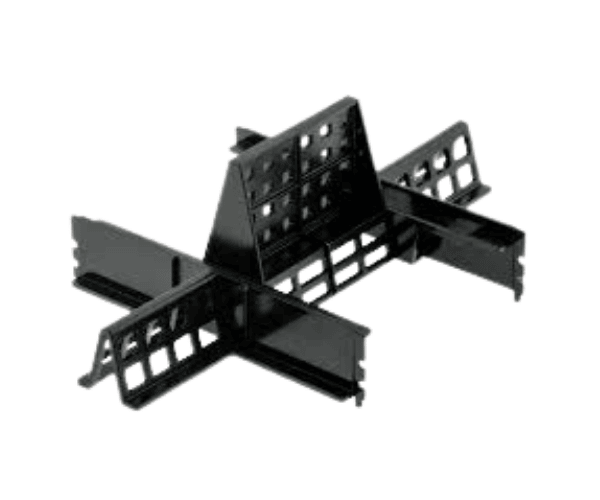
Introduction of Dell NYP7X PowerEdge R720xd Memory Blank Filler
The
Dell NYP7X PowerEdge R720xd Memory Blank Filler is a vital accessory for maintaining optimal performance in your Dell PowerEdge R720xd server. Designed to fill empty memory slots, this product helps ensure proper airflow and cooling within your server chassis, ultimately enhancing system reliability. With an increasing demand for efficient server performance, using the right components, like the
Dell PowerEdge R720xd Memory Blank Filler, is essential for creating a stable and efficient computing environment.
Why Choose the Dell NYP7X PowerEdge R720xd Memory Blank Filler?
Choosing the
Dell PowerEdge R720xd Memory Blank Filler is essential for anyone looking to optimize their server’s performance. This filler not only maintains the aesthetics of your server but also prevents dust accumulation and improves airflow. By filling empty memory slots, the
Dell PowerEdge R720xd Memory Blank Filler enhances system cooling, leading to better performance and reliability. Investing in this product ensures that your server runs smoothly and efficiently, minimizing potential downtime.
User Experience
Users of the
Dell PowerEdge R720xd Memory Blank Filler frequently express their satisfaction with its design and functionality. They appreciate the easy installation process, which requires no additional tools, making it convenient for quick upgrades. Many users have reported improved airflow and reduced dust buildup in their server chassis after installing this filler. The simple yet effective design makes it a necessary addition for any Dell PowerEdge R720xd server, allowing for better maintenance and a cleaner operating environment.
Detailed Breakdown of Features
- High-Quality Construction: Made from durable plastic, ensuring longevity and resilience.
- Perfect Fit: Engineered specifically for the Dell PowerEdge R720xd, ensuring a snug and secure installation.
- Tool-less Installation: Easily install the filler without needing tools, simplifying the setup process.
- Enhances Airflow: Helps maintain optimal airflow within the server, reducing the risk of overheating.
- Dust Protection: Prevents dust from accumulating in unused memory slots, promoting a cleaner environment.
- Lightweight Design: Makes handling and installation straightforward without adding unnecessary weight.
- Professional Appearance: Complements the server’s design, giving it a polished and organized look.
- Easy Maintenance: Simplifies cleaning processes, contributing to overall server health.
- Versatile Use: Ideal for various server environments, enhancing performance across the board.
- Cost-Effective Solution: Provides an affordable way to improve server performance and longevity.
Installation Steps
- Power Down the Server: Turn off the server and disconnect it from the power source for safety.
- Locate Empty Memory Slots: Identify the vacant memory slots in your Dell PowerEdge R720xd server.
- Insert the Filler: Align the Dell Memory Blank Filler with the empty slot and press down firmly until it clicks into place.
- Check Secure Fit: Ensure that the filler is securely in place and does not move.
- Reconnect Power Supply: Reconnect the power source to the server.
- Power On the Server: Turn on the server and verify that it operates without any issues.
Where It Can Be Used?
The
Dell PowerEdge R720xd Memory Blank Filler is primarily designed for use in Dell PowerEdge R720xd servers. However, it can also be beneficial in any compatible server environment where memory slots need to be filled. Typical use cases include:
- Data Centers: Ensures optimal cooling and dust protection in high-performance server environments.
- Enterprise Servers: Ideal for businesses that require reliable and efficient server operation.
- Virtualization: Helps maintain stable operating conditions for servers running multiple virtual machines.
- Small to Medium Businesses: Provides an effective solution for businesses looking to enhance their server’s performance without extensive modifications.