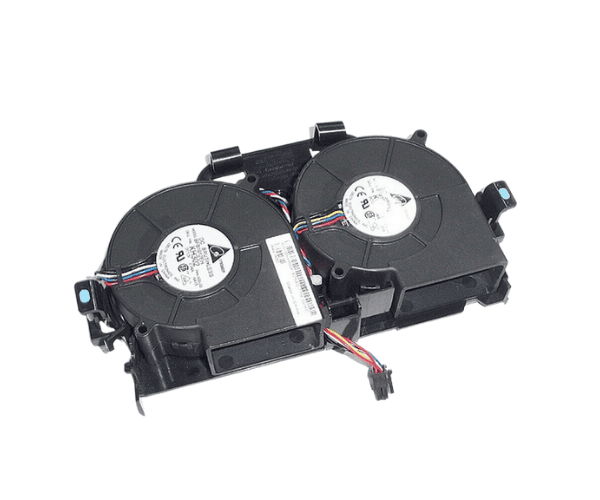
Introduction of Dell HH668 CPU Dual Blower Fan for PowerEdge 860 & R200
The
Dell HH668 CPU Dual Blower Fan is designed to ensure the optimal cooling of your Dell PowerEdge 860 and R200 servers. Overheating can lead to a significant drop in server performance, affecting critical business functions. This high-efficiency dual blower fan is engineered to deliver consistent airflow, keeping your system components at an ideal temperature. For organizations that demand uninterrupted server operations, the
Dell CPU Dual Blower Fan offers dependable cooling that extends the lifespan of your equipment and prevents overheating issues.
Why Choose the Dell HH668 CPU Dual Blower Fan?
The
Dell CPU Dual Blower Fan is an ideal choice for businesses that rely on continuous, high-performance server operations. Designed specifically for PowerEdge 860 and R200 servers, this fan ensures optimal airflow to critical components, preventing overheating. By maintaining a stable temperature, the
Dell CPU Dual Blower Fan not only helps improve performance but also extends the lifespan of your servers, ensuring you get the most out of your hardware investment. When you need efficient and reliable cooling, this product delivers top-tier performance.
User Experience
Users of the
Dell HH668 Dual Blower Fan have consistently praised its reliability and efficiency. It operates at a noise level that is suitable for office environments and does not interfere with daily operations. Many users have observed enhanced server performance due to improved cooling, which minimizes the risk of overheating during intensive tasks. With easy installation and seamless integration into Dell PowerEdge 860 and R200 servers, this fan has proven itself as an effective cooling solution.
Detailed Breakdown of Features
- Brand: Dell – trusted for delivering reliable server components.
-
Compatibility: Designed for use with Dell PowerEdge 860 and R200 servers.
- Type: Dual blower design ensures powerful and efficient cooling.
- Speed: Operates at 4200 RPM to ensure sufficient heat dissipation.
- Connector: Features a 4-pin connector for easy installation.
- Voltage: Runs on a standard 12V power supply.
- Durability: Made from strong plastic and metal materials for long-term use.
- Noise Level: Quiet operation for minimal disruption in work environments.
- Airflow Efficiency: High air output, designed to cool critical server components.
- Compact Design: Fits seamlessly into server hardware with ease.
Installation Steps
- Power Down the Server: Safely shut down your PowerEdge 860 or R200 server and disconnect it from the power source.
- Open the Server Chassis: Use the appropriate tools to remove the server’s chassis cover.
- Remove the Existing Fan: If you’re replacing an old fan, carefully disconnect it and remove it from the system.
- Position the New Fan: Insert the Dell CPU Dual Blower Fan into the designated fan slot, ensuring proper alignment.
- Connect the Fan: Plug the 4-pin connector into the matching slot on the motherboard.
- Secure the Fan: Fasten the fan securely using screws or clamps provided in the installation kit.
- Close the Chassis: Reattach the server’s chassis cover and ensure all screws are tightly secured.
- Power On the Server: Reconnect the power source and turn on the server to test the fan’s operation.
Where It Can Be Used?
The
Dell CPU Dual Blower Fan is built specifically for Dell PowerEdge 860 and R200 servers. Its application is crucial for environments where server stability and performance are vital, including:
- Data centers
- IT departments in businesses
- Educational institutions
- Server rooms in small to medium-sized businesses
- Research labs requiring continuous data processing
This fan is a critical component in maintaining the longevity and efficiency of your server systems.