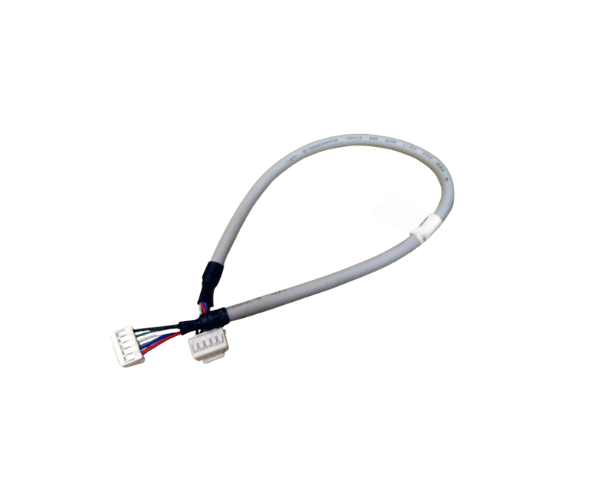
Introduction of Dell F628J PowerEdge R610 5-pin Data Cable
The Dell F628J PowerEdge R610 5-pin Data Cable is essential for reliable data transmission in Dell PowerEdge R610 servers. This high-quality cable ensures a stable connection between server components. It supports efficient operations and smooth data transfer. Whether you upgrade components or replace a damaged cable, the Dell F628J PowerEdge R610 5-pin Data Cable is an excellent choice. It helps maintain your system's performance and reliability.
Why Choose the Dell F628J PowerEdge R610 5-pin Data Cable?
Choosing the Dell F628J PE R610 5-pin Data Cable guarantees reliable data connections for your Dell PE R610 server. This cable specifically meets the performance standards of enterprise-level servers. Its durable construction ensures longevity, while the 5-pin connector allows for secure connections, which reduces the risk of data loss. The Dell F628J PE R610 5-pin Data Cable supports efficient data transfer, making it an essential part of your server setup.
User Experience
Users report positive experiences with the Dell F628J PE R610 5-pin Data Cable. Many appreciate its robust build quality and reliable performance, noting that it facilitates seamless data transmission without interruptions. The cable's compatibility with the Dell PE R610 ensures that users can easily integrate it into their existing setups. Overall, the Dell F628J PE R610 5-pin Data Cable has received high praise for its effectiveness and dependability in professional IT environments.
Detailed Breakdown of Features
The Dell F628J PE R610 5-pin Data Cable offers features that make it essential for your server configuration. The cable uses high-quality insulated materials, which protect against electrical interference and potential hazards. Its 5-pin connector provides a secure and stable connection, minimizing the risk of data loss or connection failures. The cable's standard length allows for flexible installation options, making it suitable for various server setups. With its robust design, the Dell F628J PE R610 5-pin Data Cable meets the demands of high-performance data transmission, effectively supporting your server's critical operations.
Installation Steps
Installing the Dell F628J PE R610 5-pin Data Cable is easy and can be done in just a few steps:
- Power Off the Server: First, turn off the Dell PowerEdge R610 server and unplug it from the power source.
- Locate the Data Connector: Find the 5-pin data connector on the server's motherboard or the relevant component.
- Connect the Cable: Insert one end of the Dell 5-pin Data Cable into the corresponding 5-pin connector.
- Secure the Connection: Ensure the cable is securely attached to avoid any connection issues.
- Power On the Server: Plug in the server and turn it on. Check that the data connection works correctly.
Where It Can Be Used?
The
Dell F628J PE R610 5-pin Data Cable is designed for use in Dell PE R610 servers. It is ideal for data centers, IT departments, and any environment that utilizes Dell PE servers. The cable's durable construction makes it suitable for both high-density and standard server setups, ensuring reliable data transmission for various applications.