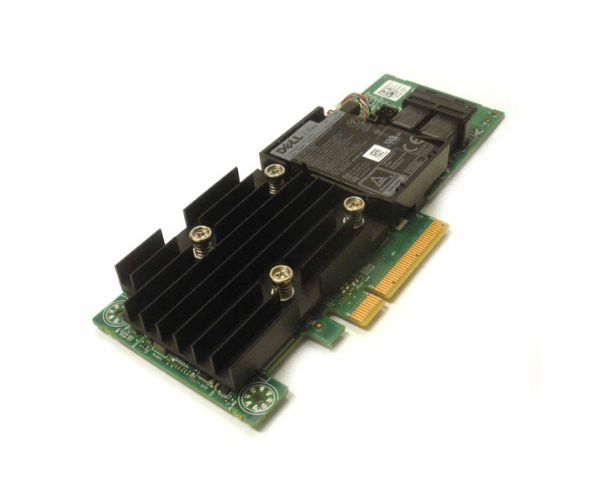
Introduction of Dell DPNHJ Perc H740p 12gb/s SAS 8-Port 8GB Adapter
The Dell DPNHJ Perc H740p 12Gb/s SAS 8-Port 8GB Adapter is designed to deliver exceptional storage performance and reliability. Engineered for high-demand environments, this RAID controller provides robust data protection and improved data transfer speeds. Its advanced features make it ideal for enterprise-level applications, ensuring efficient and reliable data management.
Why Choose the Dell DPNHJ Perc H740p 12Gb/s SAS 8-Port 8GB Adapter?
Choosing the Dell DPNHJ Perc H740p 8GB Adapter ensures enhanced storage performance and reliable data protection for your enterprise. With its 12Gb/s SAS interface and 8GB cache memory, this RAID controller significantly boosts data transfer speeds and system responsiveness. It supports multiple RAID levels, providing flexible and robust data protection options. Furthermore, its compatibility with various operating systems and easy integration into existing infrastructures make the Dell DPNHJ Perc H740p a top choice for businesses aiming to optimize their storage solutions.
User Experience
Users of the Dell DPNHJ Perc 8GB Adapter consistently report excellent performance and reliability. The adapter's high data transfer rate and substantial cache memory ensure smooth and efficient operations, even under heavy workloads. Installation is straightforward, and the adapter integrates seamlessly with Windows, Linux, and VMware environments. Users appreciate the comprehensive RAID level support, which offers flexible and secure data management options.
Key Features
- High-Speed Connectivity: 12Gb/s SAS interface for rapid data transfer.
- Large Cache Memory: 8GB cache for improved performance.
- Versatile Compatibility: Supports Windows, Linux, and VMware.
- Multiple RAID Levels: Offers robust data protection with RAID 0, 1, 5, 6, 10, 50, 60.
- Efficient Power Usage: Low power consumption at 10W.
- Compact Design: Low profile for easy integration into various systems.
- Robust Performance: Handles demanding workloads effectively.
- Advanced Features: Supports advanced RAID management and monitoring tools.
- Reliable Operation: Ensures data integrity and system stability.
- Seamless Integration: Easily fits into existing network infrastructures.
Installation Steps
- Power Down System: Turn off the computer and disconnect from the power source.
- Open Computer Case: Remove the case cover to access internal components.
- Locate PCIe Slot: Find an available PCIe 3.0 slot on the motherboard.
- Insert Adapter: Carefully insert the Dell DPNHJ 8GB Adapter into the PCIe slot.
- Secure Adapter: Fasten the adapter using screws or clips to secure it in place.
- Connect Cables: Attach SAS cables to the appropriate ports.
- Close Computer Case: Replace and secure the case cover.
- Reconnect Power: Plug the computer back into the power source and turn it on.
- Install Drivers: Download and install the latest drivers from the Dell website.
- Configure RAID: Use the RAID management software to configure RAID settings.
Where It Can Be Used?
The
Dell DPNHJ 8GB
Adapter is ideal for use in a variety of high-performance storage environments. It is perfect for enterprise servers that require robust data protection and high data throughput. This adapter is also well-suited for data centers, where its multiple RAID level support can handle large-scale data management and demanding applications. Additionally, small and medium-sized businesses (SMBs) can benefit from its reliable performance and ease of integration into their existing storage infrastructure.