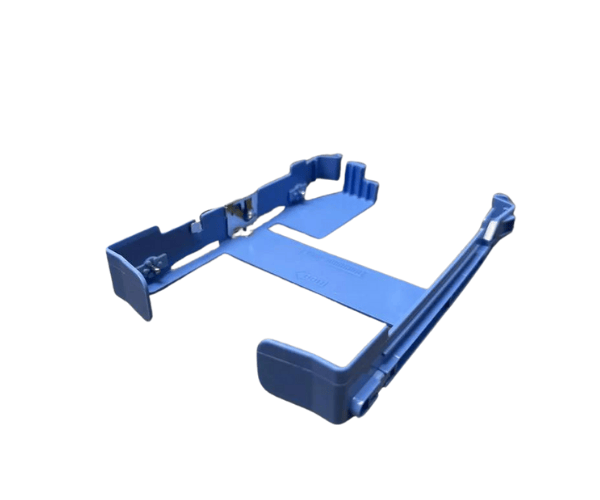
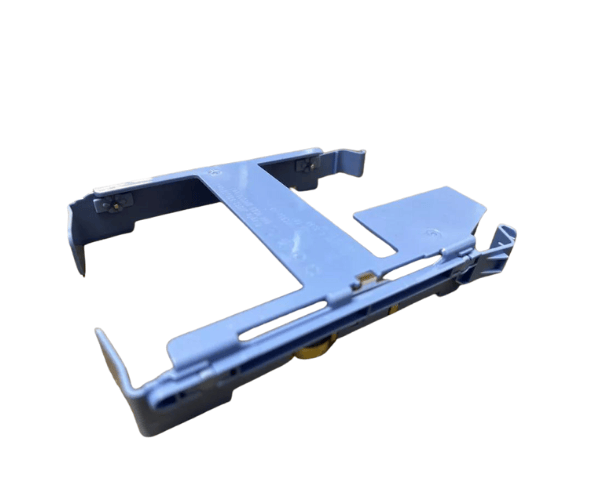
Introduction of Dell 3.5" Hard Drive Tray Caddy 065KHD
The
Dell 3.5" Hard Drive Tray Caddy 065KHD is a vital accessory designed to enhance the storage capabilities of your Dell Precision workstations, specifically the T3620, T3630, T3640, and T3650 models. This caddy offers a secure and reliable housing for your 3.5" hard drives, ensuring optimal performance and a hassle-free installation experience. By investing in this tray caddy, you can improve your workstation's efficiency and productivity, making it an essential component for professionals who require reliable data storage solutions.
Why Choose Dell 3.5" Hard Drive Tray Caddy 065KHD?
Opting for the
Dell Hard Drive Tray Caddy 065KHD ensures that you have a reliable and efficient storage solution for your workstation. This caddy simplifies the process of adding or replacing hard drives, making it easier to manage your data. Its robust construction guarantees that your drives remain safe and secure, while its compatibility with various Precision models allows you to utilize it across different setups. With this caddy, you can enjoy peace of mind knowing that your data is well-protected and accessible.
User Experience
Many users appreciate the
Dell 3.5" HD Tray Caddy 065KHD for its straightforward installation and robust design. The caddy provides a snug fit for hard drives, ensuring they stay securely in place. Users also value its compatibility with multiple Dell Precision models, which enhances the versatility of their workstations. Overall, customers report a positive experience, noting that this caddy contributes to improved performance and easier upgrades.
Detailed Breakdown of Features
- Durable Construction: Built from high-quality plastic to withstand daily wear and tear.
- Easy Installation: Designed for quick installation without the need for additional tools or screws.
- Versatile Compatibility: Works seamlessly with Dell Precision T3620, T3630, T3640, and T3650 models.
- Secure Fit: Holds drives firmly in place, minimizing the risk of damage during operation.
- Lightweight Design: Easy to handle, making it convenient for installation and maintenance.
- Cooling Features: Equipped with ventilation holes to help dissipate heat and enhance drive longevity.
- Standard Dimensions: Designed to fit into standard 3.5" drive bays without modification.
- SATA and SAS Support: Compatible with both SATA and SAS drives, offering flexibility in storage options.
- Professional Appearance: Black color provides a sleek look that blends well with workstation aesthetics.
- Cost-Effective Upgrade: An economical way to expand your workstation's storage capacity.
Installation Steps
- Power Down: Turn off your Dell Precision workstation and unplug it from the power source.
- Open the Case: Remove the side panel of your workstation to access the internal components.
- Identify the Drive Bay: Locate the 3.5" drive bay intended for the installation of the caddy.
- Insert the Hard Drive: Place your 3.5" SATA or SAS hard drive into the tray caddy, ensuring a secure fit.
- Install the Tray: Slide the caddy into the designated drive bay, aligning it with the mounting points.
- Secure the Caddy: If necessary, use the built-in clips to lock the caddy in place, ensuring it is firmly attached.
- Close the Case: Replace the side panel of your workstation and secure it properly.
- Reconnect Power: Plug your workstation back in and power it on to recognize the newly installed drive.
Where It Can Be Used?
The
Dell 3.5" Hard Drive Tray Caddy is suitable for various environments, including:
- Corporate Workstations: Ideal for professionals needing reliable storage for business applications.
- Creative Studios: Perfect for graphic designers, video editors, and other creative fields requiring high-capacity storage.
- Data Centers: Effective in server racks where secure and accessible storage solutions are essential.
- Home Offices: A great choice for upgrading storage in a personal workstation setup.