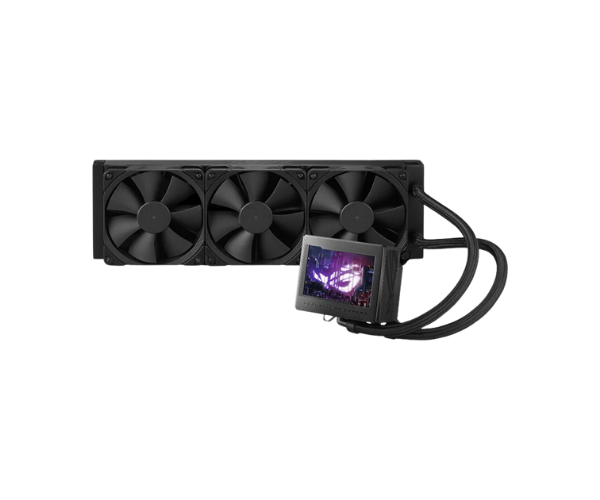
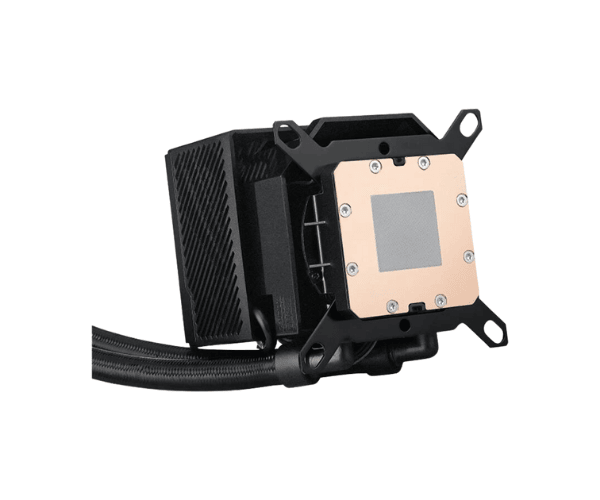
About this Asus ROG RYUJIN III 360 Liquid CPU Cooler
The Asus ROG RYUJIN III 360 AIO Liquid CPU Cooler is a high-performance cooling solution designed for serious gamers and PC builders. Featuring a 360mm radiator, customizable OLED display, and premium construction, it ensures efficient cooling for demanding CPUs.
Specifications
| Feature |
Details |
| Model |
Asus ROG RYUJIN III 360 |
| Radiator Size |
360mm |
| Pump |
Asetek 7th Gen Pump |
| Fan Size |
120mm x 3 (ROG ARGB Fans) |
| Compatibility |
Intel LGA 1700/1200/115x, AMD AM4 |
| Max Fan Speed |
2000 RPM |
| Noise Level |
36 dB(A) |
| Cooling Technology |
Asetek Pump and Radiator Design |
| Display |
3.5” OLED Display for custom graphics and monitoring |
| RGB Lighting |
Yes, Addressable RGB |
| Tube Length |
400mm |
| Material |
Premium Aluminum and Copper Construction |
Description
Asus ROG RYUJIN III 360 AIO Liquid CPU Cooler in BD
It Asus ROG RYUJIN III 360 Liquid CPU Cooler is features a highly developed cooling design built for high-performance PC builds. Having been tested with the most demanding processors, it boasts a beefy 360mm radiator and a pump that can ensure the temperature remains stable and includes stunning RGB customization through its OLED display.
User Experience
Users seem to be rejoicing over the Asus ROG RYUJIN III 360 Liquid CPU Cooler, and so far, most have only good things to say about how wonderfully the CPU cooler keeps cool under extreme gaming sessions or massive workloads. It should be highlighted that with the 360mm radiator and three high-static pressure fans, one can really notice the difference in the overall temperatures of the CPU. Basically, it has that extra touch with the sleek OLED screen where you can also have a bit of personalization of the cooler with stuff such as showing system stats or even custom animations. The easy installation process is among its major highlights, and of course, the cooler comes compatible with both Intel and AMD processors so it doesn't reinforce your building much. Effects on the lighting are vibrant and sweet customizable adding visual art into any setups for gaming, which really makes it stand out as a product.
Why Choose the Asus ROG RYUJIN III 360 CPU Cooler?
Asus ROG RYUJIN III 360 CPU Cooler is the final choice for gamers and enthusiasts demanding high-performance cooling plus top effects for good looks. The cooler awesome 360mm radiator has excellent thermal management capabilities and keeps your CPU relatively cool, even on hardcore gaming shows. Premium Silent Asetek 7th Gen pump provides reliable and very quiet cooling. The bright OLED display and highly customizable RGB lighting will take your PC's appearance to a whole new level. Asus ROG RYUJIN III 360 is a must-have as it offers beauty with functional prestige, whether you are building a high-end gaming rig or upgrading your current system.
Installation Steps
- Prepare your Working Space: Ensure that the system is completely powered off and unplugged, whilst all components and tools ready.
- Mount the Radiator: Install the included mounting brackets and screws to attach to the case the 360mm radiator. Ensure allowance for clearances.
- Install the Fans: Attach the three 120mm ROG ARGB fans to the radiator making sure the airflow direction is correct (whether Intake or exhaust).
- Attach the CPU Block: Apply thermal paste to your CPU. Position the CPU block over the processor and secure it with the included backplate and screws.
- Connect the Pump and Fans: Connect the power cable of the pump to the header for CPU fans on the motherboard and connect each of the fan cables either to the motherboard or to a fan controller.
- Install the RGB Lighting: Connect the RGB cables if your motherboard supports it for lighting purposes.
- Power and Test: Finally, check each and every connection, turn the computer on, and check for proper operation and cool performance.
What is the Price of the Asus ROG RYUJIN III 360 Liquid CPU Cooler in Bangladesh?
The latest price of
Asus ROG RYUJIN III 360 AIO Liquid CPU Cooler in Bangladesh depends on quantity.
Crystal Vision Solutions ensure This product has the best market price in Bangladesh. Our product is 100% original and lowest price in Bangladesh. All kinds of services are the best in Bangladesh, and contact us for any information and latest price.