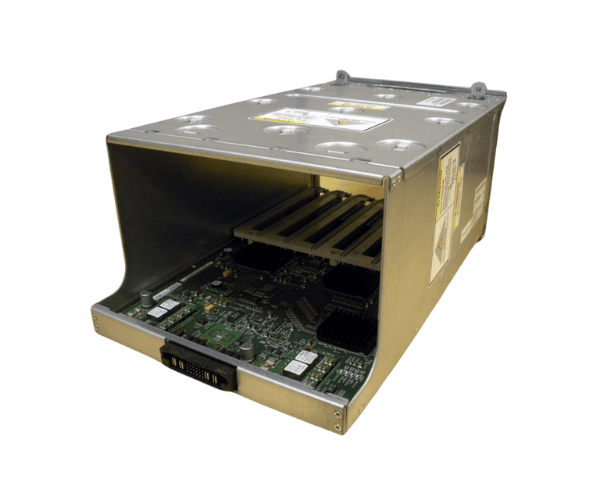
The
Sun 541-0507 7050936 PCIe I/O Boat is designed for the Sun M8000 and M9000 servers, enabling efficient I/O expansion. This module connects external I/O devices to your server infrastructure, offering scalability, flexibility, and reliable performance. Ideal for businesses seeking to enhance their data handling capabilities with minimal effort.
Specification
| Feature |
Details |
| Brand |
Sun Microsystems |
| Model |
541-0507 7050936 |
| Type |
PCIe I/O Boat |
| Compatibility |
M8000, M9000 Servers |
| Interface |
PCI Express (PCIe) |
| Functionality |
External I/O Expansion |
| Form Factor |
Standard PCIe |
| Purpose |
External I/O Expansion for Servers |
| Required Slot |
PCIe Slot |
| Installation |
Tool-less or with screws |
| Dimensions |
5.9 x 3.3 x 1.0 inches |
Description
Sun 541-0507 7050936 PCIe I/O Boat Availability in Bangladesh (BD)
The
Sun 541-0507 7050936 I/O Boat is available in Bangladesh through authorized resellers and Sun Microsystems hardware distributors. Businesses can purchase this reliable I/O expansion solution for their Sun M8000 or M9000 servers through local IT vendors or online marketplaces offering enterprise-level hardware.
User Experience
Users find the
Sun 541-0507 7050936 I/O Boat to be an essential addition to their Sun M8000 and M9000 systems. Users highly appreciate the
Sun 541-0507 7050936 I/O Boat for its simple installation process and robust performance, which enhance the overall efficiency of the server’s I/O operations. Whether used in a small business or large enterprise, this expansion module helps businesses scale their IT infrastructure without complexity.
Why Choose the Sun 541-0507 7050936 PCIe I/O Boat?
Choose the
Sun 541-0507 7050936 I/O Boat for its:
- Easy Expansion: It allows seamless integration of additional I/O devices with your existing Sun M8000 or M9000 server infrastructure.
- Reliability: Known for its high durability and stable performance, it ensures uninterrupted server operation even in high-demand environments.
- Scalability: As your business grows, this I/O boat provides the flexibility to connect multiple I/O units, thus enhancing your server's capacity to handle more data.
- Cost-Effective Solution: Rather than replacing the whole server setup, this I/O expansion module offers a cost-effective solution to boost the existing server's performance.
Key Features
- Scalable I/O Expansion: Expand your server’s capabilities by adding external I/O units.
- Seamless Compatibility: Specifically designed for Sun M8000 and M9000 servers, ensuring easy integration.
- Reliable Data Throughput: High-speed PCIe interface delivers consistent performance.
- Space-Efficient Design: Fits into the server chassis without occupying much space.
- Improved Flexibility: Supports multiple I/O devices simultaneously, ideal for growing businesses.
Installation Steps
- Power Off: Ensure you power off the server and disconnect it from any power sources.
- Locate the PCIe Slot: Find the available PCIe slot in the Sun M8000 or M9000 server.
- Insert the I/O Boat: Gently insert the Sun 541-0507 7050936 I/O Boat into the PCIe slot, ensuring it fits properly.
- Secure the Module: Use screws or tool-less mechanisms to secure the module in place.
- Reconnect Power: After installation, reconnect the server to its power source and power it on.
- Install Drivers: Install any necessary drivers for the external I/O devices connected to the module.
- Test the Setup: Ensure that all connected devices are recognized and functioning correctly.
Where It Can Be Used?
The
Sun 541-0507 7050936 I/O Boat is designed for enterprise environments that require enhanced connectivity options. It is perfect for:
- Data Centers: Expands server I/O to accommodate high traffic and growing data needs.
- Business Servers: Ideal for businesses using Sun M8000 and M9000 systems looking to expand I/O without replacing hardware.
- Large-scale Infrastructure: For organizations scaling their server capacity and needing additional connectivity options for external I/O devices.
- Storage Networks: Suitable for connecting additional storage devices to enhance data handling and retrieval.
What is the Price of Sun 541-0507 7050936 PCIe I/O Boat in BD?
Crystal Vision Solutions specializes in Oracle Sun Expansions and Enclosures solutions, including the
Sun 541-0507 7050936 PCIe I/O Boat, catering to diverse needs in Bangladesh. Our products ensure optimal performance and reliability, backed by competitive pricing and expert service to meet your business’s requirements effectively. Pricing for the
Sun 541-0507 7050936 I/O Boat depends on product availability and condition, so please contact us for the latest details.