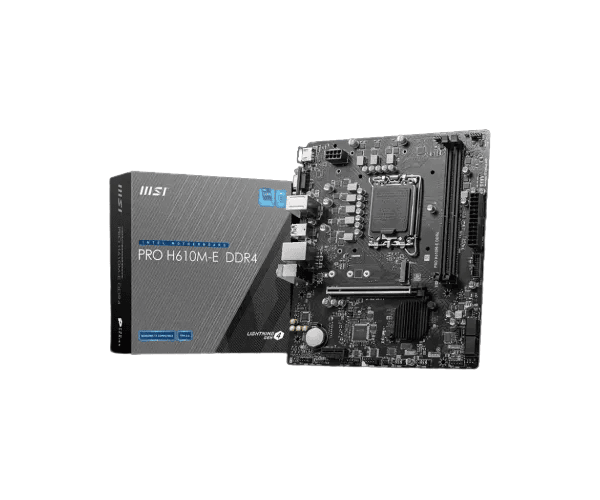
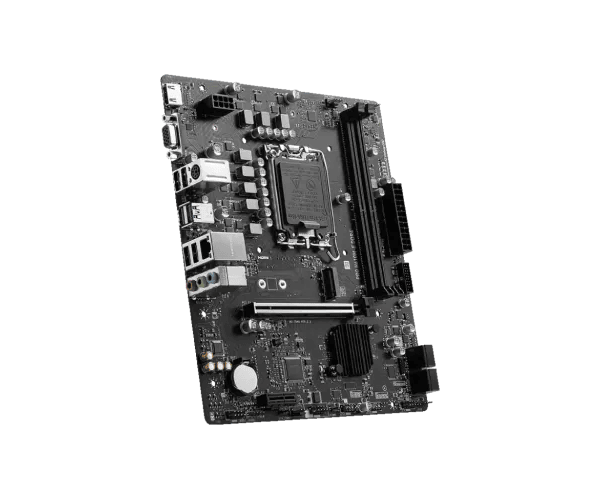
About the MSI PRO H610M-E DDR4 mATX Motherboard
The
MSI PRO H610M-E DDR4 mATX Motherboard comes in budget for those looking for reliable performance from Intel's 12th, 13th, and 14th Gen processors. It carries DDR4 memory, multiple expansion slots, and decent connectivity options that make it good for regular computing, office products, and gaming at home.
Specification
| Feature |
Details |
| Brand |
MSI |
| Model |
PRO H610M-E |
| Socket |
LGA 1700 |
| Chipset |
Intel H610 |
| Form Factor |
mATX |
| Supported CPU |
14th/13th/12th Gen Intel Processors (LGA1700) |
| Memory Type |
DDR4, Max 64GB |
| Memory Slots |
2 x DDR4 DIMM Slots |
| Expansion Slots |
1 x PCIe 4.0 x16, 2 x PCIe 3.0 x1 |
| Storage |
1 x M.2 Slot, 4 x SATA III |
| Graphics Output |
1 x HDMI |
| Audio |
Realtek ALC897 |
| LAN |
Realtek RTL8111H Gigabit LAN |
| USB Ports |
2 x USB 3.2 Gen 1, 4 x USB 2.0 |
| Internal Connectors |
1 x Front Panel Audio, 1 x 24-pin ATX, 1 x 4-pin CPU Power |
| Cooling |
CPU Fan Connector, System Fan Headers |
Description
MSI PRO H610M-E DDR4 mATX Motherboard in Bangladesh
The
MSI PRO H610M-E DDR4 mATX Motherboard is available in every city of Bangladesh, both in local tech shops and online retailers. This motherboard provides great entry for users looking to build a reliable PC within a budget. This would be more suitable for users who require a stable PC for everyday tasks and light entertainment.
User Experience of MSI PRO H610M-E DDR4 mATX Motherboard
The
MSI PRO H610M-E DDR4 mATX Motherboard makes the job easy and free of hassle for the end user. Installation is pretty smooth, and clear documentation can take users through the installation process. Users have reported seamless performance, starting from a home office setup to a basic gaming rig, along with a fast and reliable network through Realtek RTL8111H Gigabit LAN. With the HDMI port on the motherboard, one can connect to displays in a snap with no extra setup to be able to enjoy HD content.
Why Choose the MSI PRO H610M-E DDR4 mATX Motherboard?
The
MSI PRO H610M-E DDR4 mATX Motherboard is an inexpensive solution for Intel 12th, 13th, and 14th Generation processors, having all features included that one would need for a reliable PC without breaking the bank. Besides, it features up to 64GB of DDR4 memory to run multiple applications with ease. The motherboard is designed to fit perfectly with a dedicated graphics card via its 1 x PCIe 4.0 x16 slot and also offers room for extra expansion through 2 x PCIe 3.0 x1 slots. Enjoy stable internet connectivity thanks to Realtek RTL8111H Gigabit LAN and easily connect a monitor via the HDMI port.
Key Features
- Intel 12th, 13th, 14th Gen Processor Support: Supports the latest processors from Intel for quick and efficient computing.
- DDR4 Memory Support: Up to 64GB of DDR4 RAM for smooth multitasking and general computing.
- Expansion Options: 1 x PCIe 4.0 x16 slot for graphics cards, 2 x PCIe 3.0 x1 slots for peripherals.
- Storage Flexibility: 1 x M.2 slot for fast storage, 4 x SATA III connectors for additional drives.
- Reliable Networking: Realtek RTL8111H Gigabit LAN ensures stable and fast internet connectivity.
- Graphics Output: 1 x HDMI for easy connection to displays, ideal for HD viewing and casual gaming.
- Compact mATX Form Factor: The mATX design ensures compatibility with most cases while offering all the needed features.
Steps of Installation of MSI PRO H610M-E DDR4 mATX Motherboard
- Prepare Your Components: Collect all components that include the PRO H610M-E DDR4 mATX Motherboard, CPU, RAM, storage, and power supply.
- Install the CPU: Place your Intel processor into the LGA 1700 socket and ensure it's seated.
- Apply Thermal Paste: Add thermal paste to the CPU and install the CPU cooler.
- Install RAM: Insert the DDR4 RAM sticks into the DIMM slots, ensuring they click into place.
- Mount the Motherboard: Gently place the PRO H610M-E DDR4 mATX Motherboard into your case and screw it in place.
- Power Supply Connection: Connect 24-pin ATX and 4-pin CPU power into the motherboard.
- Storage: Install M.2 SSD and SATA storage drive onto the motherboard.
- GPU (if applicable): This is optional; plug your GPU into the PCIe 4.0 x16 slot.
- Fans: Connection of the fans to be used should start from the CPU fan onwards to other system fans with their appropriate headers to the motherboard.
- Power On and Configure: Boot up your system, go into BIOS for some settings, and install the operating system.
Why Buy From Crystal Vision Solution?
Crystal Vision Solution offers the
MSI PRO H610M-E DDR4 mATX Motherboard at competitive prices with excellent customer service and expert support. We ensure timely delivery, secure payments, and hassle-free returns, making it easy to purchase with confidence from a trusted supplier for your PC build.
What is the Price of the MSI PRO H610M-E DDR4 mATX Motherboard in Bangladesh?
The latest price of
MSI PRO H610M-E DDR4 mATX Motherboard in Bangladesh depends on quantity.
Crystal Vision Solution ensures this motherboard has the best market price in Bangladesh. Our product is 100% original and lowest price in Bangladesh. All kinds of services are the best in Bangladesh, and contact us for any information and latest price.