ALL Categories
Your Cart
Share:

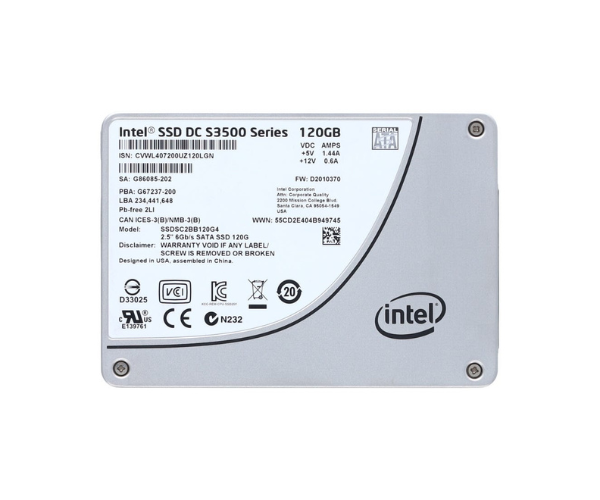
Intel SSDSC2BB120G4 Solid State Drive 120GB SATA

  • Product id:  3177
  • Stock: In Stock
  • Brand: Intel
  • Model: SSDSC2BB120G4
WhatsApp Inquiry

Key Features

    • Storage Capacity: 120GB
    • Interface: SATA III (6Gb/s)
    • Form Factor: 2.5-inch
    • Sequential Read: Up to 500 MB/s

Please confirm availability before completing your purchase by calling us.

The actual product may vary in size, color, and layout compared to the website display images. Claims will not be accepted for image discrepancies.

We reserve the right to change the price of any product at any time due to the volatile nature of technology prices.

We cannot guarantee that the information on this page is 100% accurate. Crystal Vision Solutions not responsible for any results obtained from using this information.

Main Features
Capacity 120 GB
Power Consumption Active: 2.3 W; Idle: 0.8 W
Drive Type Internal SSD (MLC, read-intensive)
Interface SATA III (6 Gb/s)
Physical Specification
Dimensions 100.45 × 69.85 × 7 mm
Weight 72 g
Form Factor 2.5″ (7 mm height)
Performance
Read Speed Up to 445 MB/s
Write Speed Up to 135 MB/s
MTBF 2,000,000 hours
Temperature
Operating Temperature 0°C to 70°C

About the Intel SSDSC2BB120G4 120 GB SATA Solid State Drive

The Intel SSDSC2BB120G4 120GB SATA Solid State Drive delivers impressive speed and reliability for an enhanced computing experience. Perfect for upgrading your system’s storage, this SSD significantly boosts boot times, application loading, and overall system responsiveness. With Intel's renowned NAND flash technology, it offers both performance and durability, making it a great choice for users looking to improve their PC’s speed and efficiency.

Intel SSDSC2BB120G4 Solid State Drive 120GB SATA in BD
The Intel SSDSC2BB120G4 120GB SATA Solid State Drive is crafted to maximize your system’s storage performance. This 120GB SSD is ideal for fast boot times, loading large files, and running intensive applications. With Intel’s cutting-edge NAND flash technology, this SSD is designed for long-lasting reliability and endurance, making it an excellent choice for both casual users and professionals seeking high performance and efficiency.

User Experience

With the Intel SSDSC2BB120G4 120GB SATA Solid State Drive, users will experience an immediate upgrade in speed and performance compared to traditional hard drives. The system boots up considerably faster, and applications open in a fraction of the time. The SSD's SATA III interface ensures consistent data transfer, providing seamless multitasking. Gamers and professionals will particularly appreciate the noticeable boost in responsiveness and performance. Additionally, the Intel SSDSC2BB120G4 operates efficiently with minimal heat output and low power consumption, making it an excellent choice for those looking to enhance their system without sacrificing energy efficiency. Its simple installation process ensures that even novice users can easily upgrade their storage.

Why Choose the Intel SSDSC2BB120G4 120 GB SATA Solid State Drive?

The Intel SSDSC2BB120G4 120GB SATA Solid Drive is the perfect choice for anyone looking for an affordable yet reliable SSD. Its fast read and write speeds significantly reduce boot times and improve overall system performance, making it a fantastic upgrade for any PC. Built with Intel's high-quality NAND flash technology, this drive offers long-term durability and an impressive 40 TBW endurance rating. Intel’s reputation for excellence, combined with the drive’s affordability and dependability, makes the Intel 120GB SATA Solid State Drive a top choice for both general and professional use. Whether upgrading a laptop or desktop, this SSD provides the performance boost you need to enhance your computing experience.

Installation Steps

  1. Prepare Your System: Power down your computer and disconnect all cables. Open the case if installing the drive in a desktop.

  2. Find the Drive Bay: Locate an available 2.5-inch drive bay. If necessary, use a 2.5-inch to 3.5-inch adapter for desktop installations.

  3. Connect the SSD: Attach the SATA data cable from the motherboard to the SSD, and plug in the SATA power cable.

  4. Mount the SSD: Secure the SSD into the drive bay using screws or the provided mounting brackets.

  5. Power On the System: Turn on your computer and enter the BIOS/UEFI settings. Confirm the SSD is detected properly.

  6. Install Operating System or Migrate Data: If you want the SSD to be your boot drive, install the operating system. Alternatively, clone your old drive to the SSD.

  7. Test the SSD: After installation, reboot the system to ensure everything works properly.

Review

Get specific details about this product from customers who own it.

Questions

Have question about this product? Get specific details about this product from expert.

No questions have been asked about this product.

What is the Intel SSDSC2BB120G4 Solid State Drive 120GB SATA price in Bangladesh 2026?

The latest price of Intel SSDSC2BB120G4 Solid State Drive 120GB SATA in Bangladesh depends on availability, specifications, and current market conditions. For quick pricing updates and stock details, reach out to us via WhatsApp or email.