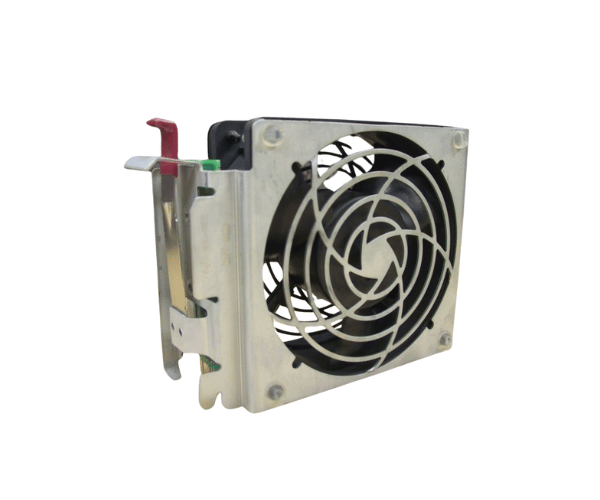
Introduction of HP Compaq 330494-001 6500 System Fan Assembly
The
HP Compaq 330494-001 6500 System Fan Assembly is a crucial component designed to maintain optimal cooling performance in HP server systems. This high-quality fan assembly ensures that your server operates efficiently by preventing overheating, which can lead to hardware failures. With its reliable performance, the HP Compaq 330494-001 fan assembly is an essential addition for anyone looking to enhance the longevity and reliability of their server infrastructure.
Why Choose the HP Compaq 330494-001 6500 System Fan Assembly?
Choosing the
HP Compaq 330494-001 6500 System Fan is a smart decision for server administrators and IT professionals. This fan assembly is specifically designed for HP ProLiant 6500 series servers, ensuring compatibility and optimal performance. Its adjustable speed allows users to customize cooling according to their specific requirements, providing the flexibility needed to maintain a stable operating environment. Additionally, its lightweight and compact design makes installation straightforward, reducing downtime and enhancing productivity.
User Experience
Users of the
HP Compaq 330494-001 6500 System Fan report positive experiences with its performance. Many have noted a significant reduction in system temperatures, leading to improved server stability. The ability to replace the fan assembly without extensive downtime is highly valued by IT teams, allowing for quick maintenance and minimizing service interruptions. Overall, this fan assembly has proven to be a reliable solution for effective cooling in demanding server environments.
Detailed Breakdown of Features
The
HP Compaq 330494-001 6500 System Fan offers several features that make it an excellent choice for server cooling. Users can adjust the fan speed, tailoring the cooling based on their system demands. This capability helps maintain safe temperature limits, preventing overheating issues. The compact design of the fan assembly simplifies installation, making it user-friendly for those with minimal technical expertise. With its 4-pin power connector, the assembly integrates seamlessly into existing server setups, allowing users to replace or upgrade the fan quickly without extensive modifications. Built to withstand constant operation, this fan assembly delivers long-lasting performance and reliability across various environments.
Installation Steps
- Power Down the Server: Always turn off the server and disconnect it from the power source before installation.
- Open the Server Case: Remove the screws or clips securing the server case and gently open it.
- Locate the Fan Assembly Slot: Find the designated area for the fan assembly in your HP ProLiant 6500 server.
- Remove the Old Fan: If applicable, detach the old fan assembly by unscrewing it and unplugging the power connector.
- Insert the New Fan Assembly: Align the HP System Fan with the slot and gently press it into place.
- Connect the Power: Plug the 4-pin connector into the corresponding power socket on the motherboard.
- Close the Server Case: Secure the case back in place with screws or clips.
- Power On the Server: Reconnect the power and turn on the server to ensure the fan is operational.
Where It Can Be Used?|
The
HP Compaq 330494-001 6500 System Fan is primarily used in HP ProLiant 6500 series servers. It is ideal for data centers, corporate server rooms, and any environment where reliable cooling is essential. This fan assembly is particularly beneficial for systems handling heavy workloads, ensuring that components remain cool under pressure.