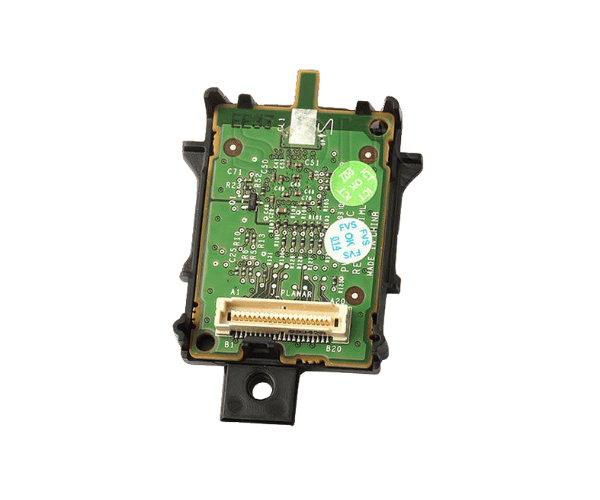
Introduction of Dell Y383M iDRAC6 Express Remote Access Controller
The Dell Y383M iDRAC6 Express Remote Access Controller provides powerful remote management capabilities for Dell servers. This controller is designed to enhance operational efficiency, allowing IT administrators to monitor, control, and troubleshoot servers remotely. With its advanced features, the Dell Y383M empowers businesses to ensure optimal server performance, minimize downtime, and improve overall management.
Why Choose the Dell Y383M iDRAC6 Express Remote Access Controller?
Choosing the Dell Y383M Express Remote Access Controller means opting for reliability and advanced management features. This product allows you to perform remote server monitoring and management efficiently. With the Dell Y383M, you can easily access server health information, troubleshoot issues, and manage resources without being physically present. This controller enhances productivity, ensuring your IT team can focus on critical tasks instead of being tied down to server rooms.
User Experience
Users appreciate the intuitive interface of the Dell Y383M iDRAC6. It offers a seamless experience for monitoring server status and performing management tasks. Many IT professionals highlight its reliability in providing timely alerts and updates regarding server health. The ability to manage multiple servers from a single interface significantly improves workflow and reduces the complexity of server management.
Detailed Breakdown of Features
The Dell iDRAC6 Express Remote Access Controller boasts several features that enhance server management. Firstly, its remote management capability allows IT professionals to control servers from anywhere, significantly reducing response times to issues. The integrated alert system notifies users about potential hardware failures or system performance issues, enabling proactive management. Furthermore, the controller supports various connection types, making it adaptable to different network environments. The compact design allows for easy installation in server racks, and its compatibility with numerous Dell PowerEdge servers ensures wide usability.
Installation Steps
- Power Down the Server: Shut down the server and disconnect it from the power source for safety.
- Locate the iDRAC Slot: Open the server chassis to find the iDRAC slot.
- Position the Dell Y383M: Carefully align the Dell Y383M with the designated slot in the server and push it in firmly until you hear a secure click, indicating it is properly seated.
- Reconnect Power: Plug the server back into the power source and power it on.
- Configure iDRAC: Access the iDRAC configuration utility to set up network settings and user accounts.
Where it can be Used?
The
Dell Y383M iDRAC6 Remote Access Controller is ideal for enterprise data centers, server farms, and businesses that require constant server monitoring and management. It is particularly useful in environments where remote access is essential, such as IT departments that manage multiple servers or locations. Organizations that rely on high uptime and fast troubleshooting will find the Dell Y383M indispensable.