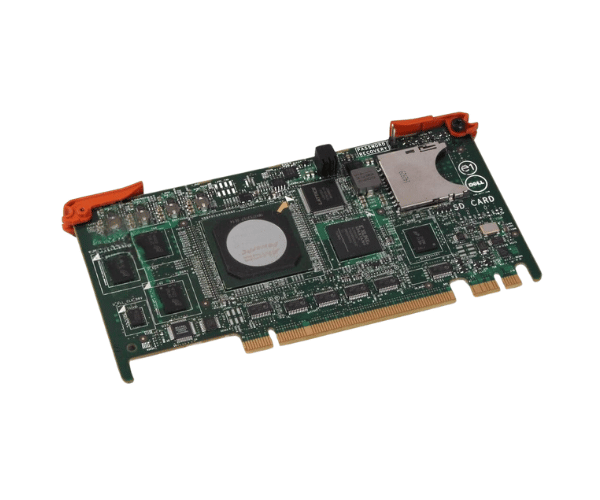
Introduction of Dell Y1F41 Chassis Management Controller
The Dell Y1F41 Chassis Management Controller is an essential component designed to enhance the management and monitoring capabilities of Dell server environments. This controller plays a crucial role in maintaining system health, optimizing performance, and ensuring reliable operation. With its advanced features, the Dell Y1F41 Chassis Management Controller offers businesses a comprehensive solution for effective server management.
Why Choose the Dell Y1F41 Chassis Management Controller?
Opting for the Dell Y1F41 Management Controller provides significant advantages for your server management needs. This controller enables thorough tracking of your server's performance and overall health. With its compatibility with various Dell PowerEdge servers, the Dell Y1F41 Management Controller ensures seamless integration and efficient operation. Additionally, its advanced features enhance your ability to manage and troubleshoot server issues, making it an ideal choice for businesses seeking reliability and efficiency.
User Experience
Users appreciate the reliability and functionality of the Dell Chassis Management Controller. Many report improved monitoring capabilities and easier management of server environments. The user-friendly interface and straightforward installation process make it accessible for both experienced IT professionals and those new to server management. Overall, the feedback highlights its effectiveness in ensuring optimal server performance and health monitoring.
Detailed Breakdown of Features
The Dell Y1F41 Chassis Controller comes equipped with a variety of features that enhance server. It allows for real-time monitoring of system temperatures, voltages, and fan speeds, helping users maintain optimal operating conditions. The controller supports remote management, enabling administrators to access server information from anywhere, reducing the need for physical presence. Additionally, it integrates seamlessly with Dell's Open Manage software, providing comprehensive insights and alerts about the server's status. This integration streamlines management tasks and allows for quick responses to potential issues. Furthermore, the Dell Y1F41 Chassis Controller is designed with redundancy in mind, ensuring that even in the event of a failure, your system remains operational.
Installation Steps
- Power Down the Server: Ensure that the server is completely powered off before installation.
- Remove the chassis lid: Take off the cover to gain access to the internal parts.
- Locate the Management Controller Slot: Identify the appropriate slot for the Dell Controller.
- Install the Controller: Carefully insert the Dell Y1F41 into the designated slot until it is securely seated.
- Secure the Controller: If necessary, use screws to firmly attach the controller in place.
- Reattach the chassis lid: Secure the cover back onto the server to safeguard the internal components.
- Power Up the Server: Turn on the server and verify that the system recognizes the newly installed controller.
Where It Can Be Used?
The
Dell Y1F41 Management Controller is suitable for use in various environments, including data centers, enterprise server rooms, and remote offices. It is particularly beneficial for businesses that rely on Dell PowerEdge servers and require robust management capabilities. Organizations that prioritize system reliability and performance will find the Dell Y1F41 Management Controller invaluable.