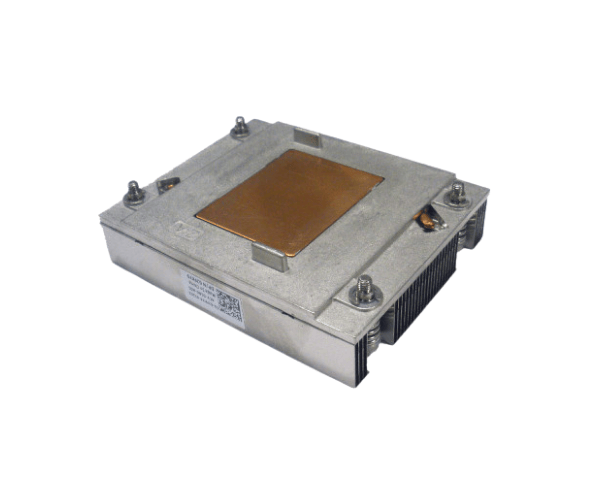
Introduction of Dell XT218 PowerEdge T105 Heatsink
The
Dell XT218 PowerEdge T105 Heatsink is a vital component designed to optimize thermal management for the Dell PowerEdge T105 server. In environments where reliable performance is crucial, this heatsink plays an essential role in maintaining optimal operating temperatures, ensuring system stability and efficiency. With its advanced engineering, the Dell XT218 Heatsink provides effective heat dissipation, allowing your server to perform at its best during demanding tasks.
Why Choose the Dell XT218 PowerEdge T105 Heatsink?
Choosing the
Dell PowerEdge T105 Heatsink ensures that your server remains cool and performs reliably, even under heavy workloads. Its efficient design maximizes airflow and heat dissipation, which helps in preventing potential overheating issues. With this heatsink, you can enhance your server’s longevity and maintain optimal performance levels, making it an excellent choice for both small businesses and enterprise environments.
User Experience
Users of the
Dell PowerEdge T105 Heatsink report significant improvements in system stability and performance. Many have noted that the installation process is straightforward, thanks to its user-friendly clip-on design. After installation, users experience reduced thermal throttling, allowing their systems to run smoothly during peak loads. Overall, the Dell XT218 provides a hassle-free experience and peace of mind regarding server cooling needs.
Detailed Breakdown of Features
- Efficient Heat Dissipation: The design maximizes airflow to prevent overheating during intensive operations.
-
Durable Construction: The heatsink features high-quality aluminum, ensuring it lasts and withstands long hours of operation.
- Lightweight Design: The lightweight nature makes it easy to install without adding unnecessary strain to the server.
- Easy Installation: Features a clip-on design that simplifies the installation process for users.
- Compatibility: Specifically engineered for the PowerEdge T105, ensuring a perfect fit.
- Passive Cooling: Operates silently without the need for fans, making it ideal for quiet environments.
- Thermal Interface Material: Uses high-performance thermal paste for improved heat transfer.
- Compact Size: Fits well within the server chassis, allowing for optimal airflow.
- Extended Operating Range: Functions effectively in a wide range of temperatures, from 0°C to 70°C.
- Cost-Effective Solution: Provides a reliable cooling solution without breaking the bank.
Installation Steps
- Power Down the Server: Ensure your Dell PowerEdge T105 is completely powered off and unplugged from any power source.
- Open the Chassis: Remove the server chassis cover to access the CPU area.
- Remove the Old Heatsink: If applicable, carefully detach the old heatsink by releasing its clips and lifting it off the CPU.
- Clean the CPU Surface: Wipe the CPU surface with a lint-free cloth to remove any old thermal paste.
- Apply Thermal Paste: Apply a small amount of high-performance thermal paste onto the CPU surface.
- Install the Dell XT218 Heatsink: Align the heatsink over the CPU and press down gently. Secure it using the clip-on mechanism.
- Close the Chassis: Replace the server chassis cover and ensure it is securely fastened.
- Reconnect Power: Plug the server back in and power it on.
Where It Can Be Used?
The
Dell PowerEdge T105 Heatsink is suitable for various applications, including:
- Small to Medium Businesses: Ideal for maintaining performance in workstations and entry-level servers.
- Data Centers: Ensures efficient cooling in environments where multiple servers operate simultaneously.
- IT Infrastructure: Supports reliable operations in networking and server management systems.
- Enterprise-Level Environments: Helps maintain stability for critical applications and services.