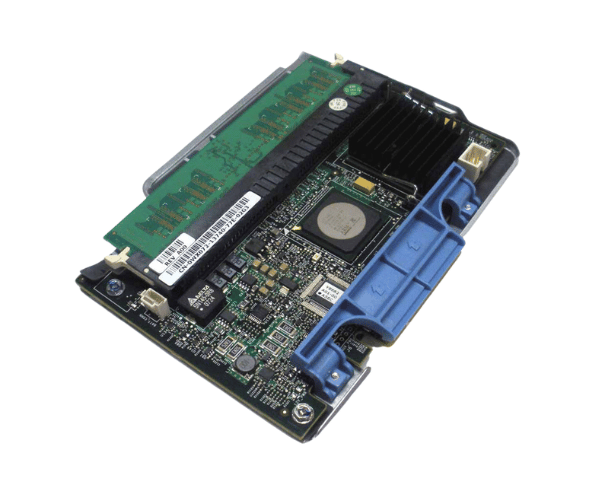
Introduction of Dell XM771 PERC 5/i PCIe SAS RAID Controller Adapter Card
The Dell XM771 PERC 5/i PCIe SAS RAID Controller Adapter Card offers efficient data storage solutions tailored for Dell servers, ensuring optimal performance and reliability. This robust RAID controller offers excellent performance and reliability, making it an ideal choice for businesses looking to enhance their storage management. With support for multiple RAID levels, the Dell XM771 ensures data integrity while optimizing performance. This controller adapts well to various workloads, ensuring efficient data handling for different applications.
Why Choose Dell XM771 PERC 5/i PCIe SAS RAID Controller Adapter Card?
Choosing the Dell XM771 PERC 5i PCIe SAS RAID Controller Adapter Card elevates your storage capabilities significantly. With its advanced RAID features, this controller enhances data protection and performance, making it essential for businesses that rely on consistent and secure data access. Its capability to support various RAID configurations offers versatility, enabling you to customize your storage solution to meet your unique requirements. Additionally, the Dell XM771 is designed for easy integration into Dell servers, ensuring a seamless installation process.
User Experience
Users frequently praise the Dell XM771 for its reliability and performance. Many appreciate how this RAID controller simplifies storage management tasks. The intuitive interface allows administrators to easily configure and monitor their storage systems. Moreover, the quick setup process reduces downtime, enabling businesses to focus on their core operations. Users also report improved data transfer speeds and enhanced redundancy, making the Dell XM771 a favored choice among IT professionals.
Detailed Breakdown of Features
The Dell XM771 PERC 5/i SAS RAID Controller Adapter Card stands out due to its robust performance and versatility. This controller supports various RAID levels, including RAID 0, 1, 5, 6, 10, and 50, enabling users to choose the configuration that best meets their performance and redundancy needs. The 256MB DDR2 cache enhances data access speeds, ensuring that applications run smoothly and efficiently. With a data transfer rate of up to 3Gb/s per port, the Dell XM771 significantly boosts data throughput, making it suitable for high-demand environments. Furthermore, its compatibility with Dell PowerEdge servers simplifies the installation process, allowing users to set up their systems quickly and efficiently.
Installation Steps
- Power Down the Server: Ensure the server is completely powered off and unplugged from the electrical outlet.
- Remove the Server Cover: Gently take off the server cover to access the internal components.
- Locate the PCIe Slot: Identify an available PCIe slot on the motherboard for the RAID controller installation.
- Insert the Controller: Position the Dell XM771 into the PCIe slot and press down until it locks securely in place.
- Secure the Controller: Use screws to fasten the controller firmly, ensuring it does not move.
- Reconnect Power: Plug the power cables back into the server.
- Close the Chassis: Replace the server cover and ensure it is firmly closed.
- Boot the Server: Turn on the server and verify that the RAID controller is recognized during the boot process.
Where It Can Be Used?
The
Dell XM771 PERC 5/i PCIe RAID Controller Adapter Card is perfect for various environments, including enterprise servers, data centers, and small to medium-sized business infrastructures. It excels in applications requiring high-speed data access and redundancy, such as database management systems, virtual environments, and storage-intensive applications. Its flexibility in RAID configurations makes it suitable for various workloads, ensuring data safety and optimal performance.