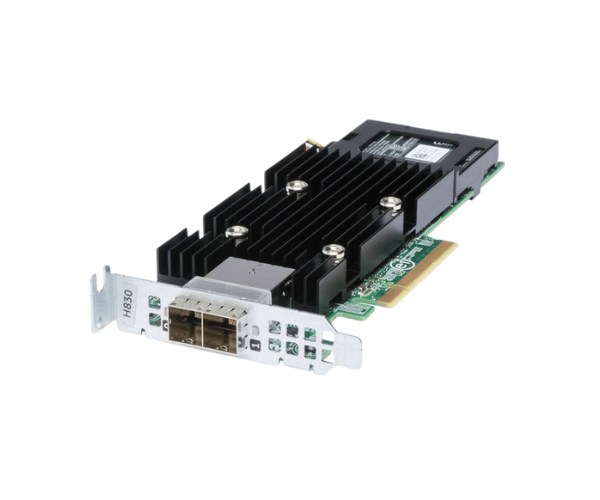
Introduction of Dell WH3W8 PERC H830 SAS RAID Controller
The Dell WH3W8 PERC H830 SAS RAID Controller delivers a powerful solution that enhances data storage performance and security. This controller suits both small and large enterprises needing efficient data management. It offers excellent speed and reliability, making it a top choice for organizations that rely on strong data protection. By supporting various RAID configurations, the Dell WH3W8 PERC H830 SAS RAID Controller streamlines data access and improves overall system efficiency.
Why Opt Dell WH3W8 PERC H830 SAS RAID Controller?
Opting for the
Dell WH3W8 PERC H830 RAID Controller ensures you invest in a dependable and effective solution for your data storage requirements. This controller stands out with its high-speed data transfer capabilities and multiple RAID options. It ensures that your data is not only stored safely but is also easily accessible whenever needed. With support for up to 256 drives, the Dell WH3W8 PERC H830 RAID Controller is ideal for companies aiming to enhance their storage infrastructure while maintaining optimal performance.
User Experience
Users report a significant improvement in data access speed and reliability after installing the
Dell WH3W8 H830 SAS RAID Controller. Many appreciate the straightforward installation process and the intuitive management interface that simplifies RAID configuration. The controller’s performance has helped users manage large datasets more efficiently, resulting in enhanced productivity and reduced downtime.
Detailed Breakdown of Features
The Dell WH3W8 PERC SAS RAID Controller has many features that make it an ideal choice for data storage. Its PCIe 3.0 x8 interface provides fast connectivity, enabling data transfer rates of up to 12Gbps. The controller supports various RAID levels, including RAID 0, 1, 5, 6, 10, 50, and 60. This flexibility allows for effective data protection strategies. With 2GB of DDR4 cache memory, it manages read and write operations efficiently, enhancing overall system performance. Additionally, it can support up to 256 SAS or SATA drives, catering to diverse storage needs. Its robust design ensures durability and reliability, making it a valuable asset for any storage setup.
Installation Steps
- Prepare the Server: Shut down the server and unplug it from all power sources.
- Insert the Controller: Locate an available PCIe 3.0 x8 slot in your server and carefully insert the Dell RAID Controller.
- Secure the Controller: Use screws to firmly secure the controller in place.
- Connect Storage Drives: Attach your SAS or SATA drives to the controller using the appropriate cables, ensuring all connections are secure.
- Power On the Server: Turn on the server and access the BIOS or RAID configuration utility.
- Verify Detection: Check that the controller is detected by the system.
- Configure RAID: Set up your desired RAID configuration using the on-screen instructions.
- Complete Setup: Finalize the RAID setup and confirm that the drives are configured and accessible.
Where It Can Be Used?
The
Dell PERC H830 SAS RAID Controller fits well in many environments. It is ideal for data centers, corporate IT departments, and small to medium-sized businesses. This controller performs exceptionally in situations that need fast data access and strong protection. It is perfect for database management, cloud computing, virtualization, and large-scale data storage. With the ability to support up to 256 drives, it allows organizations to expand their storage efficiently without sacrificing performance.