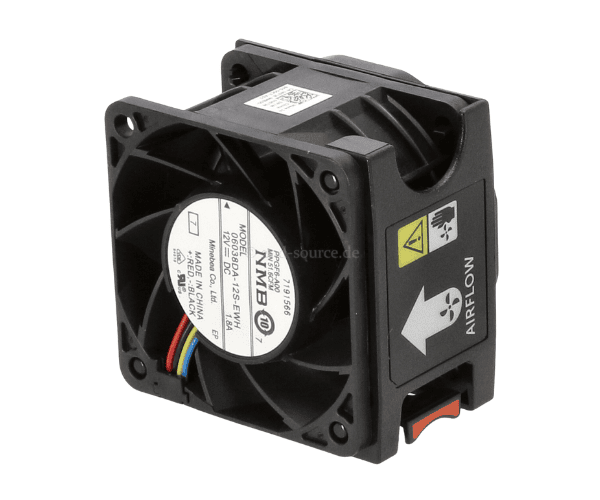
Introduction of Dell N5T36 Hot-Plug CPU Fan for R740 & R740XD
The
Dell N5T36 Hot-Plug CPU Fan for R740 and R740XD servers serves as a vital component for optimal cooling. As servers tackle demanding tasks, they generate substantial heat that can impact performance and longevity. This fan delivers reliable airflow, keeping your CPU cool and ensuring efficient operation. By choosing the Dell N5T36, you enhance your server's overall performance, making it an essential choice for businesses and data centers.
Why Choose Dell N5T36 Hot-Plug CPU Fan for R740 & R740XD?
Choosing the
Dell Hot-Plug CPU Fan for your R740 and R740XD servers ensures optimal cooling and enhanced performance for several reasons:
- Efficient Heat Dissipation: This fan effectively dissipates heat, allowing your server to operate smoothly even under heavy loads.
- Hot-Plug Feature: The hot-plug design allows for easy replacement without needing to power down the server, minimizing downtime.
- Durable Construction: Made from high-quality materials, the Dell N5T36 offers long-lasting performance and reliability.
- Compatibility: Specifically designed for PowerEdge R740 and R740XD, this fan guarantees a perfect fit.
- Low Noise Operation: The fan operates quietly, making it suitable for noise-sensitive environments.
User Experience
Users appreciate the
Dell N5T36 for its effectiveness in maintaining optimal temperatures within their servers. Many have reported a noticeable improvement in system performance after installing this fan. The ease of installation and the hot-plug capability further enhance user satisfaction, allowing quick replacements without interrupting operations. Overall, the Dell N5T36 receives positive feedback for its reliability and efficiency.
Detailed Breakdown of Features
- High Airflow: Delivers up to 60 CFM, ensuring that your server components stay cool.
- Quiet Operation: Maintains a noise level of just 38 dBA, making it ideal for office settings.
- Quick Installation: Designed for easy installation, reducing the time needed to set up or replace the fan.
- Temperature Monitoring: Works seamlessly with server monitoring systems to keep track of thermal performance.
- Energy Efficient: Consumes less power while providing maximum airflow, helping to reduce operational costs.
Installation Steps
- Power Down the Server: Ensure the server is completely turned off and disconnected from the power source.
- Locate the Fan Slot: Open the server chassis and locate the fan slot designated for the CPU fan.
- Remove the Old Fan: If replacing, gently unclip and remove the existing fan from its slot.
- Insert the Dell N5T36 Fan: Position the Dell N5T36 fan into the slot, ensuring it aligns properly.
- Connect the Fan Cable: Attach the fan’s power cable to the appropriate connector on the motherboard.
- Close the Chassis: Securely close the server chassis to ensure proper airflow.
- Power Up the Server: Reconnect the power source and switch on the server to power it back up. Monitor the fan for proper operation.
Where It Can Be Used?
The
Dell N5T36 Hot-Plug CPU Fan is ideal for various applications, including:
- Data Centers: Maintain optimal cooling for high-performance servers in a data center environment.
- Small to Medium Businesses: Ensure reliable performance for critical applications in small and medium business settings.
- Cloud Computing: Support cloud infrastructure by keeping servers running efficiently.
- Virtualization: Optimize cooling for virtualized environments where multiple workloads are processed simultaneously.