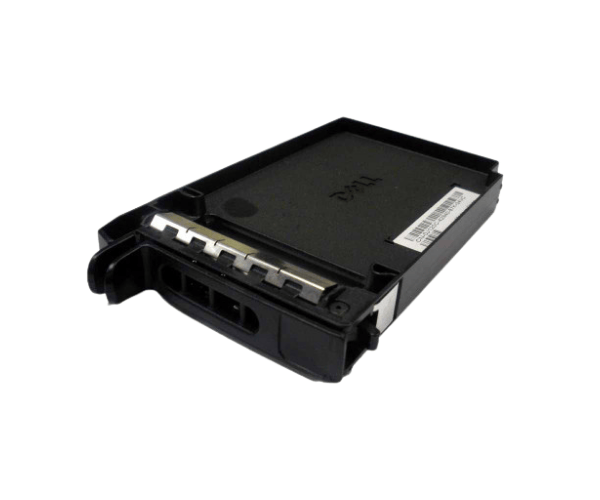
Introduction of Dell HF383 PowerEdge 2.5-inch Hard Drive Tray Blank Insert
The
Dell HF383 PowerEdge 2.5-inch Hard Drive Tray Blank Insert is an essential component for maintaining the integrity and efficiency of your Dell PowerEdge servers. This blank insert fills empty drive bays, ensuring a clean, organized appearance while protecting internal components from dust and debris. By using this blank insert, users can ensure optimal airflow within the server, which is critical for maintaining performance and longevity.
Why Opt Dell HF383 PowerEdge 2.5-inch Hard Drive Tray Blank Insert?
Selecting the
Dell HF383 Hard Drive Tray Blank Insert is a wise choice for server maintenance. This product ensures that your server operates efficiently by maintaining optimal airflow and protecting sensitive internal components. Its lightweight design makes it easy to handle, while the high-quality material guarantees durability. Whether you are upgrading your server or replacing a missing component, this blank insert is designed to fit perfectly and serve its purpose effectively.
User Experience
Users have reported positive experiences with the
Dell PowerEdge 2.5-inch Hard Drive Tray Blank Insert. Many appreciate its simple installation process and snug fit, which enhances the overall appearance of their server. IT professionals find that it effectively protects the server’s internals from dust accumulation, contributing to a longer lifespan for their equipment. Overall, customer satisfaction highlights the practicality and reliability of this blank insert.
Detailed Breakdown of Features
- High-Quality Material: Constructed from durable plastic to withstand server environments.
- Optimal Airflow: Designed to maintain airflow and cooling efficiency.
- Easy Installation: Plug-and-play installation allows for quick replacement or addition.
- Lightweight Design: Does not add unnecessary weight to the server setup.
- Secure Fit: Snugly fits into empty drive bays, preventing movement.
- Clean Appearance: Keeps the server looking organized and professional.
- Flexible Compatibility: Compatible with multiple Dell PowerEdge server models.
- Protection Against Debris: Seals off unused bays, preventing dust and debris from entering.
- Cost-Effective: An affordable way to maintain server organization.
- Essential Accessory: A necessary component for any server maintenance routine.
Installation Steps
- Power Down the Server: Completely shut down the server and unplug it from the electrical source for safety.
- Access the Drive Bays: Open the server chassis by removing the side panel or cover.
- Locate the Empty Drive Bay: Identify the empty 2.5-inch drive bay where the blank insert will be placed.
- Insert the Blank Filler: Take the Dell Hard Drive Tray Blank Insert and align it with the empty slot.
- Secure the Insert: Push the insert firmly until it clicks into place.
- Put the Server Back Together: Attach the side panel or cover of the server.
- Reconnect Power: Plug the server back into the electrical source and power it on.
Where It Can Be Used?
The
Dell PowerEdge 2.5-inch Hard Drive Tray Blank Insert fits primarily in Dell PowerEdge servers. It serves well in data centers, enterprise IT environments, and any location that utilizes Dell servers. This blank insert effectively seals off unused drive bays, helping to maintain internal cleanliness and enhance the server's efficiency.