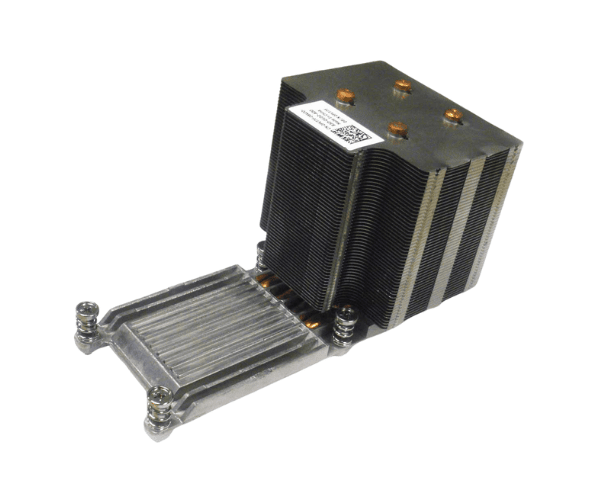
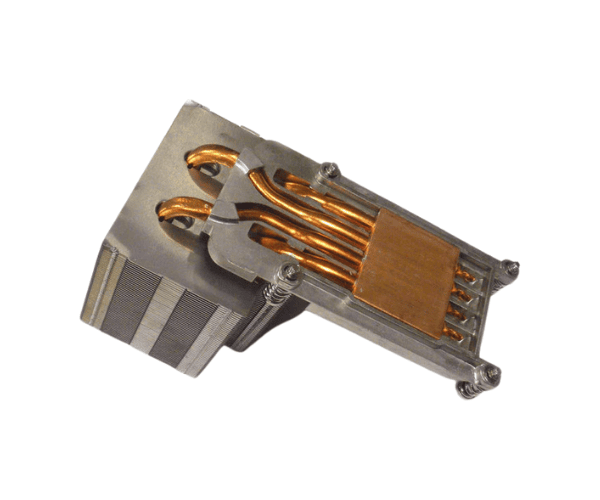
Introduction of Dell FVT7F Heatsink for PowerEdge R920 & R930
The
Dell FVT7F Heatsink for PowerEdge R920 & R930 is engineered to deliver superior cooling performance for high-demand server environments. As the efficiency of servers like the PowerEdge R920 and R930 is critical for business operations, effective heat management is essential. This heatsink ensures optimal CPU temperature regulation, preventing overheating and potential hardware failures. Designed for reliability, the Dell FVT7F is a must-have component for maintaining peak performance in your server infrastructure.
Why Choose Dell FVT7F Heatsink for PowerEdge R920 & R930?
Choosing the Dell Heatsink for PowerEdge R920 & R930 is a commitment to enhancing both reliability and performance in your server setup. This heatsink effectively dissipates heat, allowing your servers to maintain optimal performance even under heavy workloads. By choosing this heatsink, you ensure that your server operates efficiently, which can lead to enhanced system longevity and reduced risk of downtime. It is specifically designed for the PowerEdge series, ensuring a perfect fit and ease of installation.
User Experience
Users appreciate the
Dell FVT7F Heatsink for its efficient cooling capabilities and straightforward installation process. Many report significant temperature reductions in their servers after installation, leading to improved performance. The clip-on design simplifies the setup, making it easy for even less experienced users to install without needing specialized tools. Overall, users express satisfaction with its performance and reliability, often recommending it for those operating PowerEdge R920 and R930 servers.
Detailed Breakdown of Features
- Superior Cooling: Designed to manage high thermal loads, preventing CPU overheating.
- Durable Materials: Made from high-quality aluminum and copper for effective heat dissipation.
- Passive Cooling Technology: Operates without fans, reducing noise and potential points of failure.
- Clip-On Installation: Allows for quick, hassle-free installation without additional tools.
- Lightweight Design: Weighs only approximately 1.2 kg, minimizing any impact on overall server weight.
- Optimized for PowerEdge Series: Specifically tailored to fit the R920 and R930 models, ensuring compatibility and reliability.
- Efficient Heat Dissipation: Helps in maintaining the server's optimal performance, especially during heavy workloads.
- Improved Airflow: The design promotes better airflow within the server chassis.
- Minimal Maintenance Required: Its robust design requires little to no maintenance, making it user-friendly.
- Increased Server Lifespan: Helps in reducing the risk of hardware failure, extending the life of your server.
Installation Steps
- Power Down the Server: Ensure that your PowerEdge R920 or R930 server is completely turned off and unplugged from the power source.
- Remove Existing Heatsink: Carefully detach any existing heatsinks or components that may obstruct the installation of the Dell FVT7F.
- Clean the CPU Surface: Wipe the CPU surface with isopropyl alcohol to remove any thermal paste residue.
- Prepare the Heatsink: Inspect the Dell Heatsink for any damage and ensure that the mounting clips are functioning properly.
- Position the Heatsink: Align the heatsink over the CPU socket, ensuring proper alignment with the mounting clips.
- Secure the Heatsink: Firmly press down on the heatsink to engage the clip-on mechanism, ensuring it fits securely in place.
- Reapply Thermal Paste: If necessary, apply a thin layer of thermal paste on the CPU surface before installing the heatsink.
- Reconnect All Components: Ensure all connections are secure and reattach any components removed during installation.
- Power Up the Server: Plug in and turn on the server to ensure proper operation of the newly installed heatsink.
- Monitor Temperature: Use server management tools to monitor CPU temperatures and confirm that cooling is effective.
Where It Can Be Used?
The
Dell Heatsink for PowerEdge R920 & R930 is ideal for use in various environments, including:
- Data Centers: Essential for maintaining optimal server performance in high-density environments.
- Enterprise IT Infrastructure: Provides reliable cooling for critical business applications.
- Cloud Services: Supports the demands of virtualized workloads with effective heat management.
- Small to Medium-Sized Businesses: Enhances performance in smaller server setups, ensuring longevity and reliability.