The
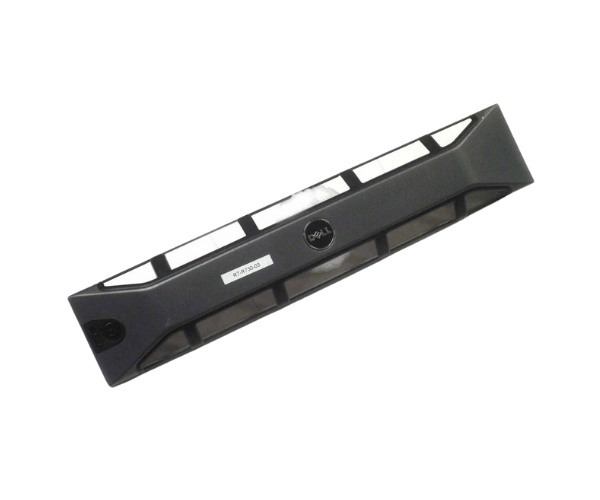
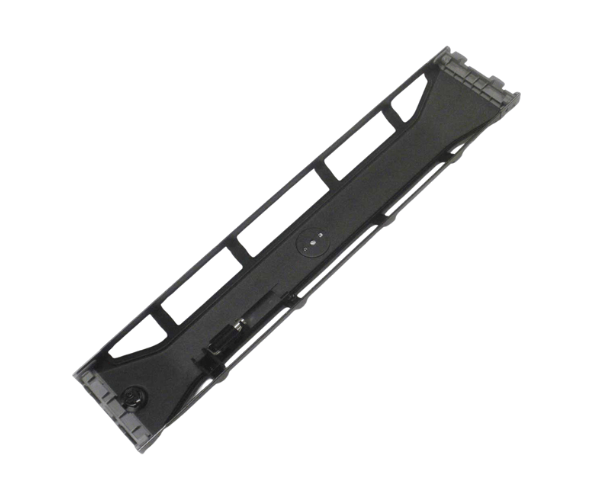
Dell 8JP02 IDRAC Quick Sync Security Bezel enhances the security and functionality of Dell servers. Designed for seamless integration, this bezel provides reliable protection while allowing easy access to server management features, making it ideal for professionals who prioritize security and efficiency in their IT environment.
Dell 8JP02 IDRAC Quick Sync Security Bezel in Bangladesh (BD)
In Bangladesh, the
Dell 8JP02 Quick Sync Security Bezel is a popular choice among IT professionals and organizations seeking reliable security solutions for their servers. This bezel offers an excellent balance of security and usability, making it a go-to option for data centers and corporate IT environments. Its design is tailored to meet the specific needs of local businesses, ensuring that server protection is both effective and accessible.
Why Choose the Dell 8JP02 IDRAC Quick Sync Security Bezel?
The
Dell 8JP02 IDRAC Security Bezel stands out for its ability to enhance server security while providing easy access to IDRAC features. By choosing this bezel, you ensure that your server components are protected from unauthorized access while still benefiting from the streamlined management capabilities that IDRAC offers. The combination of security and functionality makes the Dell 8JP02 a smart choice for any IT setup.
User Experience
Users frequently report high satisfaction levels with the
Dell 8JP02 Quick Sync Security Bezel. Many appreciate its straightforward installation process and the added layer of security it provides. IT professionals enjoy the ease of accessing server management features without compromising on safety. Overall, the product delivers a dependable performance that meets the needs of various business environments.
Detailed Breakdown of Features
- Robust Brand Quality: Manufactured by Dell, ensuring high standards of reliability and performance.
- Enhanced Security: Protects the server from unauthorized access and tampering.
- Easy Access to Management: Allows for quick access to iDRAC features, improving efficiency.
- Durable Construction: Made from high-quality plastic, designed to endure daily wear and tear.
- Lightweight Design: Easy to handle and install without adding unnecessary weight to server racks.
- User-Friendly Installation: Simple setup process, enabling quick integration into existing server setups.
- Versatile Compatibility: Designed specifically for Dell servers, ensuring a perfect fit.
- Maintenance-Free: Minimal upkeep required, keeping the bezel looking new over time.
- Cost-Effective Solution: Affordable option that enhances both security and functionality of your IT infrastructure.
- Improved Server Organization: Contributes to a tidy and professional-looking server environment.
Installation Steps for Dell 8JP02 Quick Sync Security Bezel
- Power Down the Server: Always ensure that your server is turned off and unplugged to ensure safety during installation.
- Prepare the Bezel: Remove the Dell 8JP02 Quick Sync Security Bezel from its packaging.
- Position the Bezel: Align the bezel with the front of the server, ensuring it fits securely.
- Secure the Bezel: Press the bezel into place until it clicks, indicating it is properly secured.
- Check Alignment: Ensure that the bezel is correctly aligned and firmly attached.
- Power On the Server: Reconnect the power and turn the server back on once the installation is complete.
Where Dell 8JP02 Security Bezel Can Be Used?
The
Dell 8JP02 Quick Sync Security Bezel is suitable for various environments, including data centers, corporate offices, and server rooms. Its design caters to the needs of any organization that utilizes Dell servers, enhancing both security and usability in professional settings.