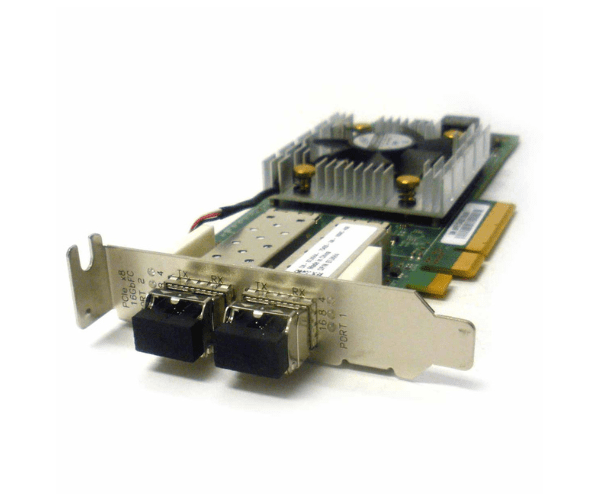
Introduction of Dell 7JKH4 Sanblade 16GB PCI-e 2-Port FC Adapter
The Dell 7JKH4 Sanblade 16GB PCI-e 2-Port FC Adapter is a high-performance fiber channel adapter that meets the demanding requirements of modern data centers. Designed with robust architecture, this adapter delivers seamless connectivity. Additionally, its advanced features ensure enhanced data transfer rates. Furthermore, it provides optimal efficiency for enterprise-level applications.
Why Choose the Dell 7JKH4 Sanblade 16GB PCI-e 2-Port FC Adapter?
Choosing the Dell 7JKH4 PCI-e 2-Port FC Adapter guarantees you high-speed connectivity and reliable performance for your data-intensive tasks. This adapter is engineered to deliver up to 16Gbps data transfer rates, making it ideal for high-demand applications and environments. Its dual-port configuration ensures redundancy and high availability, which is crucial for maintaining uptime and data integrity. Additionally, Dell’s reputation for quality and innovation means you can trust the 7JKH4 Sanblade to meet your performance needs.
User Experience
Users of the Dell 7JKH4 PCI-e 2-Port FC
Adapter consistently report significant improvements in data transfer speeds and overall network performance. They find the adapter's installation process straightforward, which makes integrating it with existing systems quick and easy. IT professionals particularly favor this adapter due to its seamless compatibility and dependable performance. Moreover, users consistently praise its stability and reliability, noting how it reduces disruptions and boosts productivity. The adapter's robust build, coupled with Dell's excellent customer support, further enhances the user experience, making it an ideal choice for any enterprise environment.
Key Features
- High-Speed Performance: The Dell 7JKH4 delivers up to 16Gbps data transfer rates, ensuring quick and efficient data movement.
- Dual-Port Configuration: Provides redundancy and increased availability, essential for critical applications.
- Compatibility: Works with various Dell servers, offering flexibility and ease of integration.
- Reliability: Engineered for stability and consistent performance, reducing downtime and maintenance needs.
- Advanced Architecture: Designed to handle modern data center demands with robust features and capabilities.
Installation Steps
- Preparation: Ensure the server is powered off and unplugged. Gather necessary tools, including a screwdriver.
- Open the Server Case: Carefully remove the server’s side panel to access the PCI-e slots.
- Locate the PCI-e Slot: Identify an available PCI-e slot for the adapter.
- Insert the Adapter: Align the Dell 7JKH4 with the PCI-e slot and gently press it into place until fully seated.
- Secure the Adapter: Use a screw to secure the adapter to the server chassis.
- Close the Server Case: Replace and secure the side panel of the server.
- Power On and Configure: Plug the server back in, power it on, and configure the adapter settings through the server’s BIOS or operating system.
Where It Can Be Used?
The
Dell 7JKH4 FC Adapter is suitable for a variety of environments. It is ideal for enterprise data centers that require high-speed data transfer and reliable connectivity. This adapter enhances the performance of cloud-based applications and services, making it an excellent choice for cloud computing environments. It supports virtualized environments with robust data handling capabilities, ensuring smooth and efficient operations. Additionally, it is perfect for high-performance computing applications that need rapid data access and transfer. The adapter is also well-suited for storage area networks (SANs), connecting storage devices for efficient data management and access.