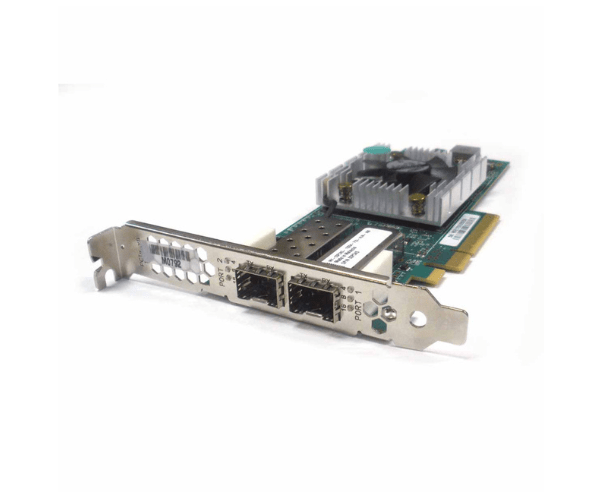
Introduction of Dell 3PCN3 16gb/s 2-Port PCI-e 3.0 FC Host Bus Adapter
The Dell 3PCN3 16Gb/s 2-Port PCI-e 3.0 FC Host Bus Adapter is engineered to elevate data center performance with advanced connectivity features. This high-speed adapter is ideal for enhancing data transfer efficiency and reliability in demanding computing environments. Whether for upgrading an existing system or setting up a new one, the Dell 3PCN3 delivers exceptional performance.
Why Choose Dell 3PCN3?
Choosing the Dell 3PCN3 16Gb/s 2-Port PCI-e 3.0 Host Bus Adapter ensures that you invest in top-tier performance and reliability. The adapter’s impressive 16Gb/s speed enables rapid data transfer, crucial for high-demand tasks. Its dual-port configuration provides both flexibility and redundancy, enhancing operational reliability. Additionally, the PCIe 3.0 interface supports compatibility with modern systems, while its compact, low-profile design fits easily into tight spaces. Overall, the Dell 3PCN3 is designed to meet the needs of high-performance computing environments, making it a valuable addition to any data center.
User Experience
Users have consistently praised the Dell 3PCN3 for its seamless integration and notable performance enhancements. To begin with, the installation process is remarkably straightforward, allowing users to get up and running quickly. Additionally, the adapter's broad compatibility with major operating systems, including Windows and Linux, ensures a smooth and hassle-free setup. Furthermore, the robust construction of the Dell 3PCN3 contributes to its reliability, while the efficient data transfer rates significantly enhance overall performance. As a result, IT professionals frequently choose the Dell 3PCN3, appreciating its dependable performance and ease of use.
Key Features
- High-Speed Connectivity: Achieves 16Gb/s data transfer rates for fast and efficient data handling.
- Dual Ports: Offers two ports for increased flexibility and redundancy.
- PCIe 3.0 Interface: Supports the latest PCIe 3.0 technology for improved performance.
- Low Profile Design: Fits easily into compact spaces, ideal for tight server configurations.
- Wide Compatibility: Works with both Windows and Linux operating systems.
- High Data Bandwidth: Provides a maximum bandwidth of 1.6 GB/s.
- Efficient Power Usage: Consumes only 6.8 watts, making it energy efficient.
- Reliable Temperature Range: Operates effectively within a temperature range of 0°C to 55°C.
- Versatile Connector Types: Supports LC/SC connectors for varied connectivity needs.
- Compact Dimensions: Measures 6.6 x 2.7 x 0.8 inches, suitable for space-constrained environments.
Installation Steps
- Power Down the System: Completely shut down the server or workstation and disconnect it from the power source.
- Open the Computer Case: Remove the cover or access panel to gain access to the internal components.
- Locate the PCIe Slot: Find an available PCIe 3.0 slot on the motherboard.
- Insert the Adapter: Carefully align and insert the Dell 3PCN3 into the PCIe slot, ensuring it is firmly seated.
- Secure the Adapter: Use the provided screws or latch to secure the adapter to the case.
- Close the Computer Case: Replace the cover or access panel and reconnect all cables.
- Power On the System: Reconnect the power source and turn the system on.
- Install Drivers: Follow the manufacturer’s instructions to install the necessary drivers and configure settings.
Where It Can Be Used?
The
Dell 3PCN3 16Gb/s 2-Port PCI-e 3.0 Host Bus
Adapter is ideal for high-performance data centers, server farms, and virtualized environments. It is well-suited for applications that require rapid data transfer and high-speed connectivity, such as large-scale data processing, virtualization, and database management.