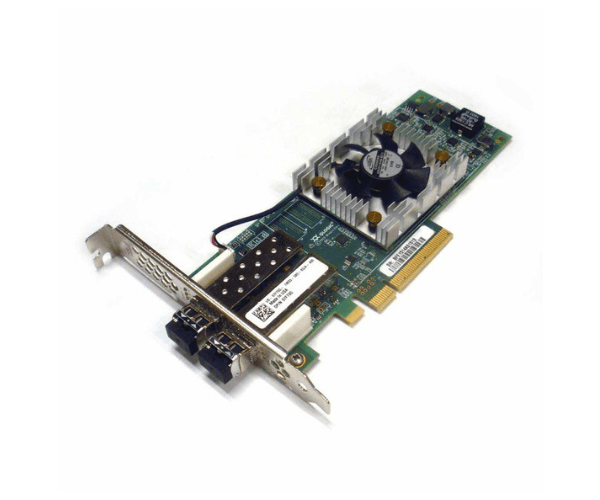
Introduction of Dell 7FT0G QLogic QLE2662 2-Port 16Gbps FC PCI-e Adapter
The Dell 7FT0G QLogic QLE2662 2-Port 16Gbps FC PCI-e Adapter is engineered to deliver high-speed connectivity and robust performance for modern data centers. With its advanced features and reliable design, this adapter is ideal for meeting the rigorous demands of enterprise applications and ensuring seamless data transfer across your network infrastructure.
Why Choose the Dell 7FT0G QLogic QLE2662 2-Port 16Gbps FC PCI-e Adapter?
The Dell 7FT0G QLogic 16Gbps FC PCI-e Adapter excels with its outstanding performance and reliability. It delivers up to 16Gbps data transfer rates, ensuring smooth and efficient operations in your data center. The dual-port design provides redundancy and high availability, which is crucial for minimizing downtime and maintaining continuous service. Additionally, the Dell 7FT0G QLogic QLE2662 integrates effortlessly with Dell servers, making it a versatile and reliable choice for various enterprise environments. By choosing this adapter, you invest in top-tier technology that significantly enhances connectivity and boosts overall network performance.
User Experience
Users of the Dell 7FT0G QLogic 16Gbps FC PCI-e Adapter consistently report significant improvements in network performance and data transfer speeds. IT professionals frequently praise its straightforward installation and seamless integration into existing systems. Many users value the stability and reliability of the Dell 7FT0G QLogic QLE2662, noting how it reduces disruptions and boosts productivity. The adapter's robust build quality, combined with Dell's excellent customer service, further enhances the user experience. Consequently, this adapter proves to be a dependable choice for demanding data center environments.
Key Features
- High-Speed Performance: The Dell 7FT0G delivers up to 16Gbps data transfer rates, ensuring rapid and efficient data movement across your network.
- Dual-Port Design: This adapter provides redundancy and increased availability, crucial for maintaining uninterrupted operations.
- Compatibility: It integrates seamlessly with various Dell servers, offering flexible deployment options.
- Reliable Operation: Engineered for stability and consistent performance, it minimizes the risk of disruptions.
- Advanced Architecture: It meets the high demands of modern data centers, utilizing cutting-edge technology to enhance overall efficiency.
Installation Steps
- Preparation: Power down the server and unplug it from the power source. Gather necessary tools, including a screwdriver.
- Open the Server Case: Remove the side panel of the server to access the PCI-e slots.
- Locate the PCI-e Slot: Identify an available PCI-e slot suitable for the adapter.
- Insert the Adapter: Align the Dell 7FT0G with the PCI-e slot and gently press it into place until it is securely seated.
- Secure the Adapter: Use a screw to fasten the adapter to the server chassis.
- Close the Server Case: Replace and secure the side panel of the server.
- Power On and Configure: Reconnect the server to the power source, turn it on, and configure the adapter settings through the server’s BIOS or operating system.
Where It Can Be Used?
The
Dell 7FT0G 16Gbps FC PCI-e
Adapter excels in several key applications. It enhances performance in enterprise data centers by providing high-speed data transfer and reliable connectivity. This adapter boosts efficiency in cloud computing environments and supports high-performance computing tasks with rapid data access. It also thrives in virtualized environments, where it ensures efficient data handling. Additionally, the adapter performs exceptionally well in storage area networks (SANs), connecting storage devices for effective data management and access.