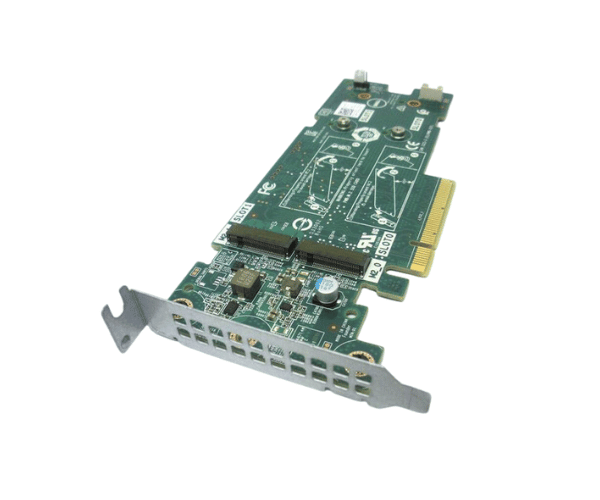
Introduction of Dell 72WKY Boss Controller Card
The Dell 72WKY Boss Controller Card is a high-performance, reliable solution designed to enhance data storage and management within enterprise environments. With advanced features and robust capabilities, this controller card ensures seamless integration and optimal performance for businesses seeking to improve their data management infrastructure. The Dell 72WKY Boss Controller Card is ideal for companies that demand efficiency, scalability, and reliability from their storage solutions.
Why Choose Dell 72WKY Boss Controller Card
Choosing the Dell 72WKY Controller Card is a smart choice for businesses that need reliable and efficient data management. This controller card shines for several reasons. It offers advanced data protection with full RAID support, keeping your data safe and redundant, even if a drive fails. Its high-speed SATA interface and 2GB NV cache memory deliver fast data transfer speeds and improve system responsiveness. The Dell 72WKY Boss Controller Card integrates seamlessly into Dell PowerEdge servers, making installation simple and ensuring compatibility. As your business grows, this card scales easily to meet rising data demands, making it a future-proof solution that adapts to your evolving needs.
User Experience
Users consistently report a positive experience with the Dell 72WKY Boss Controller. Many highlight its straightforward installation process, which can be completed quickly without extensive technical knowledge. Users also appreciate the card’s reliability and performance in handling large data volumes, which has proven crucial for enterprise-level operations. The controller’s robust RAID support and high-speed data transfer capabilities ensure that businesses can manage their data efficiently and securely.
Detailed Breakdown of Features
The Dell 72WKY Boss Controller offers robust RAID support, allowing users to configure RAID levels 0, 1, 5, and 10 based on their specific needs. This flexibility ensures that businesses can prioritize either performance or data redundancy as required. The card’s high-speed SATA interface enables rapid data transfer, which is essential for environments with heavy data processing demands. The 2GB NV cache further enhances performance by optimizing read and write operations, making the system more responsive. Its low-profile design facilitates easy installation in various Dell PowerEdge servers, ensuring broad compatibility. Additionally, the advanced power management features reduce energy consumption, contributing to more efficient operations and lower overall costs.
Installation Step
- Power Down the Server: Turn off the server and disconnect the power supply to ensure safety.
- Open the Server Chassis: Carefully remove the chassis cover to access the internal components.
- Insert the Controller Card: Locate an available PCIe slot and gently insert the Dell Boss Controller.
- Secure the Card: Use screws to fasten the card securely to the chassis.
- Restore Power and Boot Up: Reconnect the power supply and turn on the server to begin the startup process.
- Configure RAID Settings: Access the BIOS or RAID configuration utility to set up your desired RAID configuration.
Where It Can Be Used?
The
Dell Boss Controller Card is ideal for use in enterprise environments that require robust and scalable data management solutions. It is particularly suited for data centers, virtualization environments, and file servers where large volumes of data need to be stored and accessed quickly and securely.