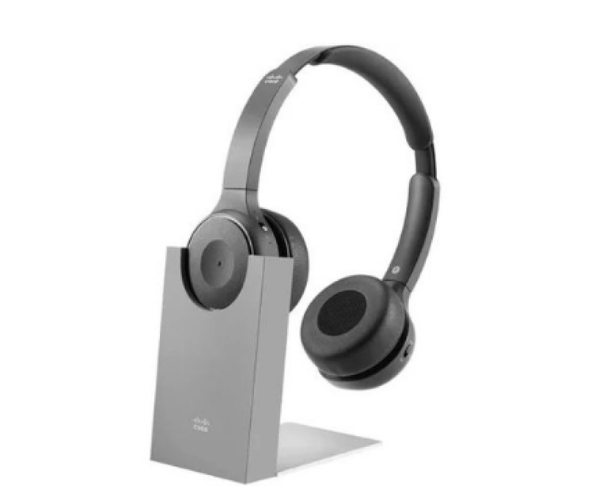
Introduction Of Cisco 730 Wireless Headset Desk Charging Stand w USB-A HS-WL-730-DSKCH-A=
The
Cisco 730 Wireless Headset Desk Charging Stand with USB-A connectivity, model HS-WL-730-DSKCH-A=, is designed to enhance convenience and functionality in professional environments. This charging stand provides a reliable solution for keeping wireless headsets powered and ready for use, ensuring seamless communication throughout the workday.
Detailed Breakdown of Features
The
Wireless Headset Desk Charging Stand features a sleek and practical design that accommodates cisco series wireless headsets. It serves dual purposes, acting as both a charging station and a secure storage solution for headsets when not in use. The stand is equipped with a USB-A port for easy connectivity, allowing quick and efficient charging without the need for additional adapters.
Users benefit from the stand's ergonomic design, which keeps headsets organized and easily accessible. LED indicators provide clear status updates on charging progress, ensuring that headsets are always ready when needed. The stand's stable base and durable construction ensure reliability, making it a valuable addition to any office or professional setting.
User Experience
The
Cisco 730 Wireless Headset enhances user experience by simplifying headset management. It eliminates the hassle of dealing with tangled wires and ensures that headsets are always charged and within reach. Users appreciate the convenience of having a dedicated charging station that maintains the functionality and longevity of their wireless headsets.
Why Choose the Cisco 730 Wireless Headset Desk Charging Stand?
Choosing the cisco
means investing in a practical solution for maintaining headset efficiency. Its seamless integration with Cisco headsets, coupled with easy USB-A connectivity, ensures uninterrupted communication and productivity. This stand is designed to streamline workflow and enhance user comfort in professional environments.
Key Features
- Designed for Cisco 730 series wireless headsets
- USB-A connectivity for easy charging
- LED indicators for charging status
- Ergonomic design for organized storage
- Stable base and durable construction
Installation Steps
- Unbox the Stand: Remove the 730 Wireless Headset Desk Charging Stand from its packaging.
- Place on Desk: Find a suitable location on your desk or workspace for the stand.
- Connect USB-A Cable: Plug the USB-A cable into a compatible power source or USB port on your computer.
- Place Headset: Position the Cisco 730 wireless headset on the stand's charging cradle.
- Check LED Indicators: Monitor the LED indicators to ensure the headset is charging properly.
- Ensure Stability: Confirm that the stand is stable and securely positioned on your desk.
Where It Can Be Used?
The
Wireless Headset Desk Charging Stand is perfect for:
- Office desks
- Workstations
- Call centers
- Conference rooms
- Any professional environment needing efficient headset management
What is the Price of Cisco 730 Wireless Headset Desk Charging Stand w USB-A HS-WL-730-DSKCH-A= in BD?
Crystal Vision Solutions specializes in server memory solutions, including the
Cisco 730 Wireless Headset Desk Charging Stand w USB-A HS-WL-730-DSKCH-A=, catering to diverse needs in Bangladesh. Our products ensure optimal performance and reliability, backed by competitive pricing and expert service to meet your business’s requirements effectively.