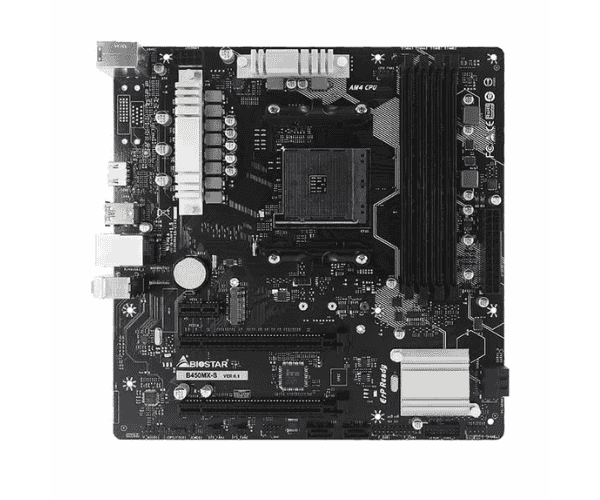
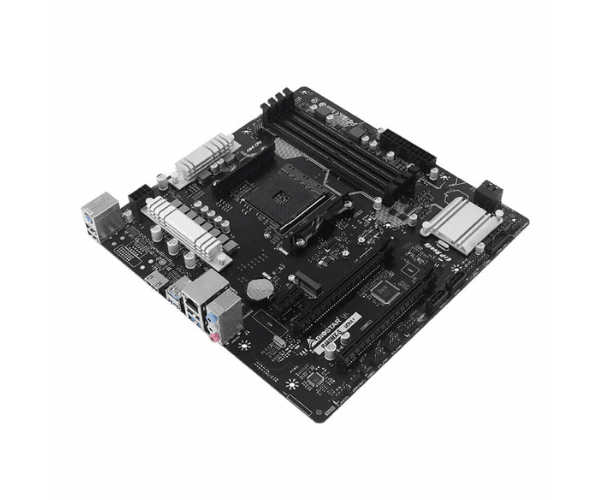
About the Biostar B450MX-S DDR4 AMD Motherboard
The
Biostar B450MX-S DDR4 AMD Motherboard is quite appropriate for budget gamers and PC builders. Carrying a layout based on the requirements of an AMD Ryzen processor, this motherboard intends to promise to deliver steadfastness in performance and high-speed memory, coupled with ample room for expansion. It can cater fully to all necessary requirements whether your system serves the purpose of either a game beast or productive work.
Specification
| Feature |
Details |
| Brand |
Biostar |
| Model |
Biostar B450MX-S |
| Chipset |
AMD B450 |
| Sockets Supported |
AM4 |
| Built-in Processor |
No |
| Generation |
Not Applicable |
| Back-Connect Design |
No |
| Memory Type |
DDR4 |
| Memory Slots |
4 |
| Max Memory |
128GB |
| Optane Memory Support |
No |
| Graphics |
Integrated with Processor |
| Graphics Chipset |
Integrated with Processor |
| M.2/SSD Expansion Slot |
1 |
| WiFi |
No |
| Bluetooth |
No |
| Form Factor |
Micro-ATX |
| Supported OS |
Windows 7, 10 |
Description
Biostar B450MX-S DDR4 AMD Motherboard in Bangladesh
The
Biostar B450MX-S DDR4 AMD Motherboard is available in Bangladesh, with several authorized retailers and e-commerce websites. It is one of the more balanced performance motherboards in its price bracket and is considered very good for a custom build gaming or normal-use computer. Price may vary, but this motherboard is considered one of the most cost-effective options in its category.
User Experience of Biostar B450MX-S DDR4 AMD Motherboard
Users have spoken highly of the
Biostar B450MX-S DDR4 AMD Motherboard because it performs so smoothly and was easy to install. Featuring a powerful chipset that supports an AMD Ryzen processor for solid processing in demanding applications and gaming, this motherboard will fit into most micro-ATX cases. It has a compact design and is ideal for space-conscious builds. Others may see it as a downside, but the stable functionality of the motherboard itself-for gaming and work, particularly-makes up for not being able to do so. Besides, maximum support for 128GB of DDR4 RAM is very much welcome for those gunning for high performance in heavy multitasking environments.
Why Choose the Biostar B450MX-S DDR4 AMD Motherboard?
The
Biostar B450MX-S DDR4 AMD Motherboard is a great option for anyone in the market for a reliable, economical motherboard to base their PC build on. This motherboard will suit users perfectly well who don't require integrated Wi-Fi or Bluetooth but need fast, stable processing power. Equipped with support for up to 128GB of RAM, an M.2 slot for fast storage, and a number of PCIe slots for expansion, this motherboard covers most application needs, from basic gaming computers to professional workstations. It comes in Micro-ATX form for easy compatibility with versatile cases and installation.
Key Features
- AM4 Socket Support: It has supported processors like the AMD Ryzen 2000 and 3000 and 5000 series, hence giving reasonably good performance for several workloads.
- Memory: Up to 128GB of DDR4 across four slots-the amount that should be more than enough for any workload from extreme multitasking to heavy gaming.
- Graphics: This is integrated on the processor itself; therefore, it does not need a separate GPU for basic usage.
- Expansion: 1 M.2 SSD expansion slot for fast storage and additional PCIe slots for additional devices.
- Micro-ATX Form Factor: Compact design fitting into most PC cases, ideal for builds where full-size ATX is just overkill.
- Operating System Compatibility: Compatible with both Windows 7 and 10, which makes it useable with some older and currently used operating systems.
Steps in Installing the Biostar B450MX-S DDR4 AMD Motherboard
- Preparation: Prepare all tools needed-screwdriver, anti-static wristband, and thermal paste-and ensure that your workspace is clean and static-free.
- Install CPU: Install your AMD Ryzen processor into the AM4 socket, aligning it properly.
- Apply Thermal Paste: Put a small amount of thermal paste on top of the CPU before mounting the cooler.
- Insert RAM: Place DDR4 RAM into the available memory slots, pushing them down fully.
- Motherboard Installation: Install the Biostar B450MX-S DDR4 AMD Motherboard in your case and screw it onto the case standoffs.
- Power Supply: Hook up the 24-pin ATX power cable and 4-pin CPU power cable to the motherboard.
- Storage: Hook up SSDs or hard drives via the M.2 slot or SATA connectors.
- Install Additional Expansion Cards: Place the dedicated GPU or other expansion cards in PCIe slots.
- Connect Front Panel: Connect the power, reset button, and USB ports to their respective front panel connectors.
- Power On: Connect everything and start your system to get into the BIOS for making settings.
Why Buy From Crystal Vision Solution?
Crystal Vision Solution offers the
Biostar B450MX-S DDR4 AMD Motherboard at competitive prices with excellent customer service and expert support. We ensure timely delivery, secure payments, and hassle-free returns, making it easy to purchase with confidence from a trusted supplier for your PC build.
What is the Price of the Biostar Z590MHP DDR4 Intel Motherboard in Bangladesh?
The latest price of the
Biostar B450MX-S DDR4 AMD Motherboard in Bangladesh depends on quantity.
Crystal Vision Solution ensures this motherboard has the best market price in Bangladesh. Our product is 100% original and lowest price in Bangladesh. All kinds of services are the best in Bangladesh, and contact us for any information and latest price.