BenQ RP7502 75-Inch 4K UHD Education Interactive Flat Panel Display in Bangladesh
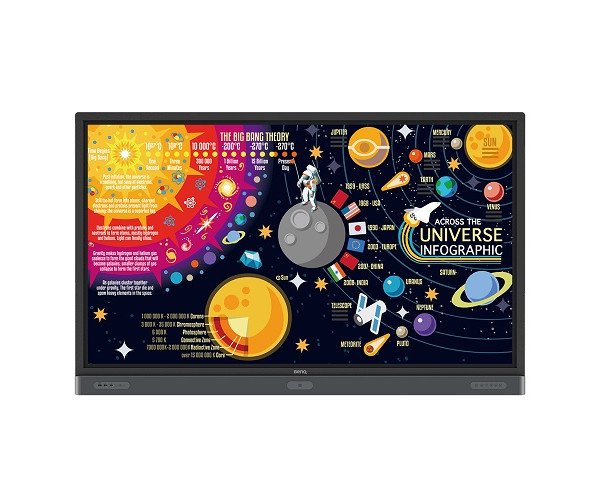
The BenQ RP7502 75-Inch 4K UHD Education Interactive Flat Panel Display is designed to transform traditional classrooms into interactive digital learning environments. Developed for educational institutions, schools, colleges, universities, and training centers, this interactive display combines 4K UHD visuals, touch-enabled collaboration, cloud-based whiteboard functionality, and classroom-focused eye-care technologies.
Featuring a large 75-inch display, the BenQ RP7502 provides teachers and students with an interactive platform for digital lessons, presentations, brainstorming, and group activities. Its integrated EZWrite 5 cloud whiteboard helps educators share ideas, annotate teaching materials, and collaborate with students across supported devices and locations.
The RP7502 also incorporates classroom-oriented features such as an air quality sensor, germ-resistant screen technology, and eye-care solutions. These features make it a suitable option for institutions looking to introduce interactive teaching technology into their classrooms.
BenQ RP7502 Interactive Flat Panel Display in Bangladesh
The demand for interactive flat panel displays is growing among educational institutions in Bangladesh as schools and universities adopt digital teaching methods. The BenQ RP7502 offers a combination of interactive whiteboard functionality, cloud collaboration, and classroom-focused display technologies.
For teachers, it provides a digital space to explain lessons, write notes, annotate documents, and present multimedia content. Students can participate in classroom activities through supported touch interactions and collaborative learning tools. Whether you are upgrading a traditional classroom or establishing a modern digital learning facility, the BenQ RP7502 can support a more interactive teaching environment.
75-Inch 4K UHD Display for Digital Learning
The 75-inch display provides a large viewing area for educational presentations, diagrams, documents, videos, and interactive learning materials. Its 4K UHD resolution delivers detailed visuals that help teachers present text, graphics, and multimedia content clearly.
The large screen is suitable for classrooms and training spaces where multiple students need to view the same content. It can also be used in institutional meeting rooms for presentations and collaborative discussions.
EZWrite 5 Cloud Whiteboard for Interactive Teaching
One of the key capabilities of the BenQ RP7502 is its EZWrite 5 cloud whiteboard functionality. It provides teachers and students with tools to create, organize, edit, and share digital notes during lessons and collaborative activities.
Smooth Real-Time Collaboration
EZWrite 5 supports interactive classroom discussions by allowing users to annotate and work with digital content. Teachers can use the whiteboard to explain complex topics, collect ideas, and encourage students to participate in lessons.
Supported mobile devices and interactive displays can be used as part of collaborative workflows, depending on the available software and network configuration.
Instant Access to Cloud Materials
The cloud functionality allows educators to access and manage teaching materials through supported cloud services, including Google Drive and Dropbox. Teachers can prepare lesson resources, retrieve files, and use compatible materials during classroom sessions.
BenQ's Account Management System (AMS) also supports access to personalized teaching resources and cloud-based workflows, subject to service availability and account configuration.
Flexible Annotation Tools
The interactive whiteboard includes tools designed to make classroom annotation more convenient:
- Adjustable screen capture regions
- Easy import of teaching materials
- Dual-pen functionality for simultaneous annotation
- Different pen colors and brush modes
- Floating annotation tools
- Intelligent handwriting recognition
- Tap-and-create functions for interactive content
These capabilities help teachers explain lessons visually and adapt teaching materials during classroom discussions.
Classroom Health and Eye-Care Features
Air Quality Sensor
The integrated air quality sensor is designed to provide information about classroom air conditions. This feature can help institutions become more aware of the learning environment.
Germ-Resistant Screen Technology
The RP7502 incorporates BenQ's germ-resistant screen technology, designed for shared classroom interaction. This is particularly relevant in educational environments where multiple students and teachers regularly use the same display.
Eye-Care Technology
The display includes eye-care features intended to support comfortable viewing during classroom sessions. Appropriate screen brightness, room lighting, and viewing distance should still be maintained for a comfortable learning environment.
Key Features of BenQ RP7502
- 75-inch display: Large interactive screen for classrooms and training environments.
- 4K UHD resolution: Detailed visuals for educational content and presentations.
- EZWrite 5: Cloud-enabled interactive whiteboard for teaching and collaboration.
- Cloud collaboration: Supports sharing and managing digital notes and teaching materials.
- Google Drive and Dropbox integration: Access compatible cloud-based teaching resources.
- AMS support: Account-based access to supported teaching materials and services.
- Dual-pen functionality: Supports simultaneous annotation with different colors.
- Air quality sensor: Provides classroom air-quality information.
- Germ-resistant screen: Designed for shared interactive classroom use.
- Eye-care technology: Includes viewing-comfort features for educational environments.
- 3-year warranty: As specified in the supplied product information.
Benefits of BenQ RP7502 for Educational Institutions
More Engaging Classroom Lessons
Teachers can combine digital presentations, annotations, videos, and interactive whiteboard activities to make lessons more engaging. Students can participate directly in supported touch-based activities.
Better Collaboration Between Teachers and Students
EZWrite 5 provides a shared digital workspace for organizing ideas and discussing educational materials. Its collaboration tools can support group activities and interactive teaching methods.
Convenient Access to Teaching Resources
Cloud-based workflows help teachers retrieve and manage compatible teaching materials without depending entirely on locally stored files. This can make lesson preparation and classroom resource management more convenient.
A Classroom-Focused Interactive Display
The combination of air quality monitoring, germ-resistant screen technology, and eye-care features makes the RP7502 particularly relevant to educational environments where the display is used regularly by different people.
Who Should Buy the BenQ RP7502?
- The BenQ RP7502 is suitable for organizations looking to introduce interactive display technology into their teaching and collaboration environments.
- Schools and colleges: Digital lessons, interactive teaching, and classroom presentations.
- Universities: Academic presentations, lectures, and collaborative learning.
- Training centers: Professional training sessions, workshops, and demonstrations.
- Educational institutions: Digital classroom development and teaching resource management.
- Corporate training facilities: Interactive presentations and group learning activities.
- It is particularly useful for institutions that want more than a conventional display and need integrated whiteboard and collaboration functionality.
Installation and Maintenance Recommendations
To maintain the BenQ RP7502 and support effective classroom use:
- Install the display using a compatible wall mount or mobile stand.
- Ensure the mounting solution supports the display's size and weight.
- Position the screen for comfortable visibility throughout the classroom.
- Clean the display using a suitable microfiber cloth and BenQ-recommended cleaning instructions.
- Maintain appropriate ventilation around the display.
- Use a stable network connection for cloud-based collaboration.
- Keep supported software and services updated.
- Follow the manufacturer's instructions for screen cleaning and maintenance.
Professional installation is recommended for educational institutions to ensure suitable positioning, secure mounting, and proper cable management.
Why Buy BenQ RP7502 from Crystal Vision Solution?
Crystal Vision Solution provides professional IT hardware and technology solutions for educational institutions, businesses, schools, universities, and corporate organizations in Bangladesh. When purchasing the BenQ RP7502, our team can assist with product availability, pricing, warranty information, and installation requirements. We aim to help institutions identify suitable interactive display solutions according to their classroom size, teaching methods, and technical requirements.