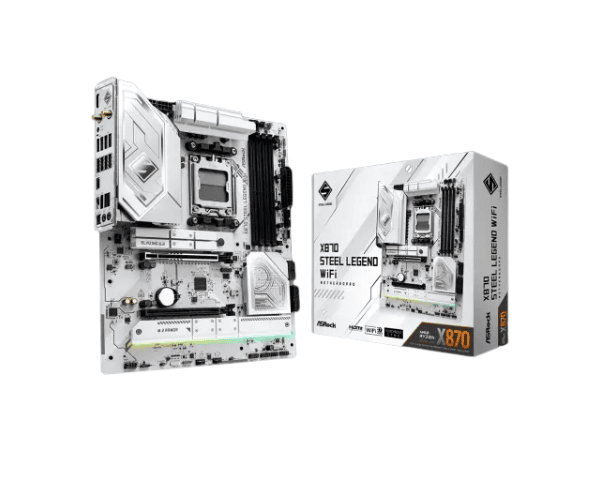
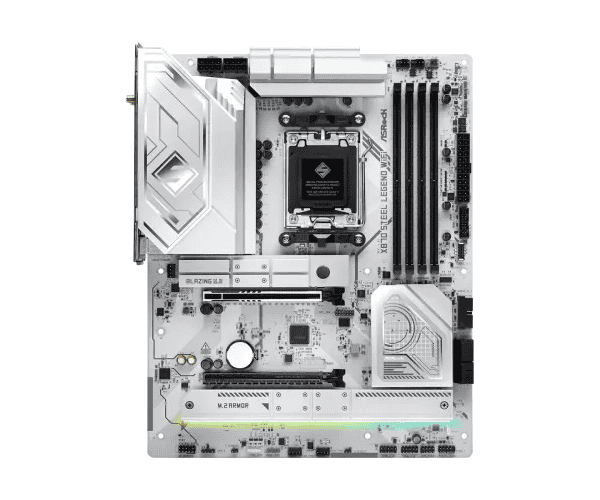
About the ASRock X870 Steel Legend WiFi AM5 DDR5 ATX Motherboard
The
ASRock X870 Steel Legend WiFi AM5 DDR5 ATX Motherboard is a really high-end mainboard with the very latest in technology to accommodate the demands of gamers, content creators, and professionals. It therefore flaunts Ryzen 9000, 8000, and 7000 series processors, high-speed connectivity for the AM5 socket, robust power delivery, and superior memory. The top features of the ASRock X870 Steel Legend WiFi are PCIe 5.0, Wi-Fi 7, and Bluetooth 5.4.
Specification
| Feature |
Details |
| Brand |
ASRock |
| Model |
X870 Steel Legend WiFi |
| Socket |
AM5 |
| Supported CPU |
Ryzen 9000, 8000, & 7000 Series Processors for AM5 Socket |
| Chipset |
AMD X870 |
| Form Factor |
ATX |
| Memory Type |
DDR5 (Up to 8000+ MHz Overclocked), Max 256GB |
| Expansion Slots |
2 x PCIe 5.0 x16, 2 x PCIe 4.0 x16 |
| Storage |
2 x Ultra M.2, 6 x SATA3 |
| Graphics Output |
1 x HDMI 2.1, 2 x USB4, Support HDCP 2.3, Max Resolution 4K |
| LAN |
2.5G LAN |
| Wi-Fi |
802.11be Wi-Fi 7 Module |
| Bluetooth |
Bluetooth 5.4 |
| Audio |
7.1 CH HD Audio |
| Cooling |
Multiple fan headers, including CPU and water pump connectors |
Description
ASRock X870 Steel Legend WiFi AM5 DDR5 ATX Motherboard in Bangladesh
The
ASRock X870 Steel Legend WiFi AM5 DDR5 ATX Motherboard is available across all tech stores and online marketplaces in Bangladesh. This motherboard is surely going to be one of those in the first rows if one wants a high-performance gaming rig or workstation with the latest Ryzen processors. The Rvik Premium features an on-board Ryzen 7000, 8000, and 9000 series processor, up to 256GB DDR5 RAM, and state-of-the-art Wi-Fi 7 technology that will keep your performance and connectivity future-proof.
User Experience of the ASRock X870 Steel Legend WiFi AM5 DDR5 ATX Motherboard
The
ASRock X870 Steel Legend WiFi AM5 DDR5 ATX Motherboard is designed for users who require high-speed memory, PCIe 5.0 support, and the latest wireless technologies. Installation is much smoother with stable performance and high overclocking headroom, which the users will definitely appreciate. Fast Wi-Fi 7 and Bluetooth 5.4 is actually faster, while for gaming and media professionals, high-definition audio and 2.5G LAN are a premium experience.
Why ASRock X870 Steel Legend WiFi AM5 DDR5 ATX Motherboard?
The
ASRock X870 Steel Legend WiFi AM5 DDR5 ATX Motherboard is perfect for a build that will reach high performance as it supports the Ryzen 9000, 8000, and 7000 series. With PCIe 5.0, DDR5 memory, Wi-Fi 7, and 2.5G LAN, this motherboard will be ready for the future and deliver ultimate gaming performance as well as professional capability.
Main Features
- AMD AM5 Socket: Equipped with the Ryzen 9000, 8000, and 7000 series for the ultimate high-performance computing
- Up to 256GB DDR5 RAM: Intense multitasking has never been performed at such an extreme level. It offers a speed of up to 8000 MHz.
- Dual PCIe 5.0 x16 Slots: Enjoy superior GPU and expansion card performance.
- Wi-Fi 7: 802.11be Wi-Fi 7 module is integrated for the fastest wireless speeds and the lowest latency on this motherboard
- Bluetooth 5.4: Advanced Bluetooth for higher performance, extended range.
- 2.5G LAN: The 2.5G LAN port represents the fastest wired networking for lightning-fast file transfers.
- Multiple Display Outputs: HDMI 2.1 and USB4, with HDCP 2.3 and 4K.
- 7.1 CH HD Audio: High-definition audio for an immersive gaming and multimedia experience.
- Robust Cooling: Multiple fan headers and water pump connectors ensure your system is always well cooled under extreme stress.
ASRock X870 Steel Legend WiFi AM5 DDR5 ATX Motherboard Installation
- Prepare the workspace and make sure it's clean and static-electricity-free.
- Your components: X870 Steel Legend WiFi AM5 DDR5 ATX Motherboard, Ryzen CPU, DDR5 RAM, GPU, and storage drives.
- Install CPU: Locate your Ryzen 9000, 8000, or 7000 series processor in the AM5 socket with alignment.
- Apply Thermal Paste: Dab a small amount of thermal paste onto the CPU before installing the cooler.
- Install Memory: DDR5 RAM in DIMM slots-they simply click into place.
- Mount the Motherboard: Place the X870 Steel Legend WiFi motherboard in the case and screw it in.
- Hook up the Power: Connect 24-pin ATX power connector and 8-pin CPU power connector to the motherboard.
- Install Storage: Install M.2 SSDs or SATA drives in their respective slots.
- Install the GPU: Carefully place your GPU in one of the PCIe 5.0 x16 slots.
- Cooling: Install your CPU cooler and case fans or any water pump systems and connect them to the motherboard fan headers.
- Connections: Double-check all connections before powering on the system. Go into BIOS to confirm everything is working.
Why Buy From Crystal Vision Solution?
Crystal Vision Solution offers the
ASRock X870 Steel Legend WiFi AM5 DDR5 ATX Motherboard at competitive prices with excellent customer service and expert support. We ensure timely delivery, secure payments, and hassle-free returns, making it easy to purchase with confidence from a trusted supplier for your PC build.
What is the Price of the ASRock X870 Steel Legend WiFi AM5 DDR5 ATX Motherboard in Bangladesh?
The latest price of
ASRock X870 Steel Legend WiFi AM5 DDR5 ATX Motherboard in Bangladesh depends on quantity.
Crystal Vision Solution ensures this motherboard has the best market price in Bangladesh. Our product is 100% original and lowest price in Bangladesh. All kinds of services are the best in Bangladesh, and contact us for any information and latest price.