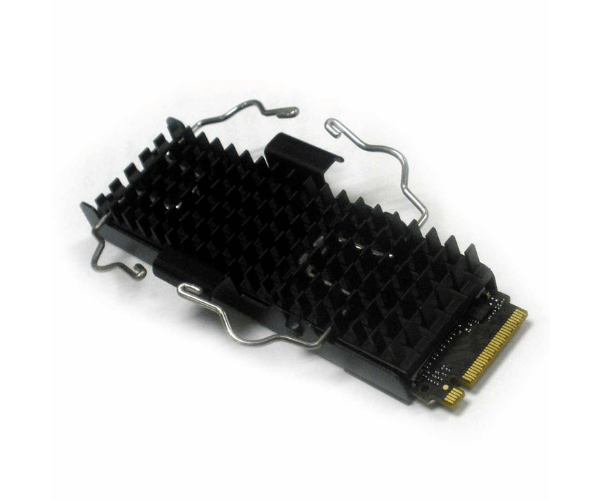
HP 8PE63AA Z-Turbo 512GB PCIe M.2 SSD with Heatsink
The HP 8PE63AA Z-Turbo 512GB PCIe M.2 SSD Module w/Heatsink delivers exceptional speed and reliable performance tailored to meet your computing demands. This high-performance SSD enhances system responsiveness and data transfer rates, equipped with a built-in heatsink to ensure optimal thermal management. Ideal for demanding applications and heavy workloads, the HP 8PE63AA Z-Turbo provides a substantial boost to your system’s performance.
User Experience
Users of the HP 8PE63AA Z-Turbo 512GB PCIe M.2 SSD w/Heatsink report remarkable improvements in system performance. The SSD’s high read and write speeds significantly reduce boot times and file transfer durations. The integrated heatsink ensures the SSD remains cool under heavy loads, maintaining consistent performance and extending the life of the module. The installation process is straightforward, making it an accessible upgrade for both professional and personal use.
Why Choose The HP 8PE63AA Z-Turbo 512GB w/Heatsink?
The
HP 8PE63AA Z-Turbo 512GB PCIe M.2 SSD w/Heatsink is an excellent choice for those seeking top-tier performance and reliability. This SSD’s superior read and write speeds make it ideal for intensive applications and large file transfers. The inclusion of a heatsink ensures thermal efficiency, preventing overheating and ensuring stable performance. Choosing the HP 8PE63AA Z-Turbo means investing in a high-quality, high-performance storage solution that enhances your system’s overall efficiency.
Key Features
- High-Speed Performance: Achieves read speeds up to 2,800 MB/s and write speeds up to 1,900 MB/s for rapid data access.
- Integrated Heatsink: Comes with a heatsink to manage heat effectively and maintain optimal performance.
- Large Storage Capacity: Provides 512GB of storage space, suitable for storing large files and applications.
- Durability: Boasts an MTBF of 2 million hours, ensuring long-lasting reliability.
- Easy Installation: The M.2 2280 form factor makes it easy to install in compatible systems.
Installation Steps
- Power Down the System: Turn off your computer and disconnect it from the power source.
- Open the computer case: Remove the side panel of your computer case to gain access to the motherboard.
- Locate the M.2 Slot: Identify the M.2 slot on the motherboard where the HP 8PE63AA Z-Turbo SSD will be installed.
- Remove the Existing Module: If applicable, remove any existing M.2 SSD or expansion card from the slot.
- Install the SSD: Align the HP 8PE63AA Z-Turbo SSD Module with the M.2 slot and gently insert it at a 30-degree angle.
- Secure the SSD: Use the mounting screw (if provided) to secure the SSD in place.
- Close the computer case. Replace the side panel and secure it with screws.
- Reconnect Power: Reconnect the computer to the power source and turn it on.
- Verify Installation: Check the system BIOS or operating system to ensure the SSD is recognized and functioning correctly.