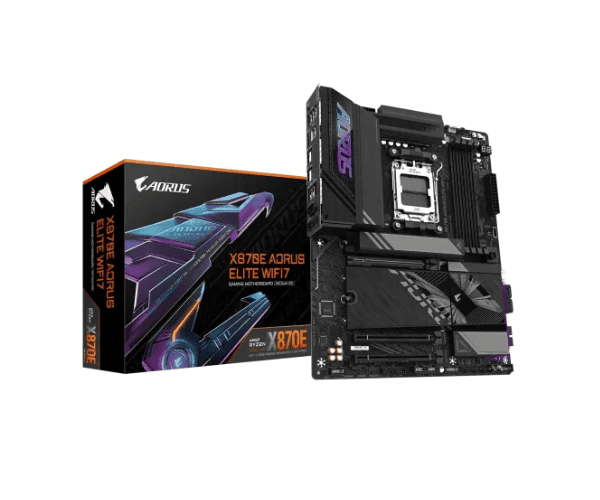
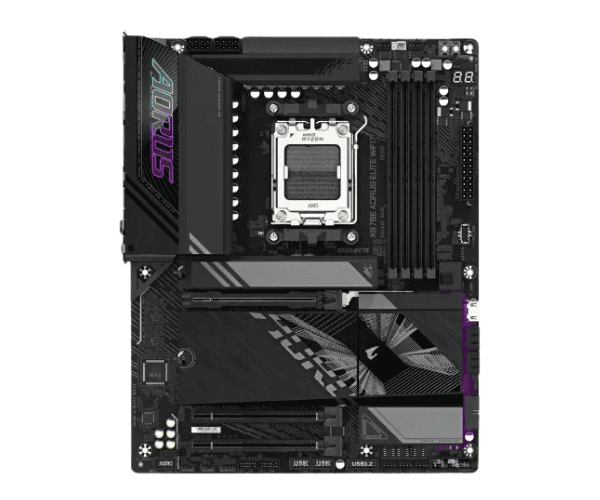
Overview of the GIGABYTE X870E AORUS ELITE WIFI7 DDR5 AMD AM5 ATX Motherboard
The
GIGABYTE X870E AORUS ELITE WIFI7 DDR5 AMD AM5 ATX Motherboard is an ultra-performance motherboard, aimed at high-performance computing applications that are powered by Ryzen 7000/8000/9000 series processors and come with DDR5 memory, Wi-Fi 7, and PCIe 5.0 for gamers, content creators, and professionals requiring more than excellent performance but a future-proof device.
Specification
| Attribute |
Details |
| Brand |
GIGABYTE |
| Model |
X870E AORUS ELITE WIFI7 |
| Chipset |
AMD X870E |
| Form Factor |
ATX |
| Supported CPU |
Ryzen 9000/8000/7000 Series Processors for Socket AM5 |
| RAM Slots |
4x DDR5, Max 128GB, 6400(OC) |
| Graphics Output |
1x HDMI, 1x DisplayPort |
| Expansion Slots |
1x PCIe 5.0 x16, 1x PCIe 4.0 x16, 1x PCIe 4.0 x1 |
| Storage |
2x M.2 PCIe 5.0, 4x SATA 6Gb/s connectors |
| LAN |
Realtek 2.5GbE LAN |
| Wireless |
Realtek Wi-Fi 7 802.11be |
| USB Ports |
2x USB 3.2 Gen 2 Type-C, 4x USB 3.2 Gen 2, 2x USB 2.0 |
| Audio |
Realtek ALC1220-VB 7.1-Channel High Definition Audio |
| Back Panel Connectors |
1x USB Type-C, 1x USB 3.2 Gen 2, 1x DisplayPort, 1x HDMI, 2x USB 2.0, 1x PS/2, 1x RJ-45 |
| Internal I/O |
1x 24-pin ATX, 1x 8-pin ATX 12V, fan headers, USB headers, front panel connectors |
Description
GIGABYTE X870E AORUS ELITE WIFI7 DDR5 AMD AM5 ATX Motherboard in Bangladesh
Finally, the
GIGABYTE X870E AORUS ELITE WIFI7 DDR5 AMD AM5 ATX Motherboard makes its way to Bangladeshi users, powered with state-of-the-art technologies. With really high feature value and super performances it presents, this is truly recommended for gamers, content creators, and power users who need a truly strong main board for most resource-intensive workloads.
User Experience with GIGABYTE X870E AORUS ELITE WIFI7 DDR5 AMD AM5 ATX Motherboard
Many users have expressed satisfaction with the
X870E AORUS ELITE WIFI7 DDR5 AMD AM5 ATX Motherboard, which works great and is very easy to install; it is reliable, too. It will be a Wi-Fi 7-equipped motherboard for the fastest wireless connection. With high-speed PCIe 5.0 and DDR5 memory, this motherboard will go perfectly well with gaming and professional applications.
Why choose this GIGABYTE X870E AORUS ELITE WIFI7 DDR5 AMD AM5 ATX motherboard?
The
GIGABYTE X870E AORUS ELITE WIFI7 DDR5 AMD AM5 ATX Motherboard combines the best of future technology with brilliant connectivity. Starting from Ryzen 9000/8000/7000 series processors, down to PCIe 5.0 and DDR5 memory and Wi-Fi 7, this board unleashes ultimate performance, speed, and reliability on gaming, streaming, and heavy work.
Key Features
- PCIe 5.0 Support: Ultra-speed data, a real showstopper, especially with the latest models of next-gen graphics cards and NVMe SSDs.
- DDR5 Memory Support: It has supported a limit of as much as 128GB of DDR5 RAM, which powers overclocking necessary in gaming and multitasking performance.
- Wireless Wi-Fi 7: Get extreme wireless speeds with reduced latency in each online, lag-free gaming with flawless streaming.
- Realtek 2.5GbE LAN: For high bandwidth, lag-free gaming, and far better download options.
- Immersive Audio: The Realtek ALC1220-VB chip supports up to 7.1-channel high-definition sound.
- Multi-Display Outputs: It has multi-support via HDMI and DisplayPort, boosting the user's multi-monitor setup.
- Robust Cooling Solutions: Advanced thermal solutions ensure your system stays cool during intensive work.
Steps for Installing GIGABYTE X870E AORUS ELITE WIFI7 DDR5 AMD AM5 ATX Motherboard
- Prepare the Environment: Prepare a working area that is far away from static electricity and dust.
- Place the X870E AORUS ELITE WIFI7 DDR5 AMD AM5 ATX Motherboard on top of the anti-static surface.
- Install Processor: Gently push the AMD Ryzen 9000 / 8000 / 7000 series processor into the socket of AM5.
- Installation of RAM: Put up to 128GB of DDR5 RAM on the 4x DIMM slots by seating well.
- Power Supply: A 24-pin ATX power connector and an 8-pin 12V ATX power connector will be connected.
- Installation of Storage: Installation of M.2 SSDs on the M.2 PCIe 5.0 slots, and the SATA devices get their respective connector connections.
- Installing a GPU: This is where one installs his GPU onto the PCIe 5.0 x16 slot for full performance.
- Installing the Motherboard: Place your motherboard in the case and fit in the cooling.
- Turn It On: Hook up the monitor, keyboard, mouse, and any other peripheral outside of your system.
- BIOS Configuration: Power up the system; afterwards, go to BIOS, and set everything with respect to better performance of the machine.
Why Buy From Crystal Vision Solution?
Crystal Vision Solution offers the
GIGABYTE X870E AORUS ELITE WIFI7 DDR5 AMD AM5 ATX Motherboard at competitive prices with excellent customer service and expert support. We ensure timely delivery, secure payments, and hassle-free returns, making it easy to purchase with confidence from a trusted supplier for your PC build.
What is the Price of the GIGABYTE X870E AORUS ELITE WIFI7 DDR5 AMD AM5 ATX Motherboard in Bangladesh?
The latest price of
Gigabyte X870E AORUS ELITE WIFI7 DDR5 AMD AM5 ATX Motherboard in Bangladesh depends on quantity.
Crystal Vision Solution ensures this motherboard has the best market price in Bangladesh. Our product is 100% original and lowest price in Bangladesh. All kinds of services are the best in Bangladesh, and contact us for any information and latest price.