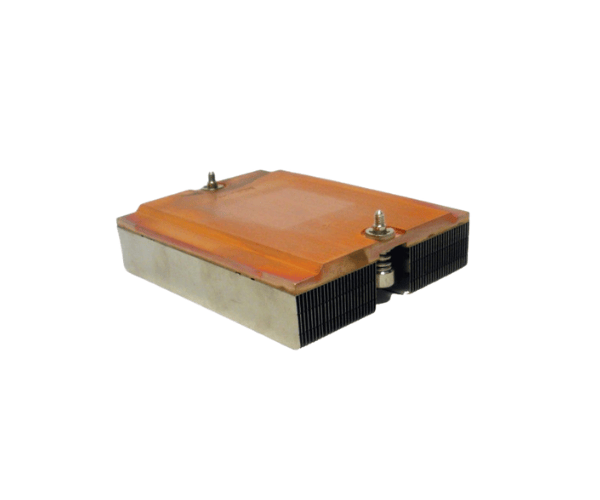
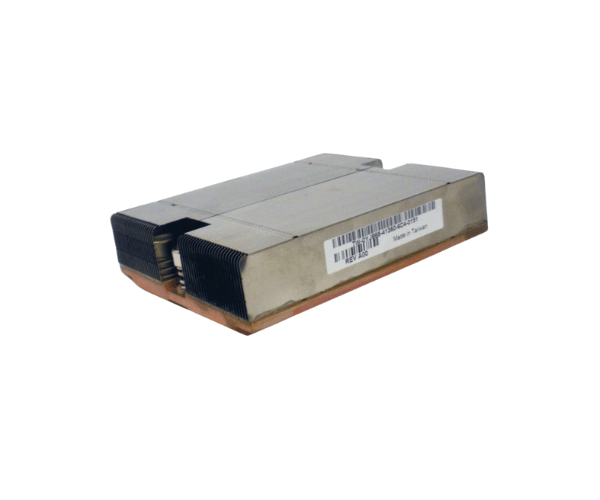
Introduction of Dell YJ868 PowerEdge SC1435 CPU Processor Heatsink
The
Dell YJ868 PowerEdge SC1435 CPU Processor Heatsink is an essential component designed to maintain optimal temperatures for your server. By efficiently dissipating heat, this heatsink enhances system stability and performance during demanding tasks. Whether you're running complex applications or managing heavy workloads, the Dell YJ868 ensures that your server operates reliably. Its robust design and effective thermal management make it a top choice for businesses seeking to maintain server longevity.
Why Choose the Dell YJ868 PowerEdge SC1435 CPU Processor Heatsink?
Choosing the
Dell PowerEdge SC1435 CPU Processor Heatsink guarantees superior cooling performance for your server. This heatsink specifically addresses the thermal needs of the PowerEdge SC1435, making it ideal for high-performance applications. With its durable construction and efficient heat dissipation, users can expect enhanced reliability and longevity for their server hardware. This product stands out for its quality and efficiency, providing users with peace of mind in their server operations.
User Experience
Users who have integrated the
Dell PowerEdge SC1435 CPU Processor Heatsink into their systems often report significant improvements in thermal management. Many have noted a reduction in system crashes and overheating issues, leading to smoother operations. The ease of installation further enhances user satisfaction, as even those with minimal technical knowledge can successfully set it up.
Detailed Breakdown of Features
- Efficient Cooling: The heatsink's design promotes effective airflow, ensuring that heat is quickly dissipated.
- Robust Material: High-quality aluminum construction ensures durability, allowing it to withstand extensive use and deliver long-lasting performance.
- Lightweight Design: Weighing only 0.8 kg, it doesn’t add unnecessary bulk to your server setup.
- Clip-on Installation: The user-friendly clip-on design simplifies the installation process, requiring minimal tools and effort.
- Compatibility: Specifically designed for the PowerEdge SC1435, ensuring perfect fit and functionality.
- Temperature Range: Operates efficiently within a temperature range of 0°C to 70°C, suitable for various environments.
- Passive Cooling: The passive design allows for silent operation, making it ideal for noise-sensitive environments.
- Durable Construction: High-quality materials ensure resilience, even during high-demand tasks.
- Heat Dissipation Power: Capable of managing heat dissipation up to 95W, making it suitable for powerful CPUs.
- Improved Reliability: Helps prevent overheating, significantly enhancing system stability and performance.
Installation Steps
- Power Down the Server: Ensure your Dell PowerEdge SC1435 is completely turned off and disconnected from the power source.
- Open the Chassis: Remove the server chassis cover to access the CPU compartment.
- Remove the Old Heatsink: If applicable, carefully detach the existing heatsink from the CPU.
- Clean the CPU Surface: Wipe the CPU surface with a lint-free cloth to remove any old thermal paste.
- Apply Thermal Paste: Apply a small amount of thermal paste to the CPU surface for optimal heat transfer.
- Position the Heatsink: Align the Dell CPU Processor Heatsink over the CPU.
- Secure the Heatsink: Use the clip-on mechanism to firmly attach the heatsink to the CPU.
- Close the Chassis: Replace the server chassis cover.
- Reconnect Power: Plug the server back into the power source and turn it on.
Where It Can Be Used?
The
Dell PowerEdge SC1435 CPU Processor Heatsink is ideal for various applications, including:
- Data centers requiring high-performance server management
- IT infrastructures with demanding computational workloads
- Enterprise environments running critical applications
- Small to medium-sized businesses looking for reliable server solutions
- Virtualization environments that require efficient thermal management