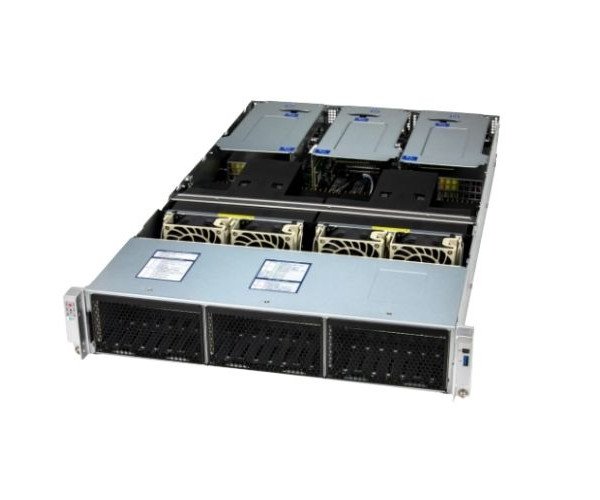
About the Supermicro CloudDC SuperServer SYS-222C-TN 2U Rack Mount Server
The Supermicro CloudDC SuperServer SYS-222C-TN 2U Rackmount Server delivers powerful performance, large storage capacity, and flexible expansion. It's designed for cloud computing, enterprise data centers, and virtualization tasks, offering a balance of speed, reliability, and scalability in a 2U form factor.
Supermicro CloudDC SuperServer SYS-222C-TN 2U Rackmount Server in BD
The Supermicro CloudDC SuperServer SYS-222C-TN 2U Rack Mount Server is built to handle modern enterprise workloads. It supports dual 4th Gen Intel Xeon CPUs, massive DDR5 memory, and high-speed I/O. This server is perfect for cloud applications, storage servers, and virtualization solutions in high-demand data center environments.
User Experience
Users report that the Supermicro Cloud-DC SuperServer SYS-222C-TN 2U Rackmount Server delivers fast, stable performance even under heavy virtualized workloads. The easy front-access hot-swap bays save time during maintenance, and the IPMI remote management makes troubleshooting simple. It fits well in standard racks and has excellent airflow design, which keeps it cool and efficient. Users also appreciate the high memory capacity and expansion options. Overall, it’s a server that IT professionals can count on to run smoothly in enterprise setups with less downtime and more control.
Why Choose the Supermicro CloudDC SuperServer SYS-222C-TN 2U Rackmount Servers?
Choosing the Supermicro CloudDC SuperServer SYS-222C-TN 2U Rackmount Server means investing in reliability, scalability, and modern technology. It's built for businesses that demand powerful dual-CPU performance, fast data handling, and support for large memory and storage configurations. With NVMe support and PCIe 5.0 slots, it ensures future-proof expansion. Supermicro's trusted design means reduced service calls and maximum uptime. Whether you're building a cloud platform or scaling enterprise applications, the Supermicro CloudDC SuperServer SYS-222C-TN 2U Server offers dependable performance for your growing infrastructure needs.
Installation Steps
-
Unbox Carefully: Remove the Supermicro SuperServer SYS-222C-TN 2U Rackmount Server from its packaging.
-
Rack Mounting: Install it securely in a standard 19-inch rack using sliding rails or shelf brackets.
-
Connect Power: Attach the dual power supplies to redundant outlets or a UPS system.
-
Network Setup: Plug in Ethernet cables to the 10G LAN ports and connect the IPMI LAN for remote management.
-
Storage Setup: Install your preferred drives into the hot-swap bays and configure RAID if needed.
-
Install Memory and CPUs: If not preinstalled, add compatible DDR5 ECC memory and supported Intel Xeon CPUs.
-
Boot and Configure BIOS: Power on the server, enter BIOS, and configure system settings.
-
Install OS: Load your desired operating system (Linux, Windows Server, etc.) via USB or remote media.
-
Software and Drivers: Install system management tools, network drivers, and any additional software needed.
-
Monitor and Optimize: Use IPMI and included utilities to monitor system health and optimize for your workload.